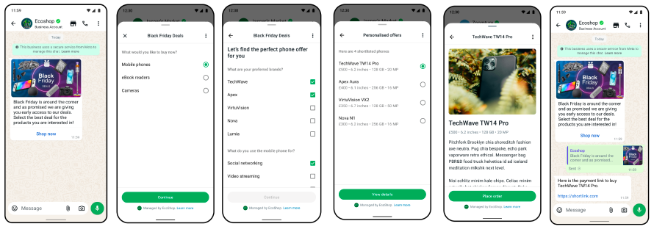
Flow template message transforms a simple chat into a mini-application, making it easier and more intuitive for users to interact with businesses and complete specific tasks without leaving the messaging platform.
Creating a WhatsApp Flow
Before sending flow template messages, you need to create a WhatsApp Flow. You can create flows through here.
Flow Requirements
The flow must be in Published state before it can be linked to a template or sent
After creating a flow, create a message template with a flow button pointing to your flow ID
Supported Flow Components
Flows support various interactive UI components:
Component
Input Type
Description
TextHeading
Display
Large heading text for screen titles
TextSubheading
Display
Smaller subheading for sections
TextBody
Display
Body text content for descriptions
TextCaption
Display
Small caption text
TextInput
User Input
Single-line text field with types: text, email, password, phone
TextArea
User Input
Multi-line text field for longer inputs
RadioButtonsGroup
User Input
Single selection from multiple options
CheckboxGroup
User Input
Multiple selection from options
Dropdown
User Input
Dropdown selection menu
ChipSelector
User Input
Chip-style selection buttons
DatePicker
User Input
Date selection component
CalendarPicker
User Input
Calendar-based date selection
Image
Display
Display images (single or carousel)
Footer
Navigation
Action buttons for navigation and submission
OptIn
User Input
Consent checkbox for opt-in collection
DocumentPicker
Media Upload
Upload documents (PDF, etc.)
PhotoPicker
Media Upload
Upload photos from device or gallery
Flow Object
Parameter
Type
Description
flow_token
String
flow_token is optional ."unused" is taken as default .
flow_action_data
object
flow_action_data is optional .json object with the data payload for the first screen.
*action_type
String
Action Type required
*index
String
Position index of the button. Required if you have flow button in your template .
constClient=require('direct7')constclient=newClient(apiToken="Your API token")constresponse=awaitclient.whatsapp.sendWhatsAppTemplatedMessage({originator:"{{originator}}",recipients:[{"recipient":"{{recipient1}}","recipient_type":"individual"}],template_id:"{{template_id}}",language:"en",button_flow:[{"flow_token":"unused","action_type":"flow","index":"0","flow_action_data":{}}]});console.log('Templated message sent successfully. Response:',response);
fromdirect7importClientclient=Client(api_token="Your API token")client.whatsapp.send_whatsapp_templated_message(originator="{{originator}}",recipients=[{"recipient":"{{recipient1}}","recipient_type":"individual"}],language="en",template_id="{{template_id}}",button_flow=[{"flow_token":"unused","action_type":"flow","index":"0","flow_action_data":{}}])
import("github.com/d7networks/direct7-go-sdk/direct7")apiToken:="Your Api Token"client:=direct7.NewClient(apiToken)whatsapp:=direct7.NewWhatsApp(client)originator:="+97156XXXXXXXX"recipient:="+9180867XXXXXXX"templateId:="call_to_action"language:="en"buttonFlow:=[]map[string]interface{}{{"flow_token":"unused","action_type":"flow","index":"0","flow_action_data":map[string]interface{}{},},}optParams:=&OptionalParams{ButtonFlow:buttonFlow,}response,err:=client.whatsapp.SendWhatsAppTemplatedMessage(originator,recipient,templateId,language,optParams)
require'direct7'client=Direct7::Client.new('Your API token')button_flow=[{"flow_token":"unused","action_type":"flow","index":"0","flow_action_data":{}}]response=@client.whatsapp.send_whatsapp_templated_message(originator='971563XXXXXX',recipient='991999999XXXX',template_id="call_to_action",language="en",body_parameter_values=nil,media_type=nil,text_header_title=nil,media_url=nil,latitude=nil,longitude=nil,name=nil,address=nil,lto_expiration_time_ms=nil,coupon_code=nil,quick_replies=nil,actions=nil,button_flow=button_flow)