


Text every new hire automatically when they’re added to BambooHR
No more copying phone numbers into a spreadsheet or chasing new hires about orientation. Connect BambooHR to D7 SMS in Make, and every new employee gets a personalised welcome text with their start date, time and joining link within seconds. Setup takes about 10 minutes and needs no developer.
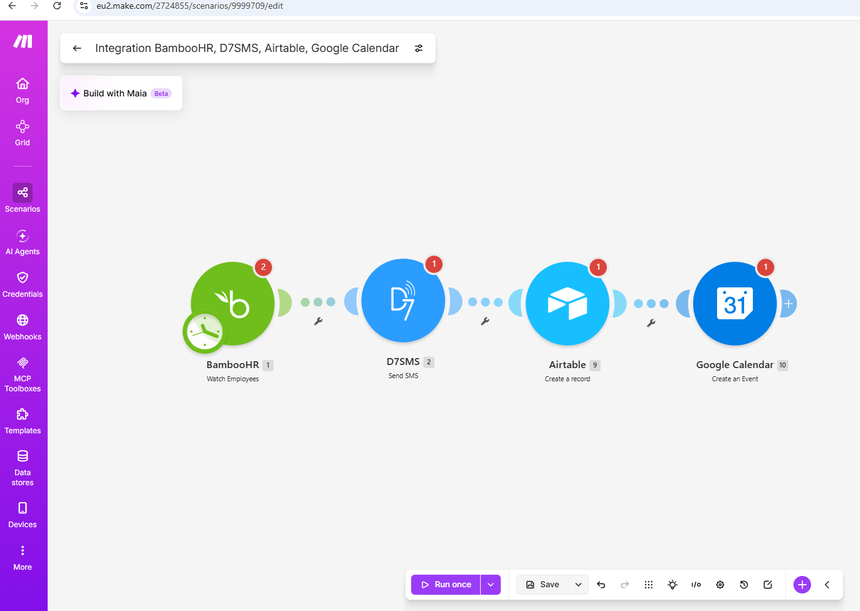

Manual onboarding vs Automated SMS onboarding
Without automation: HR copies the new hire’s number from BambooHR, writes the message, sends it from a personal phone or email, then creates the calendar invite and updates the tracker by hand. Messages go out late, wording differs from person to person, and details get missed when HR is busy.
With BambooHR + D7 SMS: The moment the employee is added, they get the same on-time message with their own name, date, and link. The record is logged, and the orientation is scheduled without anyone touching it.
See the text your new hires will get
Here’s an example you can use as is or edit in Make. The variables fill in automatically from BambooHR.
“Hi {{first_name}}, welcome to {{company_name}}! Your orientation is on {{start_date}} at {{start_time}}. Join here: {{orientation_link}}. Questions? Contact {{hr_contact}}.”
More onboarding SMS templates you can copy
Day-before reminder: “Hi {{first_name}}, a quick reminder: your orientation at {{company_name}} is tomorrow at {{start_time}}. Join here: {{orientation_link}}.”
First-day checklist: “Welcome, {{first_name}}! Today: 1) Check in at reception 2) Collect your laptop 3) Meet {{manager_name}}. Need help? Contact {{hr_contact}}.”
Document reminder: “Hi {{first_name}}, please upload your {{document_name}} by {{due_date}}: {{upload_link}}. Thanks, {{company_name}} HR.”
30-day check-in: “Hi {{first_name}}, it’s been a month since you joined {{company_name}}. How is it going? Reply to this text and we’ll get back to you.”
Key Benefits
- Welcome text sent seconds after the employee is added in BambooHR
- Orientation details delivered on time, every time
- Every hire logged in Airtable and scheduled in Google Calendar automatically
- Less manual follow-up, so HR can spend time on people instead of admin
How It Works
- A new employee is added in BambooHR.
- D7 SMS sends a personalized onboarding message.
- The employee record is logged in Airtable.
- Orientation is automatically scheduled in Google Calendar.
What you need before you start
- A BambooHR account with permission to connect apps
- A Make account (the free plan is enough to test)
- A D7 account for your API token (sign up free)
- Optional: Airtable and Google Calendar accounts for logging and scheduling
- Mobile numbers stored in international format in BambooHR
Set up BambooHR SMS automation in 4 steps
- Create your D7 account and copy your API token. Signup is free and includes test credits.
- Add the BambooHR “New Employee Added” trigger in Make.
- Add the D7 SMS module, paste your API token and map the variables. Then connect Airtable and Google Calendar.
- Run a test with your own number, then switch the scenario on.
Which BambooHR fields go into your SMS
Map these in the D7 SMS module in Make:
- To (mobile number): the employee’s mobile phone field
- {{first_name}}: first name
- {{start_date}}: hire date or start date
- {{start_time}}: orientation time (from your own field or set in Make)
- {{orientation_link}}: your meeting, form or portal link
- {{hr_contact}}: the HR contact name or number you want them to reach
Tip: if a field is empty for some employees, use a Make filter to skip the text or send a version without that detail, so no one gets a half-filled message.
Use Cases / Examples
HR Teams: Automate welcome texts and calendar invites for faster, more consistent onboarding.
Remote Companies: Instantly notify off-site hires of orientation details and track records without manual data entry.
Beyond the welcome text: Use the same scenario for a day-before orientation reminder, a first-day checklist, document-submission reminders or work anniversary messages. Just change the message text.
Texting employees: consent and sender ID basics
Rules for texting employees differ by country. Collect the mobile number with a clear note that it will be used for onboarding messages, keep the content to onboarding information, and avoid marketing wording. Some countries also require a registered sender ID before messages are delivered. Read our SMS regulations and sender ID registration guides for your destination countries, and check with your legal or HR team if you’re unsure.
How employee data is handled
The workflow sends only the fields you map: typically a name, a mobile number and the message details. Choose the minimum data you need, and leave out sensitive fields such as salary or personal IDs. D7 publishes its approach on the Information Security page, and its Privacy Policy explains how data is processed.
Why use D7 for onboarding SMS
D7 has a native Make integration and delivers through direct operator connections. You pay per message, with no monthly minimums, and delivery reports let you confirm each message was received. Check rates for your country on the pricing page.
Frequently asked questions
Do I need a developer?
No. You connect your accounts in Make and map the fields.
Is there a free trial?
Yes. New accounts get free test credits so you can run the workflow before paying.
Can I customise the message?
Yes. Edit the text in the D7 SMS module and use any BambooHR field as a variable.
Does it work for employees in other countries?
Yes, as long as the number is in international format. Check sender ID rules for the destination country.
