


Connect Tally, QuickBooks, Google Drive, and D7 WhatsApp API Seamlessly with Make
Automate your invoicing and customer notifications with Make’s powerful workflows. With the D7 WhatsApp API integrated alongside Tally, QuickBooks, and Google Drive, you can ensure your invoices are recorded, stored, and communicated instantly no manual steps required.
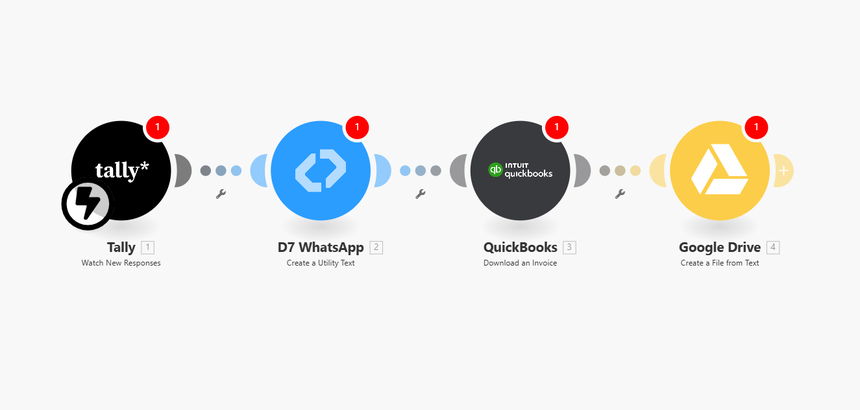
Automation Flow
1. Trigger: Tally – New Invoice Created
When a new invoice is generated in Tally, it automatically fires a Make scenario.
2. Action 1: D7 WhatsApp – Send Invoice Notification
Instantly send a professional WhatsApp message to your customer with invoice details via the Meta‑approved D7 WhatsApp API. Ensure clients receive their invoice notification in real time.
3. Action 2: QuickBooks – Record Invoice
Have the same invoice data logged and recorded seamlessly in QuickBooks for accurate accounting.
4. Action 3: Google Drive – Save PDF
Make also saves a PDF copy of the invoice directly in your organized Google Drive folder for easy access and record‑keeping.
This fully automated flow takes your invoice from creation to confirmation delivered, recorded, and archived in minutes.
Why D7 WhatsApp API
- Meta‑approved for reliable message sending through official WhatsApp channels.
- High delivery rate ensures your customers never miss important invoice updates.
- Simple API setup makes integration quick and developer‑friendly within Make.
Who Can Use It
- Developers looking to embed secure, automated notifications into business workflows.
- Marketing teams wanting to streamline communication with clients or partners.
- Support agents managing fast‑paced customer interactions and follow‑ups.
