


Integarte Mailchimp with D7 SMS using n8n
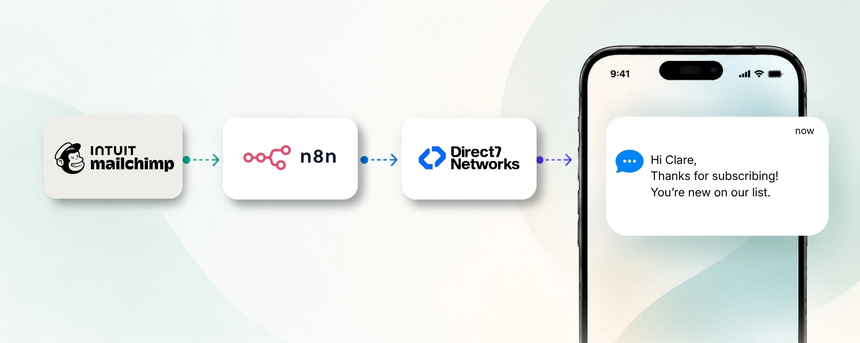
Direct7 Networks enables a seamless bridge between Mailchimp, the D7 SMS API, and your automation workflow via n8n. This integration lets you trigger SMS messages from Mailchimp events and bring SMS into your multi-channel campaigns, without building complex custom code. By leveraging Mailchimp’s audience data with D7 SMS’s messaging capabilities and n8n’s visual automation, you gain a scalable, auditable SMS channel that complements your existing marketing stack. This page is configured with dynamic inputs from Google Sheets to tailor messaging and sequencing for your specific deployment, while keeping the focus on the Mailchimp + D7 SMS workflow.
With D7 SMS, your team can send both promotional and transactional SMS triggered by Mailchimp activities, preserving consent and timing. The result is a more cohesive customer experience, faster response times, and better alignment across email and mobile channels.
Why connect Mailchimp with D7 SMS using n8n?
Connecting Mailchimp with D7 SMS through n8n unlocks cross-channel reach while preserving your existing data and consent preferences. n8n acts as the orchestration layer that reads Mailchimp events, applies simple or advanced logic, and triggers D7 SMS actions when conditions are met. This approach reduces manual follow-ups, accelerates messaging during key moments, and creates a unified record of outreach across channels. You maintain control over which audiences receive SMS, how messages are personalized, and when messages are sent, all while staying aligned with your Mailchimp automation strategies.
How the Mailchimp to D7 SMS workflow works
Mailchimp → n8n → D7 SMS:
This is a practical, high-level flow you can implement without custom code.
1) An event occurs in Mailchimp (for example, a new subscriber joins a list or a campaign generates engagement).
2) n8n receives the event via a webhook or API trigger and processes the payload.
3) n8n applies your workflow logic (check SMS opt-in, establish audience segments, select a message template, and merge in subscriber data).
4) D7 SMS is triggered to send the chosen message.
5) The SMS is delivered to the recipient’s mobile device.
6) The outcome is logged for reporting and auditing purposes, so your team can measure performance and iterate on messaging.
Mailchimp and D7 SMS use cases
These use cases are specifically tied to Mailchimp data and campaigns, demonstrating how SMS can enhance audience engagement and conversions. Business situations, triggers, SMS communications, and benefits are described for each scenario to show tangible value.
Business use cases include:
1) Business situation: New subscriber onboarding.
- Trigger: A subscriber is added to a Mailchimp list with SMS opt-in.
- SMS communication: A welcome message with a value offer or link.
- Benefit: Faster onboarding and higher subscriber activation.
2) Business situation: Post-campaign engagement.
- Trigger: Mailchimp campaign activity (open/click).
- SMS communication: A personalized follow-up with an offer or reminder.
- Benefit: Cross-channel reinforcement and improved conversions.
3) Business situation: Segment-based promotions.
- Trigger: Subscriber moves into a high-value segment (e.g., VIP).
- SMS communication: Targeted offer tailored to the segment.
- Benefit: Increased loyalty and repeat purchases.
4) Business situation: Cart or product reminders.
- Trigger: E‑commerce cart data in Mailchimp triggers a reminder.
- SMS communication: Short reminder with a link to complete checkout.
- Benefit: Reduced cart abandonment and recovered revenue.
5) Business situation: Appointment or webinar reminders.
- Trigger: Mailchimp automation for events.
- SMS communication: Reminder with time, date, and join link.
- Benefit: Higher attendance and fewer no-shows.
Example n8n workflow for Mailchimp
Here's a practical, high-level example of a Mailchimp to D7 SMS workflow via n8n.
Trigger: Mailchimp event such as a new subscriber joining a list or engagement with a campaign.
Data received: Subscriber details, consent flag, campaign metadata.
Automation logic: If the subscriber has opted in for SMS, format the message using Mailchimp merge fields (e.g., name, campaign name) and select an appropriate D7 SMS template.
SMS action: Call the D7 SMS API to deliver the message to the subscriber's phone number.
Outcome: SMS delivered and a log entry is created in n8n for reporting and auditing.
Benefits of Mailchimp SMS automation
Key benefits include faster response times, higher engagement, and a consistent customer experience across channels. By coordinating Mailchimp data with D7 SMS through n8n, teams automate repetitive messaging, reduce manual outreach, and maintain a clear audit trail for compliance. Personalization is enabled by Mailchimp audience fields, enabling targeted SMS that respects subscriber preferences. The solution scales with your lists, campaigns, and e-commerce data without heavy custom development.
Get started with Mailchimp and D7 SMS
Getting started involves a few practical steps.
1) Confirm SMS opt-in for your Mailchimp audience and ensure alignment with your compliance requirements.
2) Connect Mailchimp, D7 SMS, and n8n in your workspace.
3) Create a starter workflow that listens for new subscribers or campaign activity and routes data to D7 SMS.
4) Define SMS templates and merge fields aligned to your Mailchimp data.
5) Test the end-to-end flow with a small segment before going live.
6) Monitor performance and iterate on timing, content, and segmentation to improve results.
Frequently Asked Questions
Can I trigger SMS alerts directly from Mailchimp events using n8n?
Yes. When an event occurs in Mailchimp, n8n can process the data and trigger a D7 SMS message, provided the contact has opted in for SMS and the workflow logic is satisfied.
Do I need a specific Mailchimp plan to use this integration?
You should have access to Mailchimp automation and API capabilities, plus an active D7 SMS account and an n8n instance or service. Availability depends on your Mailchimp tier and API access settings.
What Mailchimp events can trigger SMS?
Common triggers include new subscriber joins, campaign performance events (opens/c clicks), and segment changes. If you have e-commerce data integrated in Mailchimp, cart or order-related events can also drive SMS via D7 SMS.
Can this handle transactional SMS like order confirmations or shipment updates?
Yes. The D7 SMS API supports transactional messaging, and you can route these messages through n8n when tied to Mailchimp data such as order status or shipping details.
How does n8n help with this integration?
n8n acts as the orchestration layer that ingests Mailchimp data, applies business logic (such as opt-in checks and audience targeting), and sends SMS with D7 SMS. It also provides logging, error handling, and retry capabilities to keep workflows reliable.
What are best practices for opt-in and compliance?
Obtain explicit SMS consent within Mailchimp forms and ensure subscribers can opt out, maintain up-to-date suppression lists, respect time-of-day sending limits, and document consent in your workflow for audits.

Ready to automate Mailchimp SMS with D7 SMS via n8n?
Start a free trial and explore how Mailchimp campaigns, customer journeys, and SMS notifications can work together. Connect Mailchimp, D7 SMS, and n8n to unlock cross-channel automation today.