


Integrate Asana with D7 SMS using n8n
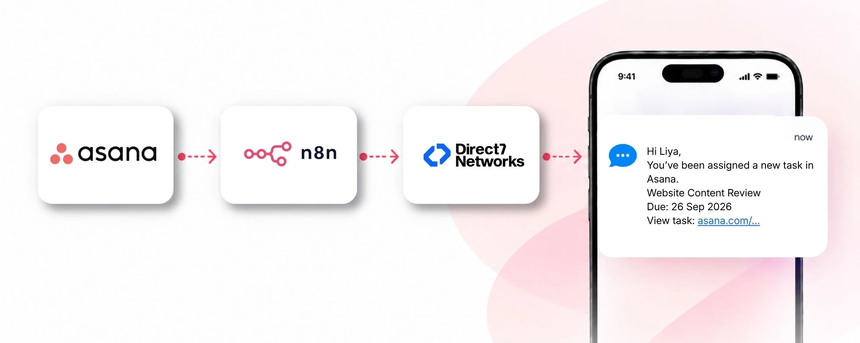
D7 SMS API provides scalable, reliable SMS messaging for business. When combined with Asana and automated through n8n, you can trigger SMS alerts based on project tasks, due dates, assignee changes, and status updates. This integration keeps teams aligned, reduces missed updates, and speeds responses without ongoing manual follow-up.
Why connect Asana with D7 SMS using n8n?
Connecting Asana with D7 SMS via the n8n automation platform empowers teams to convert project activity into timely, action-oriented SMS notifications. Real-time alerts on task assignments, approaching deadlines, and status changes reach the right people instantly, even when they are away from their desks. By reducing manual messaging, you improve accountability, speed up responses, and keep cross-functional teams in sync as work progresses.
How the Asana to D7 SMS workflow works
The conceptual flow is Asana → n8n → D7 SMS.
An event occurs in Asana—such as a task being assigned, its due date changing, or a status update. The n8n workflow receives the event and applies business logic to determine whether an SMS should be sent (for example, when a task is assigned to a stakeholder and the due date is approaching). If criteria are met, the workflow triggers D7 SMS to deliver a concise message to the intended recipient. The recipient receives the SMS with essential details and a link to the task in Asana, enabling fast action and clear visibility across the project.
Asana and D7 SMS use cases
Below are practical use cases tailored to project management workflows in Asana:
Task assignment alerts
Business situation: A new task is assigned to a team member.
Trigger: Task assignment in Asana.
SMS: The assignee receives a message with task name, due date, and a link to the task. Benefit: Immediate visibility of responsibility and next steps.
Due date reminders
Business situation: A critical task is nearing its deadline.
Trigger: Due date approaching.
SMS: Reminder with task name, due date, and link. Benefit: Reduces late deliveries and last-minute scrambles.
Status change notifications
Business situation: A task moves to a new stage (e.g., In Review, Blocked).
Trigger: Status update in Asana.
SMS: Stakeholders receive a concise update and action items.
Benefit: Keeps the team aligned on progress and blockers.
Milestone and project alerts
Business situation: A milestone is reached or a project enters a critical phase.
Trigger: Milestone event or phase shift.
SMS: Key stakeholders are notified with context and next steps. Benefit: Maintains momentum across teams.
Overdue task alerts
Business situation: A task becomes overdue.
Trigger: Overdue status in Asana.
SMS: Urgent alert with task name and link. Benefit: Speeds escalation and resolution.
Cross-team collaboration updates
Business situation: A dependent task changes status affecting another team.
Trigger: Cross-project update in Asana.
SMS: Relevant teams receive a brief summary and required actions. Benefit: Reduces delays caused by misaligned handoffs.
Example n8n workflow for Asana
Example workflow overview: An Asana event (task created or updated) triggers the n8n workflow. The workflow extracts task name, assignee, due date, project, and a direct link to the task. It applies logic to identify scenarios that require SMS (for instance, due within 48 hours and assignee has a valid contact). If the criteria are met, a message is sent via D7 SMS to the recipient with essential details and a link to the task. The result is timely, targeted SMS communication that supports faster task resolution and clearer accountability.
Benefits of Asana SMS automation
Benefits include:
- Improved response times and faster decision-making on tasks.
- Consistent, predictable notifications across the project team.
- Reduced manual follow-up and email clutter.
- Better task ownership visibility for managers and stakeholders.
- Scalability of alerts as teams and projects grow.
Get started with Asana and D7 SMS
Getting started is straightforward. Create or identify your Asana project, set up a D7 SMS account, and configure an n8n workflow that connects the two. Start with a simple trigger, such as task assignment notifications, and expand to due-date reminders and status updates as you validate the flow. Test the workflow with a sample task, verify delivery to recipients, and monitor outcomes to refine message content and timing.
Frequently Asked Questions
How does this integration work with Asana, n8n, and D7 SMS?
Asana events trigger an n8n workflow, which evaluates the event against business rules and, when appropriate, calls the D7 SMS API to send an SMS to the designated recipient. This eliminates manual notifications and ensures timely, task-related communication.
Which Asana events can trigger SMS?
Common triggers include task creation, assignment, due date changes, status updates, and milestone completions. The workflow can be tuned to a subset that matches your project management processes.
Can I customize the SMS content?
Yes. You can tailor message templates to include task name, due date, project name, assignee, and a direct link to the task, ensuring the information is concise and actionable.
Is this suitable for organizations of all sizes?
Absolutely. The solution scales from small teams to large enterprises by adjusting trigger rules, recipient lists, and message frequency, all managed through a centralized n8n workflow.
What are the prerequisites?
You’ll need an Asana account with access to the relevant project, a D7 SMS account, and an n8n instance to orchestrate the workflow.
How do I get started?
Sign up for D7 SMS, connect Asana to n8n, build a basic workflow (e.g., task assignment notices), test end-to-end delivery, and then expand with additional triggers and message templates as needed.

Automate Asana SMS alerts with D7 SMS
Start your free trial and connect Asana to D7 SMS through n8n to improve task updates, reminders, and team collaboration.