


Integrate Brevo with D7 SMS using n8n
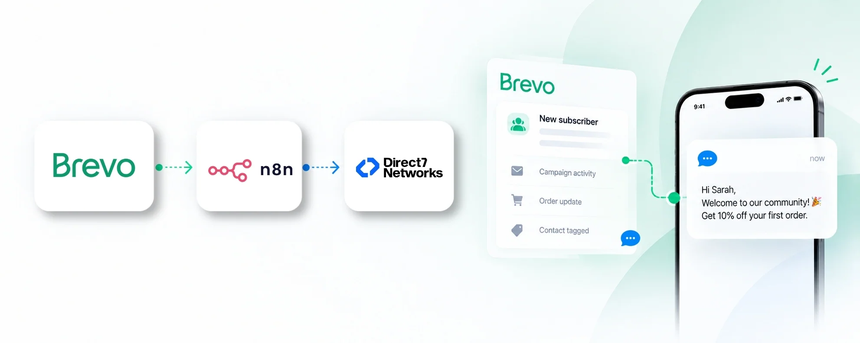
Direct7 Networks enables a seamless bridge between Brevo (Sendinblue), the D7 SMS API, and n8n to automate SMS-based communications. The combination lets marketing teams trigger transactional and promotional SMS from Brevo events, powered by D7 SMS delivery and orchestrated by n8n’s low-code automation.
Brevo handles the email and SMS channels, D7 SMS ensures reliable message delivery to mobile devices, and n8n coordinates the workflow. This triad unlocks scalable, rule-based SMS notifications tied to your Brevo campaigns, lists, and events—without custom development.
Why connect Brevo (Sendinblue) with D7 SMS using n8n?
Connecting Brevo with D7 SMS through n8n creates a powerful, automated SMS layer for your marketing and transactional communications. Benefits include:
- Event-driven SMS without manual steps: trigger texts from Brevo events like contact updates, campaign actions, or order changes.
- No-code workflow orchestration: design, test, and deploy SMS flows without coding, with centralized visibility inside n8n.
- Reliable delivery and personalization: leverage D7 SMS delivery capabilities and Brevo data to tailor messages by recipient segments.
- Compliance and opt-in control: ensure messaging complies with regional requirements and subscriber preferences.
How the Brevo (Sendinblue) to D7 SMS workflow works
The workflow begins when Brevo publishes an event. This could be a new contact added to Brevo, a campaign action, or a transactional update such as an order status change. The event payload includes identifiers, contact details, and context you define for messaging.
n8n receives the event through a webhook or API trigger, normalizes the data, and applies your business logic. Depending on the event type, n8n selects a message template and determines the recipient’s phone number. Finally, n8n calls the D7 SMS API to deliver the text. After delivery, n8n can log results and surface any errors for follow-up.
Example: when Brevo adds a new subscriber to the VIP list, n8n prepares a personalized welcome SMS and sends it via D7 SMS within minutes, helping accelerate onboarding and improve engagement.
Brevo and D7 SMS use cases
Here are practical uses that align with Brevo-driven campaigns and D7 SMS delivery:
- New subscriber welcome — Trigger a welcome SMS when a contact is added to Brevo and tagged for SMS; Benefit: higher opt-in rates and faster onboarding.
- Order confirmations and shipping alerts — Send transactional SMS when Brevo reports order events; Benefit: reduce post-purchase inquiries and improve transparency.
- Campaign follow-ups — After Brevo campaign engagement (open/click), send a targeted follow-up SMS with a relevant offer; Benefit: increased conversions.
- Abandoned cart reminders — Detect cart abandonment in Brevo and trigger a reminder SMS with a cart link; Benefit: recover revenue while maintaining customer trust.
- Appointment reminders — Schedule SMS reminders after Brevo-confirmed bookings; Benefit: lower no-show rates and smoother operations.
Example n8n workflow for Brevo
The workflow demonstrates a practical flow from Brevo to D7 SMS through n8n:
- The trigger is a Brevo event (for example, a new contact or a campaign action).
- n8n captures the event data, normalizes fields such as phone number and message intent.
- Conditional logic routes to a specific SMS template based on the event type.
- n8n invokes the D7 SMS API to deliver the message to the recipient’s mobile number.
- Delivery results are logged back into Brevo or your analytics system for reporting and reconciliation.
Practical example: A retailer adds a customer in Brevo and tags them as VIP. The automation sends a personalized welcome SMS via D7 SMS with a limited-time offer, speeding up onboarding and driving early engagement.
Benefits of Brevo SMS automation
Automating SMS with Brevo, D7 SMS, and n8n translates into real, measurable advantages for marketing and customer operations:
- Faster response to customer actions and inquiries
- Consistent messaging across channels and touchpoints
- Operational efficiency through reduced manual follow-ups
- Personalization at scale using Brevo data and audience segments
- Improved deliverability, delivery insights, and compliance tracking
Get started with Brevo (Sendinblue) and D7 SMS
To begin, sign up for Direct7 Networks’ D7 SMS API and configure your Brevo connection. Set up your n8n workspace, create a workflow that listens for Brevo events, and route messages to D7 SMS for delivery. Test in a sandbox or staging environment, review delivery logs, and then deploy to production. Maintain opt-in consent and regional compliance as you scale.
Pro tip: start with a simple welcome and order-confirmation flow, then progressively add campaign-driven SMS based on Brevo engagement signals.
Frequently Asked Questions
What is the role of Brevo (Sendinblue) in this integration?
Brevo provides the source of contact data, campaign actions, and events. It drives when an SMS should be considered for delivery, and provides a customer profile context to personalize messages.
How does n8n fit into the Brevo to D7 SMS flow?
n8n acts as the automation layer that receives Brevo events, applies business logic, and orchestrates when and what SMS to send through D7 SMS.
What can trigger SMS in Brevo + D7 SMS?
Typical triggers include new contacts, campaign actions, order updates, and engagement signals from Brevo. Each trigger maps to a specific D7 SMS message.
Can I tailor messages for different Brevo events?
Yes. The workflow can select message templates and personalize content using Brevo profile data and event details before sending via D7 SMS.
Is this suitable for transactional SMS and marketing campaigns?
Absolutely. The integration supports transactional SMS for order statuses and alerts, as well as marketing SMS tied to campaigns and audience segments.
How do I test the flow in n8n?
Use a sandbox environment or test webhook endpoints, simulate Brevo events, and verify D7 SMS delivery and logging before production deployment.

Automate Brevo to D7 SMS with n8n
Start for free and unlock automated SMS workflows that turn Brevo events into timely customer messages with D7 SMS. Connect Brevo, D7 SMS, and n8n today and scale your SMS program.