


Integrate Clickup with D7 SMS using n8n
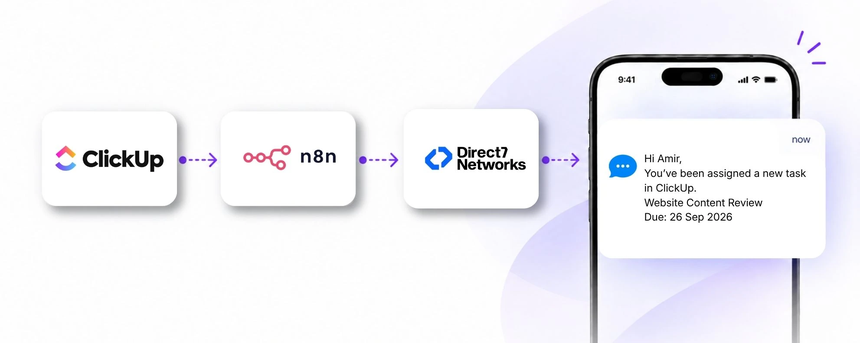
Direct7 Networks’ D7 SMS API integrates with ClickUp through n8n to transform how teams communicate task changes and reminders. This page explains how to automate SMS notifications triggered by ClickUp events, so teammates and stakeholders receive timely, transactional text messages that keep work moving forward without manual outreach.
Why connect ClickUp with D7 SMS using n8n?
Connecting ClickUp with D7 SMS via the n8n automation platform unlocks proactive, real‑time communication. Instead of logging into ClickUp to check for updates, your team receives SMS alerts when assignments are made, deadlines approach, or statuses shift. This integration scales with your organization, reduces response times, and creates a dependable record of communications tied to ClickUp activity. By centralizing notification logic in n8n, you also gain flexibility to add conditions, filters, and audience targeting while keeping data handling simple and auditable.
How the ClickUp to D7 SMS workflow works
In this workflow, a ClickUp event triggers an SMS through D7 SMS, orchestrated by n8n. When the event occurs, n8n captures the essential data, applies business rules (who should receive the message, which template to use, and any sending limits), and then calls the D7 SMS API to deliver the text. The recipient gets the message and can take timely action, while your team benefits from improved visibility and reduced manual communications.
- Trigger in ClickUp: examples include a task assignment, a status change, or a due date update.
- Data reception: n8n ingests the event payload and extracts key fields such as task name, assignee, and due date.
- Workflow logic: n8n determines recipients, message content, and any rate limits or conditional checks to prevent unnecessary messages.
- SMS action: D7 SMS is invoked with the chosen content and recipient number.
- Delivery and outcome: The SMS is delivered to the recipient, enabling faster action and alignment across the team.
Example: If a ClickUp task is due within 24 hours and assigned to a teammate, an SMS reminder is sent automatically, reducing missed deadlines and improving accountability.
ClickUp and D7 SMS use cases
Below are practical ClickUp‑driven use cases for D7 SMS via n8n. Each case explains the business situation, the trigger, the SMS communication, and the business benefit.
- Task assignment alerts: When a new task is assigned in ClickUp, an SMS is sent to the assignee with the task name and due date, helping them start work promptly and avoid delays.
- Deadline reminders: As a due date approaches, an SMS reminder is sent to the task owner or stakeholders to keep the timeline visible and on track.
- Status change notices: When a task moves to a new status (e.g., In Review, Blocked), key team members receive a concise SMS update to align expectations and accelerate handoffs.
- Escalations for blockers: If a task becomes Blocked, an SMS escalates to a responsible manager with essential context, enabling quicker resolution.
- Comment or approval alerts: New comments or approvals on critical tasks trigger SMS notifications to relevant reviewers, reducing review cycles.
- Milestone progress updates: Milestone achievements trigger summarized SMS updates to stakeholders, improving transparency and momentum.
Example n8n workflow for ClickUp
The following practical workflow illustrates how ClickUp events flow through n8n to D7 SMS:
- Trigger: A ClickUp event occurs, such as a task assignment, status change, or due date modification.
- Data capture: n8n receives the event payload and extracts task details, assignee contact information, and the relevant update.
- Logic and routing: n8n applies rules to select recipients, determine the SMS template, and enforce sending limits or opt‑in checks.
- SMS action: The D7 SMS API is invoked with the formatted message and recipient number.
- Delivery and outcome: The recipient receives the SMS, enabling timely action and productive collaboration.
Note: Keep data privacy considerations in mind and ensure recipients have consented to receive SMS communications in line with applicable regulations.
Benefits of ClickUp SMS automation
Automating SMS notifications from ClickUp via D7 SMS and n8n delivers several tangible benefits for teams and organizations:
- Faster action on updates: SMS reaches teammates immediately, reducing wait times to view ClickUp notifications.
- Improved accountability: Clear, time-stamped SMS alerts help teams track who is responsible for what and when.
- Consistency and scale: A single automation handles thousands of tasks without increasing manual workload.
- Operational visibility: Stakeholders stay informed about project progress and blockers without checking ClickUp constantly.
- Auditable communications: SMS alerts tied to ClickUp events create an accessible trace of activity and decisions.
Get started with ClickUp and D7 SMS
Getting started is straightforward. First, ensure you have access to ClickUp and a D7 SMS API plan. Then set up an n8n workflow that listens for ClickUp events and routes them to D7 SMS based on your business rules. Validate recipients’ consent, test with sample tasks, and gradually scale the automation across teams and projects. As you grow, you can refine message templates, add new triggers (e.g., comments, task reassignments), and enforce sending controls to match your governance needs.
Frequently Asked Questions
How does the ClickUp to D7 SMS integration via n8n work?
The integration uses ClickUp as the source of events, n8n as the automation orchestrator, and D7 SMS as the messaging channel. When a trigger occurs in ClickUp, n8n processes the event, applies routing and templating logic, and calls the D7 SMS API to deliver the message to the intended recipient.
What kinds of ClickUp events can trigger SMS alerts?
Common triggers include task creation or assignment, status changes, due date updates, comments, and milestone updates. You can tailor triggers to your workflow and audience.
What data from ClickUp is included in the SMS?
At a minimum, you can include task name or ID, due date, and assignee. You can tailor the content to keep it concise while conveying the essential context for action.
Are there usage limits or guardrails for D7 SMS?
Delivery limits and guardrails are managed through your D7 SMS plan and n8n workflow configuration to ensure compliance with your operational policies and recipient opt‑in rules.
How can I test the integration before going live?
Use test tasks and a controlled recipient list to simulate ClickUp events, verify message content, routing, and delivery, then gradually roll out to broader teams.
Can I customize SMS content by ClickUp status or field values?
Yes. The workflow can map ClickUp fields to SMS templates, allowing different messages for various statuses, priorities, or assignees while maintaining concise, readable SMS text.
How does Direct7 Networks support this integration?
Direct7 Networks provides the D7 SMS API and resources to help you design, deploy, and monitor SMS communications that align with your ClickUp workflows and business objectives.

Automate ClickUp SMS alerts today
Connect ClickUp with D7 SMS via n8n to deliver timely, automated SMS notifications for task updates, deadlines, and progress. Start free and scale as you grow.