


Integrate Discord with D7 SMS using n8n
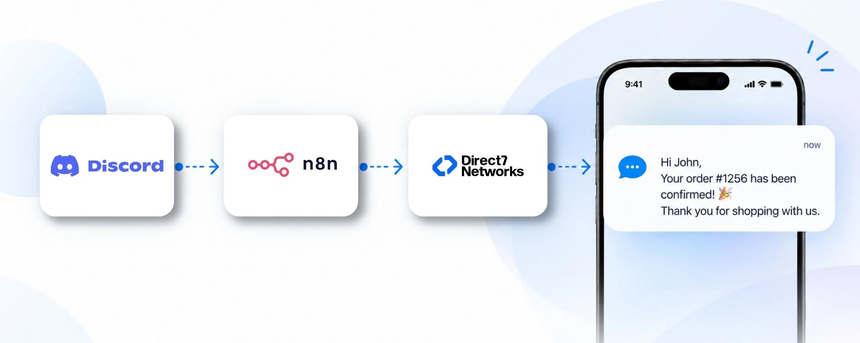
Direct7 Networks makes it practical to transform Google Sheets data into timely SMS messages via the D7 SMS API, with the orchestration power of n8n. This page demonstrates how you can automate customer communications and internal alerts by using Google Sheets as the trigger, the D7 SMS API for reliable delivery, and Discord as a real-time collaboration channel. The result is fast, scalable, and auditable SMS workflows tightly integrated with your spreadsheet-driven processes.
Why connect Discord with D7 SMS using n8n?
Google Sheets often holds critical data such as customer updates, orders, or event registrations. By wiring Sheets to D7 SMS through n8n, you automatically notify recipients on SMS while keeping your team informed in Discord. This reduces manual follow-ups, accelerates response times, and aligns customer communications with internal collaboration—delivering a synchronized, auditable flow across channels.
How the Discord to D7 SMS workflow works
The workflow follows a practical pattern: a Google Sheets event triggers n8n, n8n applies business logic, then D7 SMS delivers the message. Optionally, a Discord notification can be posted to a designated channel for internal visibility. This combination ensures customers receive timely SMS updates while your staff stays informed in real time.
Discord and D7 SMS use cases
Practical use cases for Google Sheets-driven SMS and Discord alerts include:
- E-commerce order confirmations: A new order row appears in Google Sheets, triggers an SMS confirmation to the customer and posts a status update in Discord for the operations team.
- Lead follow-ups: A new lead recorded in Sheets triggers an opt-in SMS follow-up and a Discord alert with lead details for the sales channel.
- Appointment reminders: An upcoming appointment listed in Sheets triggers an SMS reminder to the attendee and a Discord reminder for the front desk or sales team.
- Inventory alerts: Low stock or restock events stored in Sheets trigger supplier SMS and a Discord procurement alert.
- Form submissions: A form entry saved in Sheets triggers a confirmation SMS to the respondent and a Discord notification to the marketing channel.
- Payment status updates: A transaction entry in Sheets triggers a transactional SMS and a Discord alert to finance.
Example n8n workflow for Discord
Trigger: A new or updated row in Google Sheets includes recipient phone, name, message context, and a consent flag. Data received: recipient name, phone number, message content, and context. Automation logic: validate required fields and consent, format the message, and decide if an SMS should be sent. SMS action: D7 SMS API is invoked to deliver the message. Discord action (optional): A concise notification is posted to a designated Discord channel with metadata such as recipient, timestamp, and status. Business outcome: The recipient receives the SMS on time, and your team stays informed in Discord, reducing manual follow-ups and accelerating response times.
Benefits of Discord SMS automation
Key benefits include streamlined communications, faster customer responses, scalable workflows, auditable logs, and reduced repetitive tasks. By combining Google Sheets as the data source with D7 SMS for reliable delivery and Discord for real-time team collaboration, you create a unified, low-friction process that scales with your business needs.
Get started with Discord and D7 SMS
To begin, sign up for Direct7 Networks and secure access to the D7 SMS API. Then connect Google Sheets to your n8n workspace and build a simple workflow that watches a spreadsheet for new or updated rows. Add a D7 SMS action to send the message to the recipient’s phone; optionally add a Discord notification to the designated channel for internal visibility. Test thoroughly, adjust message templates and phone validation, and launch your automated workflow.
Frequently Asked Questions
Q1: Can I trigger SMS from Google Sheets data?
A: Yes. By monitoring a Google Sheets worksheet in n8n, you can trigger D7 SMS messages based on new rows, updated cells, or specific conditions defined in your workflow.
Q2: Can I customize SMS content per recipient?
A: Absolutely. You can template messages and use data from the sheet (name, order details, due dates) to personalize each SMS before sending via D7 SMS.
Q3: Is there a way to limit SMS sends to opted-in recipients?
A: Yes. You can enforce an opt-in flag in the sheet and include validation steps in the workflow to prevent messages from sending unless consent is present.
Q4: Can we post to Discord if an SMS is sent?
A: Yes. You can configure an optional Discord notification that appears in a designated channel with context about the recipient and the SMS outcome.
Q5: What data do I need in Google Sheets to set this up?
A: Typical fields include recipient name, phone number, message template or content, consent flag, and any contextual data used for personalization or routing.
Q6: How do I test and troubleshoot the integration?
A: Start with a test sheet and a sandbox phone number, verify data paths, check n8n task logs, and monitor Discord channels for the expected alerts during testing.

Start automating Discord and D7SMS
Connect Google Sheets data to D7 SMS via n8n and optionally post real-time alerts to Discord. Start automating today.