


Integrate Fresh Sales with D7 SMS using n8n
Why connect Freshsales with D7 SMS using n8n?
Connecting Freshsales with D7 SMS via n8n unlocks fast, reliable customer outreach. It reduces manual typing, ensures messages reflect real CRM data, and delivers timely notifications based on real-time events. n8n acts as the orchestrator, coordinating data from Freshsales to the D7 SMS API without custom development, letting you scale SMS communications across your CRM contacts while preserving personalization.
How the Freshsales to D7 SMS workflow works
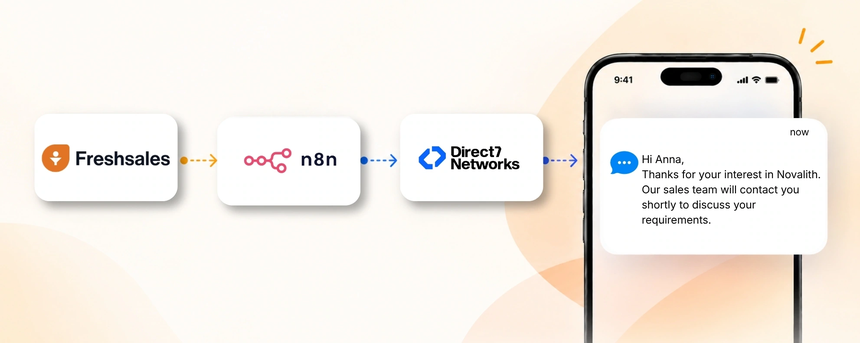
The conceptual workflow is Freshsales → n8n → D7 SMS.
An event in Freshsales (for example a new lead, a contact update, or a deal stage change) triggers n8n to receive and process the data, apply your business logic (for example selecting a message template and recipient), and call the D7 SMS API to send the message. The SMS is delivered to the recipient's mobile number and status can be reflected back into Freshsales or n8n for reporting. This creates a closed-loop communication that drives engagement while keeping data synchronized.
Example: A new lead is created in Freshsales from a Google Sheets import. n8n captures the lead data, selects a welcome SMS template, and dispatches an introductory message via D7 SMS. If the lead replies or takes a defined action, the system can log the interaction in Freshsales and assign a follow-up task to a sales rep, accelerating the warm-up process.
Freshsales and D7 SMS use cases
Lead capture and welcome:
- Trigger: Lead created in Freshsales.
- SMS: A warm welcome message with a link to schedule a call.
- Benefit: Faster engagement and higher chances of converting a cold lead.
Lead qualification and follow-up:
- Trigger: lead status moves to Qualified or Contacted.
- SMS: notification with next steps.
- Benefit: quicker progression through the funnel and reduced manual outreach.
Post-meeting follow-up:
- Trigger: meeting completed in Freshsales.
- SMS: summary and next steps.
- Benefit: improves clarity and reduces back-and-forth.
Deal stage changes:
- Trigger: deal moved to Won or Lost.
- SMS: outcome summary and onboarding steps.
- Benefit: transparent updates and faster onboarding.
Appointment reminders:
- Trigger: appointment scheduled in Freshsales.
- SMS: reminder before the meeting.
- Benefit: reduces no-shows and improves attendance.
Renewal reminders:
- Trigger: renewal date approaching.
- SMS: renewal offer and link to renew.
- Benefit: increases retention and reduces churn.
Example n8n workflow for Freshsales
Example workflow: Freshsales event triggers n8n, which collects lead or contact data, decides the message content based on the trigger type, and calls the D7 SMS API to send the message. On successful delivery, the workflow logs the SMS activity in Freshsales and can update the lead status or create a task for follow-up. If a response is received, the system can route the reply back into Freshsales for agent follow-up.
Benefits of Freshsales SMS automation
Automating SMS with Freshsales, D7 SMS, and n8n delivers faster responses, keeps messages consistent, and scales outreach without increasing manual workload. You gain a clean audit trail, easier reporting, and improved customer experience as your CRM data drives every message. If you also pull data from Google Sheets, you can ensure the CRM remains synchronized and ready to trigger SMS at the right moment.
Get started with Freshsales and D7 SMS
Get started in four steps.
- Sign up for Direct7 Networks and obtain D7 SMS API credentials.
- In n8n, connect Freshsales as the CRM source and configure trigger events for the SMS workflow.
- Set up the D7 SMS action with your preferred message template and map recipient data from Freshsales (name, phone, and fields from Google Sheets as needed).
- Test the workflow with a sample lead and verify delivery, logging, and reporting in Freshsales.
Frequently Asked Questions
How does the Freshsales to D7 SMS integration work with n8n?
It uses an event-driven flow where Freshsales triggers n8n, which processes the data, applies business logic, and calls the D7 SMS API to send messages. The result is automated, CRM-driven SMS communication with an auditable trail.
What data from Freshsales is used to send an SMS?
The system uses contact phone numbers, name, lead or deal details, and related custom fields to personalize messages and determine when to send them.
Can I trigger SMS from Google Sheets data that feeds into Freshsales?
Yes. Google Sheets can populate Freshsales records (leads, contacts, or deals) via n8n, and those events can then trigger D7 SMS messages.
Can I customize SMS templates and variables?
Yes. You can configure templates in D7 SMS with placeholders for name, date, and CRM fields to personalize each message.
How do I monitor delivery status and responses?
Delivery status can be logged back into Freshsales or n8n, and replies can trigger follow-up actions or tickets for your team. You can build a reporting view to track open rates and responses.
Are there opt-out and compliance considerations?
Yes. Include opt-out instructions in messages and respect CRM consent statuses to stay compliant with regional regulations.