


Integrate HubSpot with D7 SMS using n8n
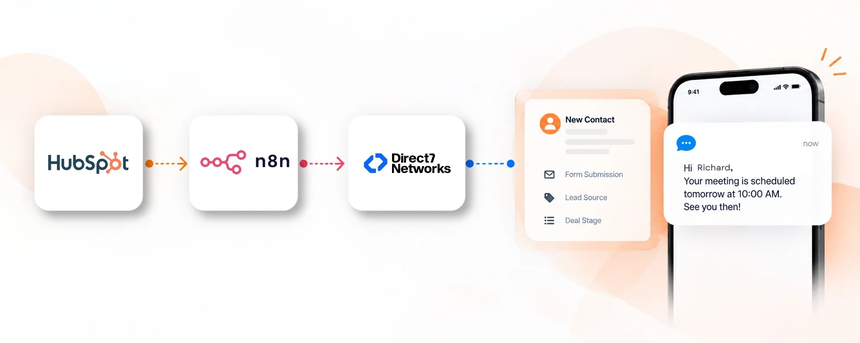
Direct7 Networks enables HubSpot users to send SMS through the D7 SMS API via n8n. This CRM-focused integration makes HubSpot events drive timely, personalized messages to leads and customers, without leaving HubSpot. By combining HubSpot data with the power of the D7 SMS API within an n8n workflow, you unlock scalable, compliant SMS communications that align with your sales and service processes.
Why connect HubSpot with D7 SMS using n8n?
Connecting HubSpot to D7 SMS through n8n reduces manual touchpoints and accelerates engagement. Automations triggered by HubSpot events ensure the right person receives the right message at the right time, while n8n handles routing, conditions, and sequencing. The result is consistent outbound SMS that scales with your pipeline and maintains an auditable history inside HubSpot.
How the HubSpot to D7 SMS workflow works
- HubSpot records an event such as a new lead, a contact property update, or a deal stage change.
- n8n receives and processes the event from HubSpot to start the workflow based on your rules.
- n8n applies filters and logic to determine who should receive an SMS and what message to send.
- D7 SMS is triggered to send a message to the designated recipient.
- The recipient receives the SMS and HubSpot logs the delivery for an auditable trail.
- Your team achieves the desired communication outcome, such as faster responses and accurate follow-ups.
HubSpot and D7 SMS use cases
Below are practical CRM-focused use cases that leverage HubSpot, D7 SMS, and n8n to automate customer and lead communications.
Lead capture and welcome:
- Business situation: A new contact is created in HubSpot from a form submission.
- Trigger: New contact record.
- SMS: A welcome and opt-in confirmation message sent via D7 SMS.
- Benefit: Accelerated engagement and higher opt-in accuracy.
Lead qualification alerts:
- Business situation: A contact reaches a high lead score or moves to Qualified.
- Trigger: Change of lead score or deal stage.
- SMS: Notify the assigned sales rep or provide next steps. Benefit: Faster follow-up and improved conversion odds.
Appointment reminders:
- Business situation: An appointment is scheduled in HubSpot.
- Trigger: Appointment created or updated.
- SMS: Reminder with date and time, plus reschedule option.
- Benefit: Higher attendance and reduced no-shows.
Post-purchase updates:
- Business situation: Deal won or service ticket created.
- Trigger: Close won or ticket creation.
- SMS: Confirmation and next steps or delivery details. Benefit: Clear expectations and fewer support calls.
Renewal alerts:
- Business situation: A subscription renewal is approaching.
- Trigger: Renewal date nearing.
- SMS: Renewal reminder with a link to renew or update preferences. Benefit: Improved retention and proactive communication.
Example n8n workflow for HubSpot
HubSpot → n8n → D7 SMS.
- Trigger: A HubSpot event such as a contact property change or deal stage update.
- Data received: Contact name, phone, deal stage, and relevant HubSpot fields.
- Automation logic: If a phone number exists and the contact has opted in to SMS, proceed to message.
- SMS action: Send a personalized message via D7 SMS.
- Business outcome: The customer receives timely information while your team logs the interaction in HubSpot for traceability and reporting.
Benefits of HubSpot SMS automation
Adopting HubSpot SMS automation with D7 SMS through n8n delivers several tangible benefits. It speeds up responses to inquiries, ensures consistent and compliant messaging, scales outreach across teams, and creates a complete SMS history within HubSpot. The automation also helps reduce repetitive manual tasks, freeing your teams to focus on higher-value activities such as advisory conversations and strategy.
Get started with HubSpot and D7 SMS
Getting started is straightforward. Sign up for D7 SMS, connect your HubSpot account to n8n, and design a simple workflow that triggers when a lead or deal changes. Test with a single contact to verify delivery and data accuracy, then scale the workflow across teams. Direct7 Networks provides implementation guidance to help you map fields, craft templates, and monitor performance.
Frequently Asked Questions
How does the HubSpot to D7 SMS integration work with n8n?
The integration uses HubSpot as the source of truth for triggers (such as contact creation, deal stage changes, or form submissions). n8n acts as the workflow orchestrator, applying logic and routing rules to determine who should receive an SMS. When criteria are met, D7 SMS is invoked to deliver the message. HubSpot is kept updated with delivery status and related activities for a complete audit trail.
Can I send SMS to my HubSpot contacts based on deal stages or lead scores?
Yes. You can configure the workflow to trigger SMS when a contact reaches a specific deal stage or crosses a lead score threshold. This enables timely, relevant messaging aligned with your sales process.
What data do I need to send an SMS from this integration?
At minimum you need the contact’s phone number and explicit opt-in to receive SMS. HubSpot properties can be mapped to D7 SMS message content to personalize communications.
Is opt-in and opt-out handling supported?
Yes. The workflow should respect opt-in status from HubSpot, and you can include opt-out instructions in the message to ensure compliance and maintain a clean contact list.
Can messages be customized per contact or per template?
Absolutely. You can template messages using HubSpot tokens and map fields to personalize each SMS according to contact data and context.
How do I troubleshoot delivery failures or retries?
Review the HubSpot activity log and the n8n workflow history for errors. Check D7 SMS delivery status and verify phone numbers and opt-in status. Adjust the workflow rules and try again with a smaller dataset before scaling.

Automate HubSpot SMS with D7 SMS via n8n
Connect HubSpot to D7 SMS through a scalable n8n workflow. Start a free trial and accelerate engagement with timely, personalized SMS.