


Integrate Jira with D7 SMS using n8n
Introduction to Jira and D7 SMS
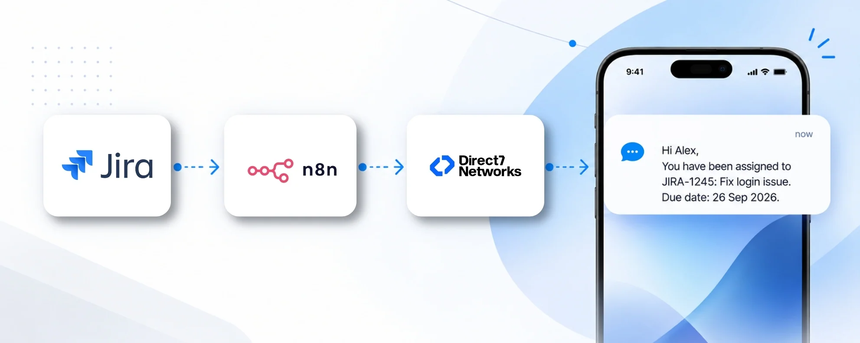
Direct7 Networks' D7 SMS API integrates with Jira via n8n, leveraging Google Sheets as a data source to map contacts and message templates. This combination enables real-time SMS notifications for Jira events such as issue assignments, status changes, and due-date alerts, ensuring stakeholders stay informed even when dashboards aren’t opened.
Why connect Jira with D7 SMS using n8n?
Connecting Jira with D7 SMS through n8n provides a scalable, low‑code approach to notifying the right people at the right time. By using Google Sheets as a lightweight data layer, teams can maintain current recipient lists, on‑call contacts, and SMS templates without custom development. Real-time workflows reduce manual handoffs, shorten response times, and improve ticket resolution SLAs.
How the Jira to D7 SMS workflow works
Jira events trigger an n8n workflow. The workflow fetches relevant issue data and recipient details from Google Sheets, applies simple business rules (for example, notify on assignment or approaching due dates), and then sends a message via the D7 SMS API. The recipient receives the SMS instantly, enabling rapid action and clear visibility across teams.
Jira and D7 SMS use cases
- Business situation: A software team uses Jira for task assignments. Trigger: A ticket is assigned to a developer. SMS: the assignee gets a notification with the task key, summary, and due date. Benefit: faster acknowledgement and reduced handoffs.
- Business situation: An upcoming QA release. Trigger: due date within 48 hours. SMS: reminders to the assigned tester and the project lead. Benefit: on‑time delivery and fewer escalations.
- Business situation: Status changes to In Review or Blocked. Trigger: issue updates. SMS: alerts to owners and stakeholders. Benefit: immediate visibility and quicker blocker resolution.
- Business situation: SLA risk detected. Trigger: SLA breach risk. SMS: escalation to on‑call manager. Benefit: faster containment and action.
- Business situation: Weekly project status for stakeholders. Trigger: Google Sheets schedule. SMS: digest of Jira activity. Benefit: better visibility and informed decisions.
Example n8n workflow for Jira
Trigger a Jira event, then use n8n to pull the relevant issue data and recipient mappings from Google Sheets, apply simple rules (for example, notify on assignment or upcoming due date), and call the D7 SMS API to deliver messages to the right recipients. The workflow updates Google Sheets with delivery status for auditing. This setup keeps Jira updates synchronized with timely SMS alerts for teams and stakeholders.
Benefits of Jira SMS automation
Key benefits include real‑time SMS alerts that reduce manual follow ups, improved adherence to deadlines, clearer cross‑team communication, and a scalable way to reach stakeholders as Jira projects grow. Using Google Sheets as the data source minimizes maintenance while enabling rapid changes to recipient lists and message templates. All messages stay within compliant, auditable channels managed through Direct7 Networks.
Get started with Jira and D7 SMS
To begin, ensure you have active Jira, a D7 SMS API account, and access to Google Sheets plus a running n8n instance. Connect Jira to trigger events, connect Google Sheets to provide recipient data and templates, and connect D7 SMS to send the messages. Build a minimal workflow in n8n that mirrors the Jira → Google Sheets → D7 SMS path, test with a sample issue, and monitor delivery results. If you need guidance, Direct7 Networks can tailor templates and ensure messaging compliance for your business.
Frequently Asked Questions
How does Jira trigger D7 SMS via n8n?
Jira events create a trigger in n8n. The workflow pulls issue data and recipient details from Google Sheets, then uses the D7 SMS API to deliver the message to the intended recipient.
Can I use Google Sheets to manage recipients?
Yes. Google Sheets acts as a lightweight data layer that stores contact numbers, messaging templates, and issue-to-recipient mappings, which n8n reads as part of the workflow.
Are transactional or promotional SMS supported?
Transactional SMS for Jira communications is supported via the D7 SMS API, with templates designed for alerts, updates, and confirmations. Marketing campaigns should follow your compliance guidelines.
Can I customize message templates?
Templates can be edited in Google Sheets and referenced by the n8n workflow to tailor messages per issue, assignee, or project.
What data is read from Jira and Google Sheets?
From Jira: issue key, summary, status, assignee, and due date. From Google Sheets: recipient phone numbers, template IDs, and mapping rules.
How do I test and monitor the integration?
Use a test Jira project, verify n8n runs, check Google Sheets for update consistency, and review D7 SMS delivery logs to confirm successful delivery.

Ready to automate Jira SMS with D7 via n8n?
Get started quickly by connecting Jira, Google Sheets, and Direct7's D7 SMS API inside n8n. Start building compliant, real-time SMS notifications for your projects today.