


Integrate Klaviyo with D7 SMS using n8n
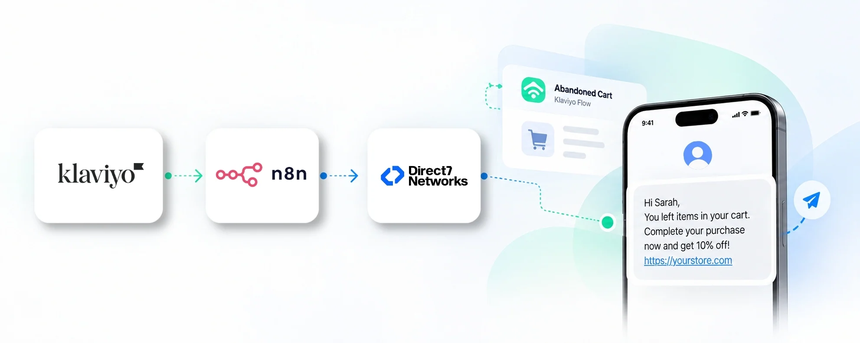
Direct7 Networks enables a native-like integration between Klaviyo, D7 SMS and n8n, letting you bring SMS into Klaviyo-powered journeys. By pairing Klaviyo's segmentation and event triggers with D7 SMS's dependable delivery, you can craft practical, compliant, multi-channel campaigns that reach customers on their mobile devices at the right moment. This page explains how to connect Klaviyo with D7 SMS through n8n and how to design automated SMS workflows that are specific to marketing automation use cases. Expect richer customer engagement, higher response rates, and more consistent messaging across channels without building a custom integration from scratch.
Why connect Klaviyo with D7 SMS using n8n?
Connecting Klaviyo with D7 SMS via n8n provides cross-channel automation, reduces manual follow-ups, and unlocks transactional SMS alongside marketing campaigns. Klaviyo can push events like Welcome, Abandoned Cart, Post-Purchase, or Win-Back to n8n; n8n evaluates audience rules, applies delays, segments, and deduplication, then triggers D7 SMS to deliver a personalized message. This reduces latency and increases engagement while keeping opt-in compliance and unsubscribe handling intact. The combination supports dynamic content, data synchronization, and scalable outreach without building custom integrations from scratch.
How the Klaviyo to D7 SMS workflow works
The conceptual workflow follows a simple path: Klaviyo → n8n → D7 SMS.
When a defined event occurs in Klaviyo, such as a user entering a Flow, updating a profile attribute, or reaching a segmentation threshold, Klaviyo emits the event payload to n8n via an integration trigger. n8n receives the data, normalizes it, and applies your workflow logic—filters, time delays, conditional branches, and audience checks. If the logic passes, n8n calls the D7 SMS API to queue a personalized SMS. D7 SMS then delivers the message to the recipient's mobile device. The business outcome is timely, relevant SMS that complements your Klaviyo campaigns, without manual intervention. A realistic example is an abandoned cart sequence where Klaviyo triggers a cart event, n8n checks stock and customer eligibility, then sends a reminder with a direct checkout link via D7 SMS.
Klaviyo and D7 SMS use cases
Here are practical use cases tailored for marketing automation with Klaviyo, D7 SMS, and n8n:
Abandoned cart reminders
- Business situation: Shoppers add items but leave before checkout;
- Trigger: Klaviyo detects an abandoned cart event;
- SMS communication: a concise reminder with a direct checkout link and a timely offer;
- Business benefit: recovered revenue and faster re-engagement.
Welcome and onboarding messages
- Business situation: new subscriber signs up;
- Trigger: Klaviyo welcome flow triggers;
- SMS communication: a warm welcome with guidance to get started; Business benefit: faster onboarding and higher initial engagement.
Post-purchase updates
- Business situation: customers want visibility into their order;
- Trigger: Klaviyo post-purchase flow;
- SMS communication: order status and shipping notifications;
- Business benefit: improved transparency and reduced customer inquiries.
VIP promotions and loyalty updates
- Business situation: segmented high-value customers;
- Trigger: VIP segment reached;
- SMS communication: exclusive offers and loyalty updates;
- Business benefit: increased loyalty and higher average order value.
Back-in-stock alerts
- Business situation: popular items return;
- Trigger: product restock detected in Klaviyo;
- SMS communication: back-in-stock notice with direct link; Business benefit: faster sales recovery and reduced lost demand.
Event reminders and confirmations
- Business situation: marketing events or webinars;
- Trigger: event sign-up or reminder schedule;
- SMS communication: reminder and RSVP link; Business benefit: higher attendance and fewer no-shows.
Example n8n workflow for Klaviyo
Example workflow: Abandoned cart SMS sequence using Klaviyo, n8n, and D7 SMS.
Trigger: Klaviyo detects a cart abandonment event for a specific customer.
Data received: customer name, phone number, cart items, and total value are passed to the automation.
Automation logic: n8n checks opt-in status, validates the phone number, and assesses how long the cart has been abandoned. If criteria are met, SMS content is personalized with the customer’s name and a direct checkout link.
SMS action: D7 SMS is invoked to deliver the message to the customer.
Business outcome: a timely, personalized reminder drives higher recovery rates and a smoother customer experience, closing the loop between Klaviyo flows and mobile engagement.
Benefits of Klaviyo SMS automation
Implementing SMS through Klaviyo with D7 SMS via n8n unlocks several advantages:
- Faster engagement: messages reach customers when they are most likely to act, improving response rates.
- Operational efficiency: automation handles repetitive messaging, freeing teams to focus on strategy.
- Personalized experiences: data from Klaviyo powers tailored SMS, strengthening relevance and trust.
- Scale and consistency: one workflow can serve millions of customers with consistent messaging across channels.
- Better compliance and opt-out handling: centralized controls for consent and unsubscribe preferences.
Get started with Klaviyo and D7 SMS
Getting started is straightforward. First, connect Klaviyo to n8n so Klaviyo events can trigger automation. Next, connect your D7 SMS account to n8n to enable SMS delivery. Build a starter workflow around a high-impact use case like abandoned cart recovery or welcome messages. Test the workflow with a test contact, verify opt-in status, and preview messages before sending. Finally, deploy the workflow to scale across segments, campaigns, and flows while monitoring delivery and performance metrics within Klaviyo and D7 SMS analytics.
Frequently Asked Questions
How does the Klaviyo to D7 SMS integration work with n8n?
The integration leverages Klaviyo to emit events, n8n to orchestrate the workflow, and D7 SMS to deliver the message. When an event occurs in Klaviyo, n8n processes the data, applies business rules, and triggers D7 SMS when criteria are met.
Is coding required to set this up?
Basic setup requires configuring triggers, conditions, and messages in n8n, with connections to Klaviyo and D7 SMS. A marketer with comfort in flows or a developer can configure and adjust the logic.
What messages can I send with D7 SMS in Klaviyo flows?
You can send transactional updates (order status, shipping) and marketing messages (abandoned carts, promotions, welcome texts) triggered from Klaviyo flows and segments.
Is this compliant with opt-in requirements?
Yes. The workflow respects Klaviyo opt-ins, consent preferences, and unsubscribe requests. Always align SMS messaging with regional regulations and your policy.
Can I test messages before sending to customers?
Yes. Use test contacts, preview content, and simulate events in Klaviyo and n8n to validate delivery timing, content accuracy, and opt-in status before going live.
What analytics are available for the Klaviyo–D7 SMS workflow?
You can monitor delivery rates, click-throughs, opt-out rates, and SMS reply activity. Combine Klaviyo analytics with D7 SMS delivery metrics for a complete view of performance.

Automate Klaviyo SMS with D7 SMS via n8n
Start your free journey today. Connect Klaviyo, D7 SMS, and n8n to unlock timely SMS campaigns, personalized messages, and scalable automation. Start free or book a demo to see it in action.