


Integrate Monday.com CRM with D7 SMS using n8n
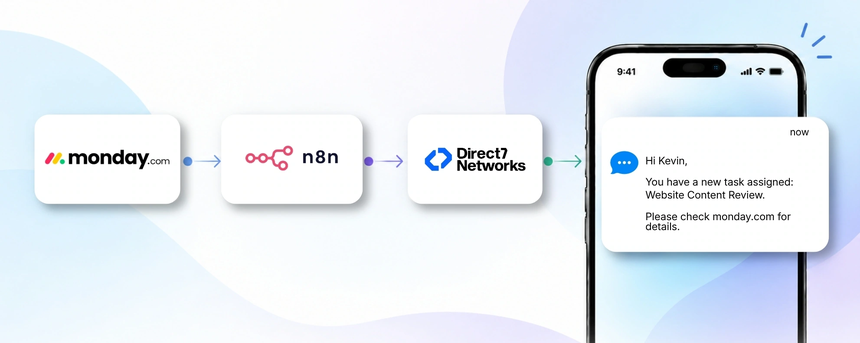
D7 SMS API powers scalable, compliant business SMS that plugs directly into monday.com CRM. By pairing monday.com CRM with D7 SMS through n8n automation, teams can orchestrate customer conversations where they already work—inside dashboards—while ensuring timely, personalized SMS communications powered by Direct7 Networks.
Why connect monday.com CRM with D7 SMS using n8n?
Connecting monday.com CRM with D7 SMS via n8n centralizes customer communications. n8n acts as the automation layer that listens to CRM events, applies business logic, and routes the right SMS at the right time without manual steps. This means sales, customer success, and support stay aligned and responsive while keeping data synchronized in monday.com CRM.
How the monday.com CRM to D7 SMS workflow works
The workflow runs as a simple, repeatable pattern:
1) An event occurs in monday.com CRM (for example a lead moves to New Lead or a deal advances to Proposal).
2) n8n receives and processes the event, normalizes contact data and relevant deal details.
3) n8n applies routing logic to choose the appropriate D7 SMS template based on status, due dates and contact preferences.
4) D7 SMS is triggered with the recipient phone number and message.
5) The SMS is delivered and the result is fed back to monday.com CRM for traceability.
6) The business gains faster response times, higher engagement, and auditable conversation history.
Example: A professional services team uses monday.com CRM to track inbound inquiries. When a lead is created with status New Lead and a preferred contact method SMS, n8n triggers a welcome SMS from D7 SMS with meeting options. This reduces first-contact time and increases booked meetings.
Monday.com CRM and D7 SMS use cases
Use cases include:
- Lead capture and welcome SMS: A new lead is created in monday.com CRM with SMS preference. Triggered SMS welcomes the prospect and offers next steps, shortening response time and improving engagement.
- Follow-up reminders: If a task or follow-up is due, an SMS reminder is sent to the prospect or client to keep conversations moving and reduce dropped opportunities.
- Deal progress updates: When a deal advances to Proposal or Won, a timely SMS informs the contact of the update and what to expect next.
- Appointment reminders: For scheduled meetings, clients receive reminder SMS with date, time and location, reducing no-shows.
- Post-sale onboarding: After a successful close, onboarding steps are communicated via SMS, guiding customers through setup and first use.
- Payment and renewal notifications: Automated payment confirmations, due reminders, or renewal notices help maintain cash flow and reduce churn.
Example n8n workflow for monday.com CRM
Example workflow:
- Trigger: monday.com CRM item updated.
- Data received: lead_id, name, phone, status.
- Automation logic: if status is New Lead or Follow-Up, send D7 SMS using a template with appointment options; if status is Won, send a congratulatory SMS; if a due date is approaching, send a reminder SMS.
- SMS action: D7 SMS call with recipient and template.
- Business outcome: faster responses and higher conversion.
- Realistic example: A consulting firm uses monday.com CRM to manage inbound inquiries. When a new lead is created with a mobile number, n8n triggers a welcome SMS from D7 SMS with a link to book an intro call, reducing manual outbound effort.
Benefits of monday.com CRM SMS automation
Automating SMS communications through this integration delivers tangible benefits across the CRM lifecycle.
- Faster response times to new leads and inquiries.
- Consistent, on-brand messaging aligned with your sales playbook.
- A complete audit trail of customer conversations visible in monday.com CRM.
- Reduced manual workload for sales, success, and support teams.
- Scalability to handle growing lead pools without increasing headcount.
- Improved compliance and opt-out handling through D7 SMS capabilities.
Get started with monday.com CRM and D7 SMS
Getting up and running is quick. Start by connecting monday.com CRM to D7 SMS via n8n, map contact fields to SMS templates, and test end-to-end messaging. Monitor delivery statuses inside monday.com CRM and adjust templates as your teams learn what converts best.
Frequently Asked Questions
How does the monday.com CRM to D7 SMS integration work with n8n?
The integration uses events from monday.com CRM as triggers, routes data through an n8n workflow, and calls the D7 SMS API to send messages. n8n handles data mapping, conditional logic, and retries, enabling consistent SMS communication without custom code.
What do I need to get started?
Basic items include a monday.com CRM workspace, a D7 SMS account, and access to an n8n instance. You’ll map fields like lead name, phone number, and status to the appropriate SMS template.
Can I send transactional SMS with D7 SMS?
Yes. The D7 SMS API supports transactional messages for timely confirmations, alerts, and reminders triggered by CRM events.
How do I stay compliant with SMS messaging?
Ensure you have opt-in consent and an easy opt-out method. Use template-based SMS and respect regional regulations for compliance and user preferences.
Is this suitable for lead nurturing and follow-ups?
Absolutely. You can automate multi-step follow-ups, reminders, and check-ins based on lead status and milestones in monday.com CRM.
What is the value of using n8n with this integration?
n8n provides visual workflow automation, conditional routing, and retries without bespoke development, accelerating time-to-value and reducing maintenance.

Connect monday.com CRM to D7 SMS with n8n
Start automating lead follow-ups and customer updates today. Try a free setup and see how SMS can streamline your CRM workflows.