


Integrate Pipedrive with D7 SMS using n8n
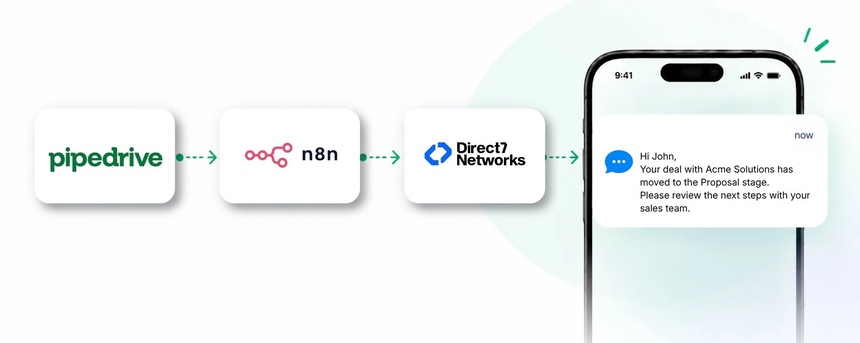
Pipedrive helps teams manage pipelines, deals, and customer relationships with clarity. When you connect Pipedrive to D7 SMS through n8n, you unlock seamless, automated SMS communications that keep prospects and customers engaged at the right moments. D7 SMS API brings reliable transactional and promotional SMS capabilities, while n8n orchestrates the workflow without heavy development. This page explains how the trio—Pipedrive, D7 SMS, and n8n—work together to deliver timely SMS updates, reminders, and notifications directly from your CRM data.
Why connect Pipedrive with D7 SMS using n8n?
Linking Pipedrive with D7 SMS through n8n gives you a powerful automation layer that brings CRM events directly into personalized SMS messages. You can trigger transactional and promotional SMS from key CRM moments—like a new lead, a deal milestone, or a follow-up—without writing custom integrations. n8n acts as the bridge, coordinating data flow and message logic between Pipedrive and D7 SMS, so your team stays coordinated and your customers stay informed. Direct7 Networks focuses on delivering reliable SMS delivery and compliance-aware messaging as part of the D7 SMS API.
How the Pipedrive to D7 SMS workflow works
The workflow pattern is Pipedrive → n8n → D7 SMS.
When an event occurs in Pipedrive (such as a new lead or a deal moving to a new stage), Pipedrive can push the data to n8n via a trigger. n8n receives the payload, applies simple workflow logic (for example, checking for a valid phone number and consent), and then triggers D7 SMS to the intended recipient. D7 SMS delivers the message, and your team benefits from timely, relevant customer communications with clear delivery records. This setup scales across teams while preserving personalization and compliance.
Pipedrive and D7 SMS use cases
Here are concrete CRM-focused use cases showing what you can automate between Pipedrive, n8n, and D7 SMS:
- Lead capture and welcome: When a new lead is created in Pipedrive with a phone number, n8n triggers a personalized welcome SMS via D7 SMS, initiating engagement early.
- Deal stage change alerts: As deals move to stages like Qualified, Proposal, or Won, an automated SMS updates the recipient or sales owner to keep everyone aligned and ready for the next step.
- Appointment reminders: If a meeting is scheduled in Pipedrive, an SMS reminder is sent ahead of time with the date, time, and location to improve turnout.
- Meeting follow-ups: After a recorded meeting, an SMS is sent with a summary and next steps to accelerate progress.
- Customer win notification: When a deal is marked Won, a transactional SMS confirms the win and provides onboarding or setup steps.
- Re-engagement for dormant leads: If a lead shows inactivity for a defined period, an SMS nudges the contact to rekindle interest and re-enter the pipeline.
Example n8n workflow for Pipedrive
The following is a practical, non-technical description of a typical Pipedrive → n8n → D7 SMS workflow:
- Trigger: a Pipedrive event such as New Lead or Deal Stage Change.
- Data received: n8n captures essential fields (name, phone, deal id, stage).
- Automation logic: check for a valid phone number and opt-in status, then build a personalized message template.
- SMS action: D7 SMS is invoked to send the message to the recipient's phone.
- Business outcome: The recipient receives a timely SMS, improving engagement and accelerating CRM processes.
Benefits of Pipedrive SMS automation
Automating SMS from Pipedrive via D7 SMS through n8n delivers tangible operational benefits:
- Faster response times: Immediate, relevant messages reduce friction and improve conversion.
- Consistent follow-ups: Standardized messaging ensures every lead and customer receives timely updates.
- Scalability: One workflow can serve many reps and campaigns without duplicating effort.
- Improved data alignment: Message delivery is connected to CRM events for better traceability.
- Enhanced customer experience: Personalization and timely info build trust and satisfaction.
Get started with Pipedrive and D7 SMS
Getting started is simple with Direct7 Networks. Set up D7 SMS, connect Pipedrive data to n8n, and build a lightweight workflow to test a welcome or update message. As you scale, you can expand to multi-user teams, additional deal stages, and richer message templates, all while keeping delivery reliable and compliant.
- Step 1: Sign up for D7 SMS and obtain your API credentials.
- Step 2: Connect Pipedrive to n8n in your workspace.
- Step 3: Create a basic workflow that triggers on a new lead or deal stage update.
- Step 4: Test with a sample contact and review delivery results.
- Step 5: Deploy to production and monitor performance.
Frequently Asked Questions
What is required to connect Pipedrive with D7 SMS via n8n?
You need a Pipedrive account, a D7 SMS API key, and an n8n instance. The integration uses standard CRM events to trigger SMS messages through D7 SMS, orchestrated by n8n.
Can I send transactional SMS with this setup?
Yes. The D7 SMS API supports transactional messages, and you can configure flows that trigger on critical CRM events like new leads, deal wins, or appointment confirmations.
Do I need to code to implement this workflow?
Minimal technical effort is required. n8n provides visual workflow building, and you map data from Pipedrive to D7 SMS messages without writing custom code.
Is it compliant to send SMS data from Pipedrive?
Compliance depends on recipient consent and opt-in status. Configure your workflow to check consent fields in Pipedrive before sending messages and keep a record of opt-ins.
Can I customize messages per deal stage?
Yes. You can template messages per stage and personalize them with contact fields such as name, company, and transition details.
How do I start testing the integration?
Sign up for D7 SMS, set up a test Pipedrive contact or deal, build a simple n8n workflow, and run a test to verify delivery and timing.

Automate Pipedrive with D7 SMS via n8n
Turn CRM events into timely SMS updates with a scalable, low-code workflow. Start for free and scale messaging as your deals grow.