


Integrate Salesforce with D7 SMS using n8n
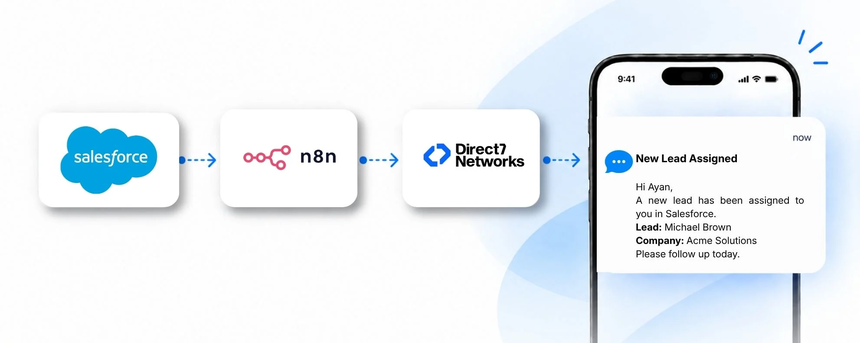
D7 SMS API powers scalable SMS communications that teams can trigger directly from Salesforce. When an event happens in your CRM, n8n routes the data to D7 SMS to deliver timely messages to leads, customers, or internal owners. For example, when a new Lead is created in Salesforce, the integration can automatically notify the assigned sales rep via SMS with key details and next steps, accelerating outreach and keeping the pipeline moving.
Why connect Salesforce with D7 SMS using n8n?
Connecting Salesforce with D7 SMS through n8n unlocks automated, rule-based messaging at scale. n8n acts as the orchestration layer that watches Salesforce for events, applies business logic (like lead score, stage, or ownership), and triggers D7 SMS to send the right message to the right person at the right time. This reduces manual follow-ups, ensures consistent messaging, and improves response rates across the customer journey.
How the Salesforce to D7 SMS workflow works
The conceptual workflow is:
Salesforce event → n8n processes and enriches the data → D7 SMS sends the message → Recipient receives the SMS.
In practice, an event such as a new lead, an updated opportunity stage, or a case closure is captured by Salesforce; n8n pulls the relevant fields (name, phone, account, message template), applies the workflow logic (conditions, delays, personalization), and calls the D7 SMS API to deliver the SMS to the intended recipient. The result is timely, consistent communication that supports sales and service teams.
Salesforce and D7 SMS use cases
Use cases include:
Lead assignment alerts
- Business situation: A new Lead is created in Salesforce.
- Trigger: Lead Created.
- SMS: Notify the assigned owner with lead name and a call-to-action to contact the lead.
- Benefit: Faster outreach and improved conversion rates.
Immediate follow-up reminders
- Business situation: No contact activity after lead creation.
- Trigger: 48-hour inactivity.
- SMS: Send a gentle reminder with an option to schedule a call.
- Benefit: Keeps momentum and shortens sales cycles.
Opportunity milestone alerts
- Business situation: Opportunity stage moves to Closed Won.
- Trigger: Stage change.
- SMS: Notify sales leadership with key deal details.
- Benefit: Real-time visibility and recognition of wins.
Customer onboarding SMS
- Business situation: New account activation.
- Trigger: Account Created.
- SMS: Welcome message with onboarding steps and support contact.
- Benefit: Improves first-week engagement and time-to-value.
Case updates to customers
- Business situation: Support case status changes.
- Trigger: Case Update.
- SMS: Customer receives status and expected resolution time.
- Benefit: Reduces status inquiries and increases satisfaction.
Example n8n workflow for Salesforce
Trigger: Salesforce Lead Created or Updated.
Data received: lead name, phone, owner, lead score, status.
Automation logic: If lead score exceeds a threshold and status is New, proceed to message.
Data enrichment: pull owner’s contact details and preferred message template.
SMS action: send a personalized SMS via D7 SMS with a single call-to-action link to the Salesforce record.
Business outcome: faster outreach, higher engagement, and a more predictable qualification process.
Benefits of Salesforce SMS automation
Implementing SMS automation between Salesforce, D7 SMS, and n8n delivers tangible benefits for CRM teams. It reduces repetitive manual communication, ensures timely notifications, and scales outreach without increasing headcount. Expect higher response rates from leads, faster follow-up with customers, and consistent messaging across the sales and support lifecycle. The integration also creates an auditable trail of communications within Salesforce and D7 SMS, helping with compliance and performance reporting.
Get started with Salesforce and D7 SMS
Getting started is straightforward. Sign up for Direct7 D7 SMS, connect your Salesforce account in n8n, and authorize the integration to read and respond to CRM data. In n8n, create a workflow that listens for Salesforce events (leads, opportunities, cases), applies your business rules (score thresholds, ownership, stages), and triggers D7 SMS with personalized messages. Test the flow in a sandbox or test environment, then deploy to production. As your needs evolve, you can add more triggers, delay logic, or message templates to align with your evolving CRM strategy.
Frequently Asked Questions
How does the Salesforce to D7 SMS integration work with n8n?
The integration uses n8n as an orchestration layer that watches Salesforce for events, processes relevant data, and conditionally triggers D7 SMS messages. This enables automated, rule-based SMS communications tied to your CRM activity without writing custom code.
Can I send transactional SMS via D7 SMS for Salesforce updates?
Yes. You can configure transactional messages for events such as lead creation, opportunity changes, case updates, or onboarding milestones, ensuring customers and team members receive timely, compliant notifications.
Do I need coding to set this up?
Most configurations are achieved through a no-code/low-code workflow in n8n, using pre-built connectors for Salesforce and D7 SMS. Some basic understanding of workflow logic helps, but extensive development is not required.
Are there limits on SMS sending or recipient numbers?
Limits depend on your D7 SMS plan and regional regulations. It’s important to configure opt-ins, opt-outs, and message templates to stay compliant with local laws.
How secure is the integration?
Security follows industry best practices for API authentication, least-privilege access, and data handling. Both Salesforce and D7 SMS connections should be secured with your organization’s credentials and token management, and access should be restricted to authorized users only.
How do I handle opt-outs and consent?
Implement a customer opt-out mechanism at the template level, store consent in Salesforce, and honor opt-outs in D7 SMS to maintain trust and compliance.

Automate Salesforce SMS with D7 via n8n
Start your free journey by connecting Salesforce to D7 SMS through n8n. Automate leads, updates, and customer communications at scale—no heavy coding required.