


Integrate Shopify with D7SMS using n8n
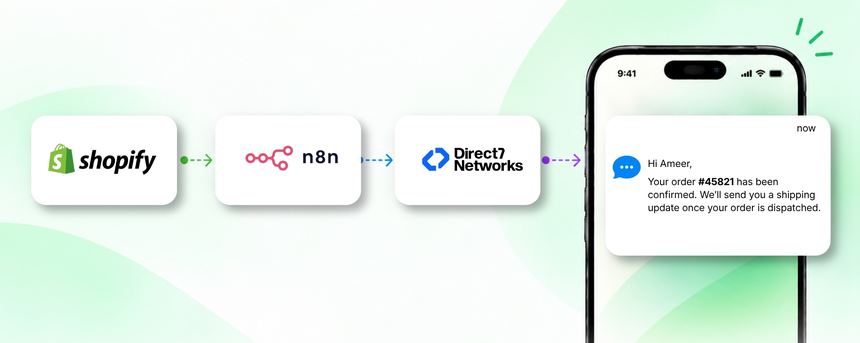
Google Sheets can act as the central data layer for your Shopify store, bringing order details, customer contact information, and shipping status into a single, accessible sheet. When paired with Direct7 Networks D7 SMS API and the automation power of n8n, you can turn data changes in Sheets into timely, personalized transactional SMS for Shopify customers. This page explains how to connect Google Sheets with D7 SMS through n8n to automate customer communications tied to Shopify orders, payments, and shipments, delivering faster, more reliable updates without manual effort.
Why connect Google Sheets with D7 SMS using n8n?
By linking Google Sheets to D7 SMS through n8n, you gain a scalable, no code path to SMS driven commerce communications. Shopify order data can be mirrored into Sheets, where n8n applies business rules and decides when to notify customers. This approach reduces manual follow ups, standardizes messaging, and creates an auditable trail of customer interactions. It also scales with your Shopify store volume, so even as orders grow, SMS notifications remain timely and reliable.
How the Google Sheets to D7 SMS workflow works
Conceptual flow: Shopify → n8n → D7 SMS.
A relevant Shopify event is captured and written into a Google Sheet; n8n processes the data, and then D7 SMS delivers the message to the customer. This setup keeps Shopify data in Sheets as the source of truth for messaging decisions. The common data points include order ID, customer phone number, order status, and tracking details.
- Trigger: A Shopify event is captured and written into Google Sheets, such as a new order, a payment update, or a shipment status change. The sheet acts as the trigger surface for n8n.
- Data received: The row contains essential fields like order_id, customer_phone, status, and tracking_number.
- Automation logic: n8n evaluates the status values (Paid, Shipped, Cancelled) and selects the appropriate SMS template and recipient.
- SMS action: The process makes a call to D7 SMS to deliver the message to the customer's phone.
- Business outcome: The customer receives timely notifications, reducing support inquiries and boosting trust in your Shopify store.
Real-world example: When a Shopify order is placed and the corresponding row is added to Google Sheets, n8n detects the new row. If the status is Paid, it triggers a D7 SMS transaction that confirms the order. As shipment updates flow from Shopify and update the same row, customers receive a follow-up SMS with the tracking number automatically.
Google Sheets and D7 SMS use cases
Below are practical use cases specific to Shopify and Google Sheets connected through n8n and D7 SMS:
- Order confirmation SMS: Triggered when a new Shopify order is logged in Sheets with a Paid status; the customer receives a confirmation with order details and a timeframe for processing.
- Shipping notification: When the order status updates to Shipped in Shopify and Sheets reflects the change, an SMS with the carrier and tracking link is sent to the customer.
- Payment failure alert: If a payment fails and the status in Sheets reflects this, send an SMS advising the customer of the issue and next steps to reattempt payment.
- Backorder and stock updates: If a product goes on backorder or stock levels drop below a threshold in Sheets, notify internal teams and optionally customers about delays or restock ETA.
- Delivery confirmation and post-delivery follow-ups: After delivery is confirmed in Shopify, a follow-up SMS asks for feedback or a request for a review, enhancing post-purchase engagement.
Example n8n workflow for Google Sheets
Example workflow outline you can configure in n8n without custom coding:
- Trigger: Google Sheets activity such as a new row addition or row update in a dedicated Shopify orders sheet.
- Data extraction: Read order_id, customer_phone, status, and tracking_number from the updated row.
- Decision node: If status equals Paid, trigger an order confirmation SMS; if status equals Shipped, trigger a shipping SMS; if status equals Cancelled, trigger a cancellation SMS.
- Action: Send SMS via D7 SMS API using the selected template and the customer phone number from the sheet.
- Result: The customer receives timely, personalized messages while the business maintains an auditable trail of all SMS communications.
- Practical note: Always include a simple opt-out option in SMS and ensure you adhere to applicable SMS compliance guidelines.
Benefits of Google Sheets SMS automation
Adopting Google Sheets as the data backbone for D7 SMS driven by n8n delivers several benefits for Shopify merchants:
- Faster, consistent messaging: Automated alerts shorten the cycle from order event to customer notification.
- Reduced manual workload: Replaces repetitive manual SMS updates with dependable, rule-based automation.
- Improved customer experience: Timely confirmations, updates, and requests for feedback increase satisfaction and trust.
- Supply-chain visibility: Inventory and fulfillment status can be monitored in Sheets and surfaced to customers when appropriate.
- Auditability and compliance: All messages and events are recorded, providing traceability for your communications.
- Scalability: Works with growing Shopify volumes without added manual effort or complexity.
Get started with Google Sheets and D7 SMS
Getting set up is straightforward:
- Ensure you have access to D7 SMS and an API key or credentials to use the D7 SMS API.
- Create a Google Sheet with the essential columns: order_id, customer_phone, status, and tracking_number, along with any Shopify-specific fields you wish to surface in messages.
- In n8n, create a workflow that watches the Google Sheet for new or updated rows and applies your status-based logic to decide which SMS to send.
- Configure a D7 SMS action in the workflow to deliver the message to the customer’s phone number from the sheet.
- Test the flow with a few test orders and a controlled list of phone numbers, then deploy to production and monitor performance.
Tip: Use clear message templates and include opt-out language to stay compliant with messaging regulations.
Frequently Asked Questions
Can I use Google Sheets as the trigger for Shopify SMS updates?
Yes. Google Sheets can serve as the central trigger surface. When Shopify data is synchronized to Sheets, n8n can monitor changes and trigger D7 SMS messages accordingly.
Do I need to code to set this up?
No. Using n8n alongside Google Sheets and the D7 SMS API is designed to be a low-code approach. You configure triggers, conditions, and actions via a visual workflow builder.
Which Shopify events work best with this flow?
New orders, order payments, shipment updates, and order cancellations can all be reflected in Google Sheets and trigger SMS notifications via D7 SMS.
What data do I need in Sheets?
Key fields include customer_phone, order_id, status, and any tracking or delivery details. You may also include customer name and order total for personalized messages.
How does D7 SMS handle delivery and opt-outs?
D7 SMS delivers messages through its carrier network and supports delivery receipts where available. Ensure your templates include opt-out language to comply with SMS regulations.
Can I customize SMS templates?
Yes. You can design templates for different statuses such as Paid, Shipped, or Cancelled and tailor messages to Shopify order data stored in Sheets.

Start automating Shopify SMS with Google Sheets and D7 SMS
Connect Google Sheets to D7 SMS via n8n and unlock timely, personalized transactional messages for Shopify customers. No code, scalable workflows, and measurable impact.