


Integrate Trello with D7SMS using n8n
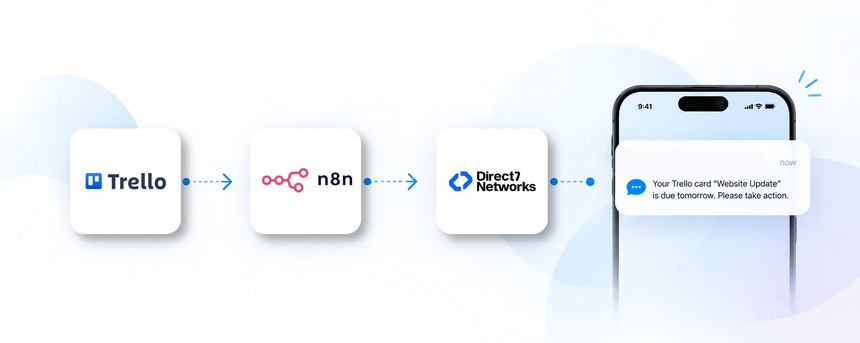
Direct7 Networks enables Trello teams to send SMS updates using the D7 SMS API, powered by n8n automation. This page shows how Trello cards and lists can trigger transactional SMS to assignees, stakeholders, and customers, helping teams respond faster and keep projects on track. Whether you need task reminders, client notifications, or status alerts, this integration delivers concise, compliant SMS messages directly from Trello activity.
Why connect Trello with D7 SMS using n8n?
n8n acts as the bridge between Trello and D7 SMS, translating card events into SMS sends without custom code. Connecting Trello with D7 SMS through n8n provides scalable alerts, auditable logs, and centralized control over who receives what messages. By centralizing notifications, teams reduce back-and-forth emails and ensure critical updates reach the right people at the right time.
- No‑code integration leverages visual workflows in n8n to connect Trello events to D7 SMS.
- Granular routing delivers messages to specific roles, boards, or card members.
- Audit and compliance keeps a history of sent SMS for accountability.
How the Trello to D7 SMS workflow works
The Trello to D7 SMS workflow follows a simple, repeatable pattern:
- Trello event occurs such as card created, assigned, due date updated, or status change.
- n8n receives the event via Trello webhook or trigger and processes the card data.
- Workflow logic evaluates conditions like due date proximity and recipient availability.
- When criteria are met, a D7 SMS action is invoked to send a message.
- D7 SMS API delivers the SMS to the target recipient.
- Teams gain timely visibility and can act on updates without constantly checking Trello.
Example: If a Trello card is assigned to a project manager and its due date is within 24 hours, n8n triggers a D7 SMS with the card title, due date, and a brief reminder to take action.
Trello and D7 SMS use cases
Practical Trello to SMS use cases:
- New card assignment alert — When a card is assigned, the assignee receives an SMS with the card title and due date to start work immediately.
- Deadline reminders — Cards with approaching due dates trigger SMS reminders to owners or stakeholders, reducing overdue work.
- Status change notifications — Changes like Move to In Progress or Done notify team members and clients who need visibility.
- Comment alerts — Mentions or comments on a card send SMS to involved teammates, speeding collaboration.
- Milestone updates for clients — Significant Trello milestones trigger client-facing SMS updates for transparency.
Example n8n workflow for Trello
Example n8n workflow for Trello:
- Trigger captures a Trello card event such as assignment or due date update.
- The workflow reads card data including title, due date, members, and board.
- Decision logic checks who should receive the SMS and whether the recipient has a verified phone number.
- If criteria are met, a message is composed from Trello data and sent via D7 SMS.
- The D7 SMS API delivers the message to the recipient.
- The team sees a clear SMS trail in operational dashboards for verification and audits.
Benefits of Trello SMS automation
Key benefits of Trello SMS automation include:
- Faster response times by delivering updates directly to mobile devices.
- Reduced manual follow-ups and status inquiries.
- Improved cross-team collaboration with consistent messaging.
- Greater accountability with an auditable SMS history.
- Better stakeholder transparency for projects and tasks.
Get started with Trello and D7 SMS
Get started with Trello and D7 SMS in minutes:
- Sign up for D7 SMS and obtain your API access.
- In n8n, connect Trello as the trigger and D7 SMS as the action.
- Create a simple workflow: when a Trello card is assigned and due soon, send an SMS to the assignee with essential details.
- Test the workflow on a sample card to verify the SMS content and delivery.
- Monitor results and adjust recipients, templates, and conditions as needed.
Frequently Asked Questions
How does the Trello to D7 SMS integration work with n8n?
The integration uses Trello events as triggers in n8n, which then calls the D7 SMS API to send messages to designated recipients based on your rules.
Do I need to code to set this up?
No code is required. n8n provides a visual workflow editor to connect Trello and D7 SMS, with conditional logic to tailor recipients and message templates.
What Trello data is included in the SMS?
Messages typically include card title, due date, and a short action description. Sensitive fields are omitted unless you explicitly include them in your template.
How can I test the workflow before going live?
Use a test Trello board and a test D7 SMS number. Run the workflow in a sandbox mode or with a small subset of cards to confirm formatting and delivery.
Can this support multiple boards or teams?
Yes. You can route messages by board, list, member, or role, enabling separate SMS flows for different teams or clients.
What about opt-in and compliance?
Implement appropriate consent practices for SMS delivery and maintain a clear opt-in record in your workflow logic and auditing.

Streamline Trello updates with SMS
Turn Trello activity into timely SMS notifications with D7 SMS and n8n. Start a free trial today and see how faster updates boost collaboration.