


Integrate Typeform with D7 SMS using n8n
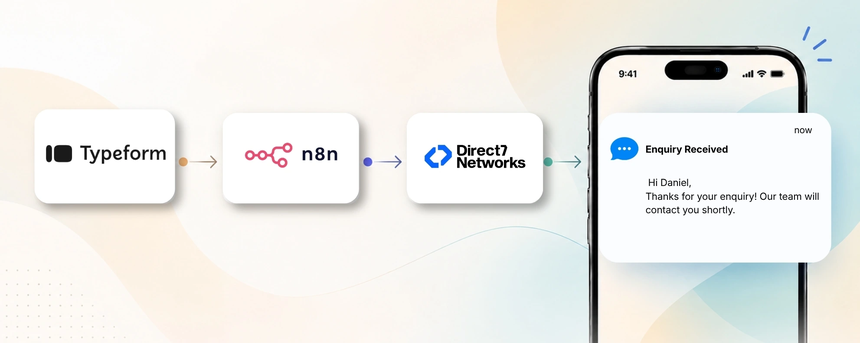
Direct7 Networks' D7 SMS API powers transactional SMS for Typeform submissions. This integration, built with n8n, connects Typeform forms to D7 SMS to send instant, personalized messages when a form is submitted, updated, or when a follow-up is needed.
Why connect Typeform with D7 SMS using n8n?
Connecting Typeform with D7 SMS via n8n unlocks real time engagement, automated confirmations, lead routing, scalable notifications, and a clear audit trail for compliance. It turns form responses into meaningful, timely SMS messages that nurture leads and inform customers without manual effort.
How the Typeform to D7 SMS workflow works
- Trigger: Typeform submission occurs when a user completes a form that collects name, phone number, consent, and optional details.
- Data received: n8n captures the submission data and validates essential fields such as phone number and consent status without exposing credentials.
- Automation logic: apply business rules in the workflow, such as checking consent, selecting an SMS template based on form answers, and scheduling delivery.
- SMS action: D7 SMS is invoked to send a personalized message to the recipient's phone number immediately or at a scheduled time.
- Business outcome: the customer receives a timely acknowledgement or reminder, increasing engagement and reducing manual follow-ups.
Typeform and D7 SMS use cases
- Lead capture with SMS confirmation: Business situation: A prospective client fills a Typeform form to request information; Trigger: Typeform submission; SMS communication: a personalized welcome and confirmation message; Benefit: faster response and higher lead qualification.
- Appointment scheduling follow-up: Business situation: A customer schedules an appointment via Typeform; Trigger: submission; SMS communication: appointment confirmation and reminder; Benefit: reduces no-shows and improves attendance.
- Post-purchase feedback: Business situation: Customer completes a purchase survey; Trigger: submission; SMS communication: request for feedback with a short survey link; Benefit: higher feedback rates and customer insights.
- Event registration alert: Business situation: Event sign-up via Typeform; Trigger: submission; SMS communication: registration confirmation and event details; Benefit: instant confirmation and higher turnout.
- Support follow-up: Business situation: Customer reports an issue through a Typeform; Trigger: submission; SMS communication: status updates and ETA; Benefit: faster issue resolution and customer satisfaction.
Example n8n workflow for Typeform
- Trigger: Typeform submission for a lead capture form.
- Data received: The form includes name, phone, consent and responses to key questions.
- Automation logic: If a valid phone exists and consent is granted, the workflow selects an SMS template based on the answers and decides immediate versus scheduled delivery.
- SMS action: D7 SMS is invoked to send the chosen message to the recipient's number.
- Business outcome: The lead receives a timely, personalized SMS that accelerates engagement and improves conversion rates.
Benefits of Typeform SMS automation
- Speed and scale: Send personalized SMS at scale as soon as Typeform responses arrive.
- Consistency: Standardized messaging ensures every lead gets the same quality follow-up.
- Compliance and opt-ins: Respect consent preferences and maintain an auditable trail.
- Measurable impact: Track delivery and response metrics within your existing dashboards.
- Operational efficiency: Reduce repetitive manual follow-ups and free team bandwidth.
Get started with Typeform and D7 SMS
- Prepare Typeform: Ensure the form collects a valid phone number and explicit consent for SMS communications.
- Build the n8n workflow: Connect the Typeform trigger to D7 SMS, implement simple conditional logic, and set the delivery rules.
- Connect D7 SMS: Authenticate with your D7 SMS API key and verify sending templates.
- Test thoroughly: Run live tests with test numbers to validate data flow and message content.
- Go live and monitor: Deploy the workflow and review delivery metrics and opt-out rates.
Frequently Asked Questions
How does the Typeform to D7 SMS integration work with n8n?
When a Typeform form is submitted, n8n captures the data, applies rules, and triggers D7 SMS to send a personalized message to the respondent or assigned contact.
Can I customize SMS templates based on Typeform responses?
Yes. Use form responses to map to D7 SMS templates, enabling targeted messages with personalized content.
Do I need to code to implement this integration?
Minimal setup is required in n8n; no custom code is necessary unless you have highly specialized logic.
What data is sent to D7 SMS?
Only the relevant fields from Typeform (for example name, phone, and consent status) are used to compose the SMS template.
How can I test the workflow before going live?
Use test submissions in Typeform and dummy phone numbers to simulate the entire flow end-to-end.
How do I handle opt-out and compliance?
Include an opt-out option in your Typeform and honor it in the workflow to prevent further messages.

Automate Typeform SMS with D7 SMS via n8n
Connect Typeform submissions to D7 SMS through n8n to deliver timely, personalized SMS updates. Start Free today or book a demo.