


Integrate WooCommerce with D7 SMS using n8n
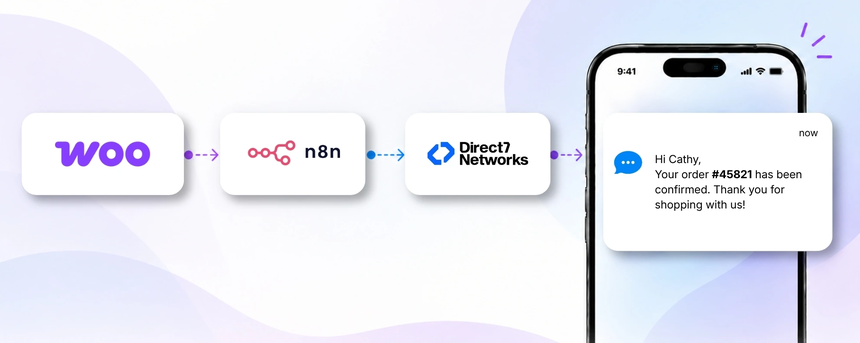
D7 SMS API powers transactional and customer communications for WooCommerce stores. When connected through n8n, you can automatically notify customers with order confirmations, shipping updates, delivery notices, and proactive follow-ups—without manual handling. This integration focuses on the live flow between WooCommerce events, n8n automation, and the D7 SMS API to deliver timely, relevant messages at scale.
Why connect WooCommerce with D7 SMS using n8n?
Connecting WooCommerce to D7 SMS via n8n centralizes event driven messaging, reduces manual workload, and ensures customers receive timely updates exactly when events occur in your store. n8n acts as the automation layer, orchestrating data extraction from WooCommerce, applying simple decision logic such as opt-in verification and status-based message selection, and invoking D7 SMS to deliver the message. This approach keeps communications compliant, personalized, and scalable while minimizing the risk of missed notifications.
How the WooCommerce to D7 SMS workflow works
Here's how the workflow typically runs
- Event occurs in WooCommerce such as a new order or status update
- n8n processes the event and extracts essential data such as order id, customer name and phone number
- n8n applies business logic to determine if an SMS should be sent and which template to use
- n8n invokes D7 SMS to deliver the message to the customer's mobile number
- The customer receives the SMS and the store logs delivery status for follow ups or reconciliations
WooCommerce and D7 SMS use cases
Use cases tailored to WooCommerce show how SMS can enhance customer experience and reduce manual follow ups:
- Order confirmation — Triggered when a new order is placed; a personalized SMS confirms the purchase and provides an estimated timeline for fulfillment. Benefit: reduces post-purchase support inquiries and sets clear expectations.
- Shipping updates — When the order ships, customers receive tracking details and delivery ETA. Benefit: improves transparency and helps customers plan to receive shipments.
- Payment status notifications — Notify customers of successful payments or payment failures to resolve issues quickly.
- Abandoned cart reminders — If a cart remains incomplete, send a reminder with a link to complete checkout. Benefit: recovers potentially lost revenue and speeds up conversions.
- Post-purchase follow ups — Request reviews or offer related product recommendations after delivery. Benefit: increases engagement and repeat purchases.
Example n8n workflow for WooCommerce
In a typical setup, an event from WooCommerce triggers the workflow. n8n reads order details and customer contact data, applies simple logic to ensure SMS consent and appropriate template selection, and then sends a message via D7 SMS. The result is timely, relevant communications that enhance the customer experience and reduce manual outreach.
Benefits of WooCommerce SMS automation
Automating SMS notifications for WooCommerce offers several practical benefits:
- Timely customer communication at key moments in the buyer journey
- Reduced manual follow ups and support workload
- Personalization using order data while maintaining scale
- Improved order visibility and reduced post purchase inquiries
- Compliance and opt in controls with centralized governance
Get started with WooCommerce and D7 SMS
Getting started is straightforward. Verify your D7 SMS account, set up a secure connection through n8n, and build a simple workflow that listens to WooCommerce events and delivers messages via D7 SMS. Start with a basic order confirmation or shipping update template, then expand to additional statuses and campaigns as you gain confidence. Always test with test data before going live and monitor delivery status to optimize templates and timing.
Frequently Asked Questions
Can this integration handle international numbers?
Yes. D7 SMS supports many regions, and you can configure your workflow to format messages and handle country specific dialing formats where supported.
Do I need to manage opt-ins or compliance?
Yes. It is important to ensure customers have opted in to receive SMS messages and that your use aligns with regional regulations. Use n8n to enforce consent before sending messages.
Can message templates be customized by order status?
Yes. You can define templates for different statuses (order placed, shipped, delivered) and personalize with customer and order data.
How are delivery statuses tracked?
Delivery status is reported back to the workflow via D7 SMS responses or delivery receipts, enabling you to log status and trigger follow ups if needed.
Is abandoned cart SMS supported?
Abandoned cart reminders can be implemented by detecting cart activity and sending a reminder after a defined inactivity period, subject to opt-in and policy guidelines.
What if a customer does not have a mobile number?
The workflow should skip sending SMS for that contact and can fall back to email or other channels if available.

Automate WooCommerce SMS with D7 SMS and n8n
Set up transactional and customer notifications for orders, shipping, and payments in minutes with a scalable, compliant SMS workflow.