


Automate Airtable user onboarding OTP with Zapier
Launch a user onboarding OTP and real-time status SMS in minutes. When a record status is updated in Airtable, Zapier triggers D7 Messaging to send secure one-time passcodes and customer status notifications—powering a verification OTP workflow that accelerates onboarding automation and builds trust from the very first interaction.
Overview
This integration connects Airtable (Trigger App) to D7 Messaging through Zapier. Any time the Record status updated event occurs in Airtable, Zapier automatically instructs D7 Messaging to Send customer status SMS. Use it to deliver onboarding OTPs, verify new accounts, and keep customers informed as they move from signup to verified to fully active—without manual follow-up or engineering effort.
Typical Airtable statuses might include: Pending OTP, Awaiting Documents, Verified, or On Hold. Each update can trigger the right message at the right time, forming a reliable verification OTP workflow that strengthens account security and improves conversion rates.
How It Works
- Prepare Airtable: Add a Status field (e.g., Pending OTP, Awaiting Docs, Verified) and a Phone field for the recipient’s number.
- Zapier Trigger: Choose Trigger App: Airtable with Trigger Event: Record status updated. Zapier watches for changes in your Status field.
- Zapier Action: Add D7 Messaging as the Action and select Send customer status SMS. Map the Phone field and compose your SMS, including your onboarding OTP code and next-step instructions.
- Test and enable: Send a test from Zapier to confirm delivery via D7 Messaging, then turn the Zap on.
- Expand logic: Use Zapier Filters or Paths to send different templates based on specific statuses (e.g., different messages when status = Pending OTP vs Verified).
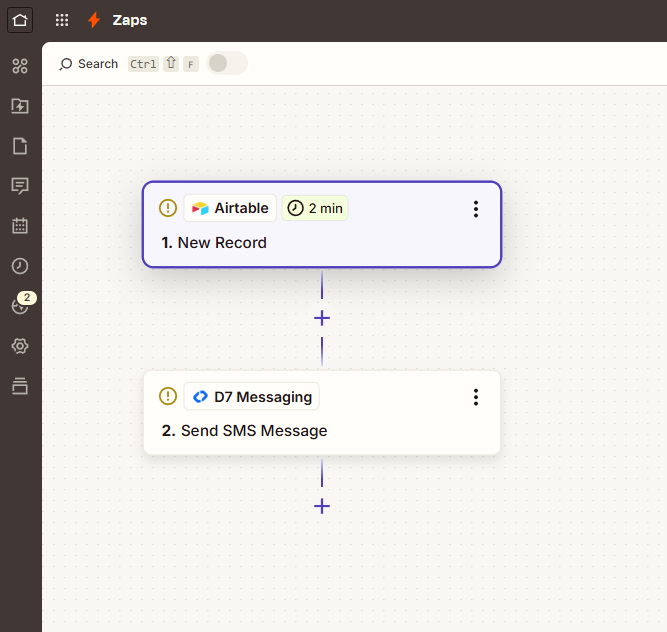
Tip: Personalize messages with Airtable fields (first name, company, status) and align templates with your onboarding automation stages.
Business Benefits
- Higher conversion during signup: Reduce friction and drop-offs with instant OTP delivery and clear next steps.
- Faster verification: Move users from pending to verified quickly with automated, timed messages.
- Lower operational load: Replace manual follow-ups with a scalable, hands-free workflow.
- Improved security: Strengthen account authentication using time-sensitive OTPs.
- Consistent CX: Standardize messaging and timing across all onboarding stages.
- Single source of truth: Drive your process from Airtable while D7 handles delivery.
- No-code speed: Launch and iterate without deploying code or waiting on dev cycles.
Industry Applications
- Fintech & Banking: KYC, account activation, and transaction verification.
- SaaS & B2B Platforms: Trial signups, account verification, and access upgrades.
- Marketplaces: Buyer/seller verification and onboarding readiness.
- eCommerce: New customer verification and high-risk order checks.
- Logistics: Driver/partner onboarding and credential confirmation.
- EdTech & Training: Student/teacher account verification and enrollment steps.
Common Use Cases
- Signup OTP: When Status = Pending OTP, send an onboarding OTP with instructions to confirm the account.
- KYC updates: Notify users when Status = Awaiting Documents or Verified to keep momentum high.
- Nudge incomplete users: If Status = Stalled/In Review, send reminders and guidance.
- Password reset verification: If Status = Reset requested, send a verification OTP to proceed.
- 2FA for sensitive actions: Trigger OTPs when Status = Elevated access required.
- Upgrade confirmation: Confirm plan or role changes with a verification step.
Why Use D7 Messaging
- Reliability: Carrier-grade delivery with robust routing and delivery reporting for confidence at scale.
- Global reach: Send messages to users worldwide with local-friendly sender options where supported.
- Automation: Seamless Zapier action, flexible APIs, and templates that fit your onboarding automation.
- Fast delivery: Low-latency routing to deliver OTPs and status updates in seconds.
Frequently Asked Questions
Do I need to write code to set this up?
No. You can build the entire workflow in Zapier by connecting Airtable (trigger) to D7 Messaging (action).
Can I customize the OTP and message content?
Yes. Use Zapier to map Airtable fields and compose personalized SMS templates that include your OTP code and onboarding instructions.
How do I avoid sending duplicate messages?
Use Zapier Filters to only proceed when the Status changes to a specific value, and update Airtable after sending to mark that the message was dispatched.
Will this work for international phone numbers?
Yes. D7 Messaging supports global delivery. Ensure numbers are stored in E.164 format (e.g., +15551234567) for best results.
Can I monitor delivery success?
You can view delivery reports in your D7 Messaging account and use them to refine templates or sending times.
What about compliance and consent?
Only message users who have opted in, include your brand name, and follow local regulations on sender IDs and content. Configure templates accordingly.
Get Started with Airtable + D7 Messaging
Automate your onboarding in under an hour. Create your Airtable base, build a Zap with the Record status updated trigger, and connect D7 Messaging to send OTPs and status SMS automatically. Turn on your Zap and start verifying users at scale.

Start sending onboarding OTPs with D7 Messaging
Connect Airtable in Zapier and go live with a verification OTP workflow today. Fast setup, reliable delivery, and a smoother onboarding experience for every new user.