


Automate ClickUp Employee Alert SMS via Zapier
Instantly send employee alert SMS the moment a new task is assigned in ClickUp. With Zapier connecting ClickUp to D7 Messaging, your team receives real-time task assignment notifications and productivity alerts on mobile, so nothing slips through the cracks.
Overview
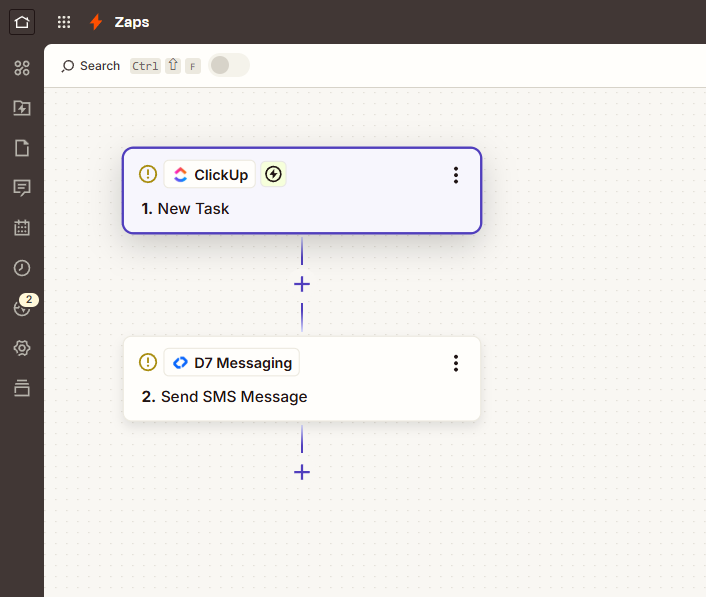
This integration links ClickUp and D7 Messaging through Zapier. When a ClickUp task is assigned to a user, Zapier triggers D7 Messaging to deliver a concise SMS that includes key task details (like task name, assignee, due date, and a direct link). The result is fast, reliable SMS automation that complements email and in-app alerts—boosting visibility and response times. While this page focuses on employee alerts, D7 Messaging also powers OTP automation and authentication workflows, making it a versatile choice for broader customer notification systems and workflow automation.
How It Works
- Trigger App: ClickUp
- Trigger Event: New task assigned
- Automation Platform: Zapier captures the event in real time.
- Action App: D7 Messaging sends an SMS to the intended recipient(s).
- Personalize the message: Map ClickUp fields (task title, assignee name, due date, task URL) into your SMS template.
- Add controls: Use Zapier Filters or Paths to send only for specific Spaces, Lists, priorities, tags, or working hours.
- Test & go live: Validate your Zap, then turn it on to start delivering task assignment notifications instantly.
Business Benefits
- Immediate visibility: Employees see high-priority assignments right away on their phones.
- Fewer missed tasks: Reinforce in-app and email alerts with SMS for time-sensitive work.
- Faster time-to-action: Productivity alerts reduce lag between assignment and first response.
- Greater accountability: Clear, direct notifications help teams own next steps.
- Works anywhere: Reach field teams, frontline staff, and remote workers without requiring app access.
- No-code automation: Build and adjust workflows in Zapier without engineering backlogs.
- Template consistency: Standardize wording to align with your processes and compliance needs.
- Scales with you: Add recipients, teams, and conditions as operations grow.
Industry Applications
- Field services & facilities: Dispatch new work orders to technicians instantly.
- Logistics & operations: Alert drivers and coordinators about assigned pickups or deliveries.
- IT & software teams: Notify on-call engineers when urgent tickets become theirs.
- Construction & trades: Assign tasks to crews and subcontractors on site.
- Healthcare & clinics: Route non-PHI operational tasks to the right staff member.
- Retail & hospitality: Assign shifts and back-of-house duties with reliable delivery.
Common Use Cases
- High-priority assignments: Send an SMS when tasks are created with Priority High/Urgent.
- SLA-sensitive work: Text the assignee when a new ticket with a tight due date is assigned.
- Team handoffs: Notify a shift lead or team channel number when ownership changes.
- Project-specific alerts: Trigger only for specific Spaces/Lists or tagged projects.
- Field escalation: Alert field staff when action items are assigned during site visits.
- Manager oversight: CC a supervisor or shared phone for critical assignments.
Why Use D7 Messaging
- Reliability: Built for dependable, high-volume delivery so critical alerts get through.
- Global reach: Send messages to staff across regions with support for international formats.
- Automation: Seamless integration with Zapier enables flexible, no-code workflows.
- Fast delivery: Low-latency routing designed for time-sensitive notifications.
- Developer-friendly: APIs and docs for teams who want to extend beyond Zapier.
- Secure by design: Manage access and templates to align with internal policies.
FAQ
Do I need to write code to set this up?
No. You can build the entire workflow in Zapier by selecting ClickUp as the trigger and D7 Messaging as the action.
Can I customize the SMS content?
Yes. Map ClickUp fields like task title, assignee name, due date, and the task URL into your message template in Zapier.
How do I choose who receives the SMS?
Use the assignee’s phone number from ClickUp (if stored), a custom field, a lookup table in Zapier, or route to a shared team number.
Will it work for international numbers?
Yes. Use E.164 formatting with country codes. D7 Messaging supports messaging across major regions worldwide.
Can I control when messages are sent?
Yes. Add Zapier Filters, Schedules, or Delays to respect working hours or only send for certain priorities/lists.
Does D7 also support OTP automation?
Yes. D7 provides APIs for OTP and authentication workflows. You can create separate Zaps or server-side flows for verification use cases.
Employee Alert SMS for ClickUp (via Zapier)
Connect ClickUp, Zapier, and D7 Messaging to send fast, reliable task assignment notifications and productivity alerts to the right people at the right time, without writing code.

Start sending employee alerts in minutes
Connect ClickUp to D7 Messaging with Zapier to automate real-time task assignment notifications. No code, just results.