


Automate Lead Follow-Up SMS from Freshsales via Zapier
Turn every new assignment in Freshsales into a timely lead follow-up SMS—automatically. With Zapier and D7 Messaging, your team delivers instant sales automation messaging that drives fast customer communication and higher connect rates.
Overview: Lead Follow-Up SMS for Freshsales via Zapier
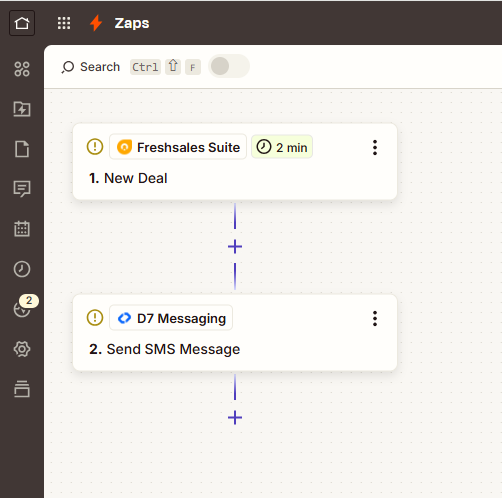
This integration connects Freshsales to D7 Messaging through Zapier. When the Freshsales Trigger Event “New lead assigned” fires, Zapier sends the lead’s details to D7 Messaging, which instantly delivers a personalized SMS to the lead. No manual outreach, no delays—just consistent, trackable outreach that complements your sales automation messaging and strengthens customer communication from the first touch.
Example message template:
“Hi {{Lead.FirstName}}, this is {{Owner.FirstName}} from {{Company}}. I just received your details and would love to help. Reply YES to connect now or share a good time. —{{Owner.FirstName}}”
How It Works
- Trigger App: Freshsales
- Trigger Event: New lead assigned
- Automation Platform: Zapier orchestrates the workflow and passes lead data securely.
- Action App: D7 Messaging sends the sales follow-up SMS using your chosen sender ID or number.
- Personalization: Map fields like Lead Name, Owner Name, Company, and Phone to create tailored messages.
- Compliance: Include opt-out language when required and respect consent captured in Freshsales.
- Tracking: Monitor delivery status in D7 Messaging; use Zapier paths or filters for advanced routing.
Business Benefits
- Respond instantly: Reach every assigned lead within seconds to win the first-contact advantage.
- Scale outreach: Automate consistent follow-ups without adding headcount.
- Improve conversions: Personalized SMS boosts reply rates over email alone.
- Cleaner handoffs: Align SDR–AE processes with dependable, trackable messages.
- Better customer communication: Keep leads informed at every stage with clear, concise texts.
- Lower leakages: Eliminate missed outreaches when reps are out or busy.
- Data-driven refinement: Use delivery and response insights to optimize your sales automation messaging.
Industry Applications
- SaaS and software — qualify trials and demos faster.
- Agencies and consulting — book introductions right after inquiry.
- Real estate — follow up on property interest immediately.
- Financial services — confirm interest and schedule advisory calls.
- Ecommerce & B2B marketplaces — engage high-intent buyers quickly.
- Healthcare and wellness — initiate HIPAA-aware outreach and reminders where applicable.
- Education and training — welcome and guide prospective students.
Common Use Cases
- Instant welcome text when a lead is assigned to a rep.
- Intro message with a calendar link for quick meeting booking.
- Follow-up nudge if the lead hasn’t replied in 24–48 hours (via Zapier delay).
- Handoff confirmation when ownership changes in Freshsales.
- Event-driven updates (pricing sent, proposal shared, demo completed).
- Re-engagement outreach for dormant or recycled leads using filters.
Why Use D7 Messaging
- Reliability: Carrier-grade routes and real-time delivery reporting ensure your messages arrive.
- Global reach: Send to 190+ countries with local-compliant sender options where supported.
- Automation-first: Built for Zapier integrations and workflow automation across CRMs and apps.
- Fast delivery: Low-latency messaging for time-critical sales outreach and customer notification systems.
- Security-ready: Use D7 for OTP automation and authentication workflows in other journeys.
- Analytics & control: Track performance, manage templates, and standardize your sales automation messaging.
FAQ
Do I need coding skills to set this up?
No. Zapier provides a no-code builder. Connect Freshsales and D7 Messaging, map fields, and publish your Zap.
Can I personalize messages with lead and owner details?
Yes. Map Freshsales fields (e.g., Lead First Name, Owner Name, Company, Phone) directly into your D7 Messaging template.
What about international numbers and formatting?
D7 supports international SMS. Use E.164 format when possible; you can transform numbers in Zapier with Formatter steps if needed.
How do I handle compliance and opt-outs?
Send only to opted-in contacts and include opt-out language where regulations require. If a contact opts out, update Freshsales and add a filter in Zapier to stop future sends.
Can I track delivery and retries?
D7 provides delivery status. You can log this to Freshsales via additional Zapier steps, and configure conditional retries based on status if desired.
Does D7 support OTP and authentication use cases?
Yes. Beyond sales follow-ups, D7 powers OTP automation and account authentication workflows via Zapier and API for secure, time-sensitive messaging.
Get Started in Minutes
1) Create your D7 Messaging account. 2) In Zapier, choose Freshsales as the Trigger (New lead assigned). 3) Add D7 Messaging as the Action (Send sales follow-up SMS). 4) Map fields, add compliance text, and test. 5) Turn it on and start engaging leads instantly.

Send Your First Follow-Up in Minutes
Connect Freshsales to D7 Messaging with Zapier and start converting more leads with fast, reliable SMS outreach.