


Automate Google Forms Send Registration OTP with Zapier
Instantly send a registration OTP to new form respondents with a no-code Zapier workflow connecting Google Forms to D7 Messaging. Use form verification OTP to validate phone numbers and ensure secure signups, without manual steps or custom code.
Overview: Google Forms registration OTP via Zapier
This integration links Google Forms to D7 Messaging through Zapier so every time a respondent submits a form, an OTP is sent to their phone number for quick verification. It helps verify ownership of a mobile number, reduce spam entries, and protect user onboarding flows with secure signups. Whether you’re qualifying leads, approving event registrations, or authenticating new accounts, OTP automation keeps your data clean and your users trusted.
How It Works
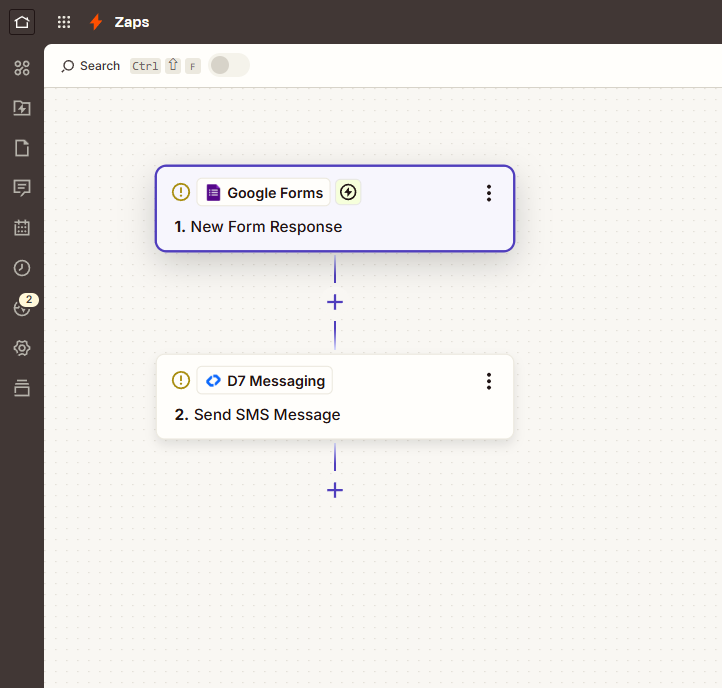
- Trigger App: Google Forms
- Trigger Event: Form Submitted a respondent completes your Google Form.
- Zapier captures the submission and maps the phone number field.
- Action (D7 Messaging): Send registration OTP an SMS with a one-time passcode is delivered to the respondent.
- Optional: Add a Zapier step (e.g., Formatter/Code) to generate your OTP and store or verify it in your system, or use a follow-up step to confirm the code entered by the user.
The result is a streamlined authentication workflow that validates phone numbers automatically and safely.
Business Benefits
- Reduce fake or low-quality signups: Require form verification OTP to block bots and invalid numbers.
- Improve data integrity: Capture verified, contactable leads for more effective follow-ups.
- Accelerate onboarding: Automated OTP delivery enables users to complete registration in seconds.
- Enhance security: Add a lightweight authentication layer for secure signups and account protection.
- Operate at scale: Zapier automation + D7 Messaging handles high volumes reliably.
- Lower manual workload: Remove manual checks and phone validations.
- Better customer experience: Fast, clear OTP SMS improves trust and conversion rates.
Industry Applications
- SaaS & B2B software: Trial signups, user provisioning, portal access.
- E-commerce & marketplaces: Buyer/seller verification and checkout security.
- Events & communities: RSVP validation and gated membership approvals.
- Education & training: Learner account verification and exam access.
- Financial services & fintech: Added security for onboarding and sensitive form actions.
- Healthcare & wellness: Patient portal and appointment request verification.
Common Use Cases
- Verify new account signups submitted via Google Forms.
- Confirm phone ownership for event registrations or waitlists.
- Qualify leads before routing to sales or CRM.
- Protect promotional campaigns or referral submissions.
- Secure profile change requests (e.g., phone/email update) with OTP checks.
- Gate community or workspace access with a one-time code.
Why Use D7 Messaging
- Reliability: Carrier-grade infrastructure designed for consistent delivery, even at peak volumes.
- Global reach: Deliver OTPs to users worldwide with localized routing.
- Automation: Seamlessly integrate with Zapier and your stack to trigger OTPs from any workflow.
- Fast delivery: Low-latency SMS dispatch so users can verify in seconds.
- Developer-friendly: Clean APIs, clear docs, and flexible templates for tailored messages.
- Visibility & control: Tracking, logs, and reporting to monitor performance and optimize flows.
FAQ
What do I need to set this up?
A Google account (for Google Forms), a Zapier account, and a D7 Messaging account. Create your form with a phone number field, then build a Zap that maps the phone number to the D7 Messaging action.
How is the OTP generated?
You can generate a one-time code using Zapier (e.g., Formatter/Code step) or your own backend. Pass the code into the D7 Messaging SMS template and store it in your system for verification. Alternatively, use your preferred verification logic to match the code entered by the user.
Can I limit or throttle OTP sends?
Yes. Add Zapier Filters or Delay steps to prevent repeated sends within a timeframe, or check for duplicates before sending. You can also create re-send rules based on user requests or delivery status.
Does this work internationally?
Yes. D7 Messaging supports global delivery. Be sure to collect phone numbers in international format (E.164) for best results and compliant routing.
How long should an OTP remain valid?
Most teams choose 2–10 minutes. Define your expiration and verification logic in your app or workflow and communicate it in the SMS content so users know what to expect.
What are the costs?
Standard D7 Messaging SMS pricing applies, plus any Zapier task usage based on your plan. You only pay for messages sent and the automation tasks you use.
Get started with secure, automated OTP verification
Connect Google Forms to D7 Messaging in minutes and start sending registration OTP messages automatically. Strengthen security, reduce spam, and convert more verified users—no code required.

Launch your Google Forms OTP workflow today
Create a Zap, map your form fields, and start sending secure OTPs with D7 Messaging. Try it now and streamline verification at scale.