


CRM SMS integration for HubSpot: Auto-send Lead Nurturing SMS with Zapier
Launch a powerful CRM SMS integration that texts every new HubSpot lead in seconds. With Zapier connecting HubSpot to D7 Messaging, you’ll automatically send personalized lead nurturing SMS the moment a contact is created, improving speed-to-lead, kickstarting conversations, and boosting customer engagement automation from day one.
Introduction
When a new lead appears in HubSpot, timing is everything. This integration uses Zapier to watch for the New Lead Created event in HubSpot and instantly trigger D7 Messaging to deliver a friendly, branded text message. Whether you’re welcoming a prospect, sharing next steps, or offering a quick call link, lead nurturing SMS sets the tone for a responsive, human experience—without adding manual work for your team.
How the Integration Works
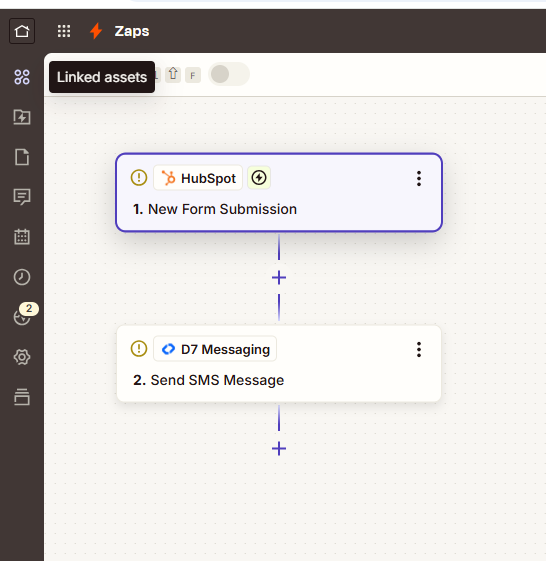
Here’s the simple flow powered by Zapier:
- Trigger (HubSpot): New Lead Created — Zapier detects a new contact or lead in your HubSpot CRM.
- Data Mapping — Pull the lead’s phone number, first name, lifecycle stage, owner, and any custom properties.
- Action (D7 Messaging): Send SMS — D7 Messaging delivers a personalized text, such as a welcome, offer, or next-step prompt.
- Optional Filters & Delays — Only message qualified leads, route by region, or add a short delay to match your outreach rhythm.
- Track & Optimize — Use delivery analytics and HubSpot reporting to iterate on message content and timing.
All of this runs reliably in the background so your team can focus on closing deals—not sending manual texts.
Key Benefits
- Instant speed-to-lead — Convert more by reaching prospects within seconds of form submission.
- Higher engagement — Lead nurturing SMS consistently outperforms email open rates, driving faster replies.
- Consistent follow-up — Never miss a welcome, reminder, or promo thanks to always-on automation.
- Relevant, personalized messaging — Use HubSpot properties to tailor each SMS for real-time notifications and better outcomes.
- Scales with your funnel — From transactional confirmations to promotional messaging, support every stage of the journey.
- Simple, no-code setup — Build and maintain the workflow in Zapier without developer time.
Popular Use Cases
- Welcome SMS — “Hi {{First Name}}, thanks for reaching out! Here’s a quick link to book a call: {{Meeting Link}}.”
- Speed-to-lead alert + nudge — Send an internal alert to reps and an external SMS to the lead at the same time.
- Trial onboarding tips — Drip short messages with setup steps and helpful resources during the first week.
- Webinar registration reminders — Confirm sign-ups and send day-before and hour-before reminders.
- Promotional offers — Time-limited discounts to move leads from MQL to SQL.
- Transactional confirmations — Acknowledge demo requests, downloads, or quote submissions instantly.
Why Choose D7 Messaging
- Global, reliable delivery — Reach leads worldwide with high deliverability and carrier-grade routes.
- Fast, real-time notifications — Messages land within seconds to capitalize on lead intent.
- Brand-friendly sender options — Dedicated sender IDs and templates for consistent voice.
- Insightful analytics — Track delivery, response trends, and optimize campaigns with data.
- Security & compliance — Built with privacy and regional regulations in mind.
- Flexible pricing — Scale confidently as your pipeline grows.
Frequently Asked Questions
1) How do I connect HubSpot to D7 Messaging with Zapier?
Create a Zap in Zapier, choose HubSpot as the trigger app with “New Lead Created,” then add D7 Messaging as the action to send an SMS. Map HubSpot fields (name, phone, owner) into your message and turn the Zap on.
2) Can I personalize messages with HubSpot properties?
Yes. Zapier lets you insert any HubSpot field—like first name, company, lifecycle stage—directly into your D7 Messaging SMS template.
3) Will this work for both SMS notifications and promotional messaging?
Absolutely. Use filters and paths in Zapier to send transactional alerts (welcome, confirmations) and promotional campaigns (offers, reminders) from the same workflow.
4) What if a lead doesn’t have a valid phone number?
Add a Zapier filter to check the phone field before sending. You can also route to email or create a HubSpot task if the number is missing.
5) Can I send OTPs or verification codes with D7 Messaging?
Yes. While this Zap focuses on lead nurturing SMS, you can create a separate Zap or path that triggers OTP delivery for verification events using D7 Messaging.
6) How do I monitor performance?
Use D7 Messaging delivery analytics alongside HubSpot reports to track send volume, delivery status, and downstream metrics like replies, meetings booked, and conversions.
Get Started in Minutes
Connect HubSpot, configure your Zap, and start sending high-converting lead nurturing SMS with D7 Messaging today. Turn new leads into warm conversations with fast, relevant, and automated outreach.

Launch HubSpot Lead Nurturing SMS with D7 Messaging
Start your free setup, connect HubSpot via Zapier, and send your first automated SMS in minutes.