


Automate Jotform Secure Access OTP with Zapier
Automate secure access OTP delivery for protected Jotform submissions using Zapier and D7 Messaging. This workflow adds OTP verification automation to secure forms so only verified users can view or submit sensitive information, without writing code.
Overview
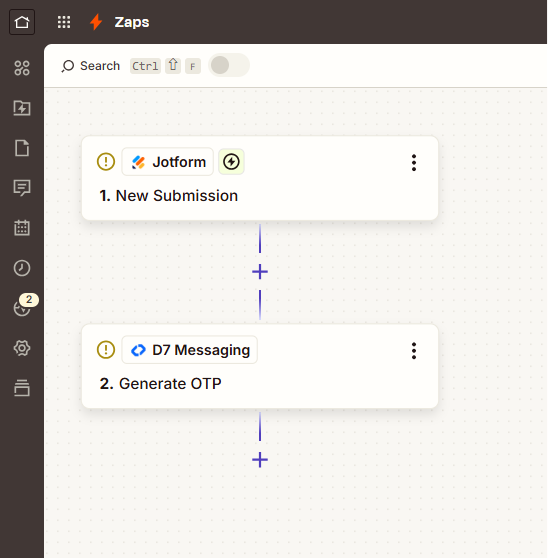
Connect Jotform to D7 Messaging via Zapier to send one-time passwords the moment a user requests access to a protected form. When the Jotform Secure Form Access event occurs, Zapier triggers D7 Messaging to Send access OTP, enabling a simple, scalable authentication workflow. Use this to strengthen form security, reduce fraud, and streamline user access while maintaining an excellent experience.
How It Works: Secure Access OTP with Jotform, Zapier, and D7 Messaging
Here’s the end-to-end automation powered by Zapier:
- Trigger App: Jotform
- Trigger Event: Secure Form Access (a user attempts to open or submit a protected form)
- Zapier: Orchestrates the workflow and passes the user’s phone number and context to D7 Messaging
- Action (D7 Messaging): Send access OTP instantly via SMS
- User verification: The user enters the received OTP in your Jotform verification step; you validate and grant access based on your configured workflow
In Zapier, you can add steps to generate OTP codes (e.g., with Formatter or Code by Zapier), define message templates, log attempts, and handle exceptions. D7 Messaging takes care of fast, reliable global SMS delivery so your authentication workflows run smoothly at scale.
Business Benefits
- Stronger access control: Verify users before they view or submit sensitive forms.
- Fewer manual steps: Replace manual approvals with automated OTP verification.
- Faster user experience: Instant OTP delivery improves completion rates.
- Scalable security: Roll out OTP automation across many forms without code changes.
- Audit-friendly: Use Zapier paths and logs to track attempts and outcomes.
- Global-ready: Reach users in many countries with D7’s high-quality routes.
- Cost control: Pay per message with transparent routing and delivery reporting.
Industry Applications
- Healthcare: Patient intake, consent forms, and portal access.
- Financial services: Loan applications, KYC updates, and secure requests.
- Education: Exam registrations, transcript requests, and grade access.
- HR & recruiting: Candidate portals, onboarding, and document access.
- Legal & compliance: NDA approvals, contract access, and secure filings.
- Ecommerce & marketplaces: High-value order forms, vendor onboarding, and returns.
- Government & public sector: Citizen service forms and appointment bookings.
Common Use Cases
- Passwordless access to protected Jotform pages via SMS OTP.
- Gate sensitive forms (finance, medical, legal) with OTP verification automation.
- Step-up authentication for high-risk submissions or edits.
- Time-limited OTPs for temporary access windows.
- Multi-region forms that require reliable, fast global SMS delivery.
- Notify admins if multiple failed OTP attempts occur.
Why Use D7 Messaging
- Reliability: Carrier-grade routes and delivery reporting ensure your OTPs arrive.
- Global reach: Send SMS to users across many countries with high deliverability.
- Automation: Native Zapier integration to build powerful, no-code workflows.
- Fast delivery: Low-latency routing for time-sensitive authentication.
- Control & insights: Template management, DLRs, and configurable parameters.
- Scalable pricing: Pay-as-you-go that grows with your form traffic.
FAQs
- What do I need to get started?
A Jotform account, a Zapier account, and a D7 Messaging account with API access. You’ll also need a Jotform field to collect the user’s phone number for OTP delivery.
How do I generate and validate the OTP?
Use Zapier to generate a random code (Formatter or Code by Zapier) and send it via D7 Messaging. Add a verification step in Jotform (e.g., a short text field) and compare inputs using Zapier logic or your backend process.
How fast are OTPs delivered?
Most OTPs arrive within seconds. Actual delivery time can vary by user location, network conditions, and handset availability.
Can I customize OTP length, message, and expiry?
Yes. Configure the code format in Zapier, personalize the SMS template in the D7 Messaging step, and enforce time-based expiry using Zapier paths/filters or your verification logic.
Can I customize OTP length, message, and expiry?
Yes. Configure the code format in Zapier, personalize the SMS template in the D7 Messaging step, and enforce time-based expiry using Zapier paths/filters or your verification logic.
What if an SMS fails to deliver?
D7 provides delivery reports. In Zapier, you can add a retry path, send an alert to your team, or offer the user a resend option in your form flow.
How is user data handled?
Phone numbers and OTPs are processed within Zapier and sent to D7 for delivery. Limit sensitive data in payloads, follow your regional sender ID rules, and consult your compliance policies when storing logs.
Get Started with Secure Access OTP
Protect your Jotform workflows with fast, reliable SMS OTPs. Connect Jotform to D7 Messaging in Zapier, launch secure forms in minutes, and scale confidently across teams and regions.

Launch OTP Verification in Minutes
Connect Jotform to D7 Messaging via Zapier to send access OTPs globally with reliable delivery, no code required.