


Automate SMS marketing with Mailchimp and Zapier
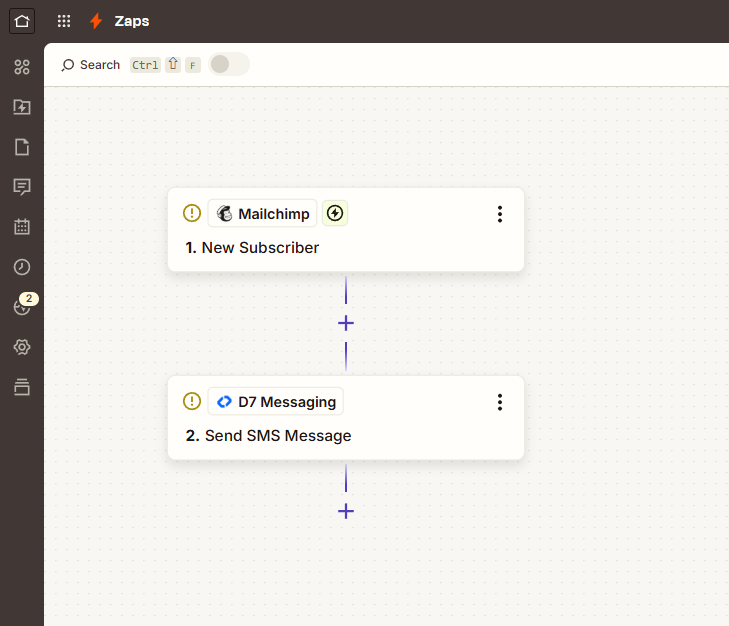
Kick-start your SMS marketing automation in minutes. When a New Subscriber is added in Mailchimp, Zapier instantly triggers D7 Messaging to send a targeted promotional SMS campaign — welcomes, discounts, product drops, and more, so you deliver real-time customer engagement SMS right when people opt in.
Why connect Mailchimp and D7 Messaging with Zapier?
Email captures interest, SMS converts it. By pairing Mailchimp’s audience growth with D7 Messaging’s reliable delivery via Zapier, you can automatically send promotional SMS campaigns the moment a subscriber joins your list. It’s a simple way to boost engagement, reduce manual work, and get measurable results from day one.
How SMS marketing automation works with Mailchimp and D7 Messaging
Set up takes a few clicks in Zapier, no code required:
- Choose Mailchimp as the trigger app and select “New Subscriber Added.”
- Pick the audience/list to watch and pull in a sample subscriber.
- Add D7 Messaging as the action and select “Send promotional SMS.”
- Map fields (e.g., subscriber phone number, first name) and personalize your message.
- Test the Zap, turn it on, and watch SMS send automatically in real time.
Optional: Add Zapier Filters or Paths to send different texts based on tags, signup source, location, or campaign—perfect for segmented, high-ROI promotional SMS campaigns.
Key benefits
- Instant outreach: Send SMS notifications at the exact moment a new subscriber joins your Mailchimp list.
- Higher conversions: Pair email with timely promotional messaging to drive clicks and sales.
- Personalization at scale: Merge fields like name, discount code, or city for tailored messages.
- Reliable delivery: D7 Messaging routes ensure fast, global reach and real-time delivery insights.
- Less manual work: Automate repetitive sends so your team can focus on strategy.
- Compliance-friendly: Easily target opted-in contacts and honor regional messaging rules.
Popular use cases
- Welcome promos: Send a limited-time coupon by SMS the moment someone subscribes in Mailchimp.
- New product alerts: Announce product drops to fresh subscribers while interest is highest.
- Event signups: Share event details and reminders immediately after list opt-in.
- Loyalty nudges: Invite new contacts to join your rewards program via SMS with a sign-up bonus.
- Regional campaigns: Trigger different promotional SMS campaigns based on country or language tags.
- Lead-to-first-purchase: Send a timed follow-up SMS if a new subscriber hasn’t purchased within 24–72 hours (use Delay + Filter in Zapier).
Why choose D7 Messaging
- Global, fast delivery: High-throughput routes and real-time status tracking.
- Personalization & templates: Dynamic fields, reusable templates, and short links with click tracking.
- Quality and compliance: Robust sender ID options, Unicode support, and regional best practices.
- Scalable & reliable: From startups to enterprises, send confidently as your list grows.
- Insightful analytics: Monitor delivery rates and engagement to optimize future campaigns.
Frequently asked questions
What exactly does this integration do?
When a New Subscriber is added in Mailchimp, Zapier triggers D7 Messaging to send a promotional SMS automatically. You can personalize content using subscriber fields and segment with tags or signup source.
Do I need subscribers’ phone numbers in Mailchimp?
Yes. Store phone numbers in a dedicated field (preferably in international format, e.g., +1, +44). In Zapier, map that field to D7 Messaging’s recipient field to ensure accurate delivery.
Can I control who receives the SMS based on tags or conditions?
Absolutely. Use Zapier Filters or Paths to send messages only to subscribers with specific tags (e.g., “VIP,” “US Market”) or signup sources, enabling targeted customer engagement SMS at scale.
Can I also send OTPs with D7 Messaging via Zapier?
Yes. While this workflow focuses on promotional messaging, you can create separate Zaps to deliver OTPs for verification and login flows using D7 Messaging’s OTP capabilities. Keep OTP and marketing messages in distinct automations for clarity and compliance.
How do I track delivery and performance of my SMS campaigns?
D7 Messaging provides delivery reports and optional short-link click tracking. You can also log SMS activity to your CRM, spreadsheet, or analytics tool using additional Zapier actions for a complete view of campaign performance.
What about consent and compliance for promotional SMS campaigns?
Send only to contacts who have explicitly opted in for SMS. Include clear opt-out instructions (e.g., reply STOP where applicable) and follow local regulations (TCPA, GDPR, DND lists). D7 Messaging supports sender IDs and features that help you align with regional rules.
Get started in minutes
Connect Mailchimp to D7 Messaging in Zapier and start sending high-impact promotional SMS campaigns to every new subscriber, automatically, reliably, and at scale.

Start Automating SMS Workflows Today
Connect Mailchimp with D7 Messaging using Zapier and automate SMS marketing instantly.