


Automate Workflow Notification SMS from Notion with Zapier
Instantly send workflow notification SMS when a new database item is added in Notion. Use Zapier to route database alerts to D7 Messaging for fast, reliable productivity messaging that keeps teams and customers informed in real time.
Overview: Notion + D7 Messaging via Zapier
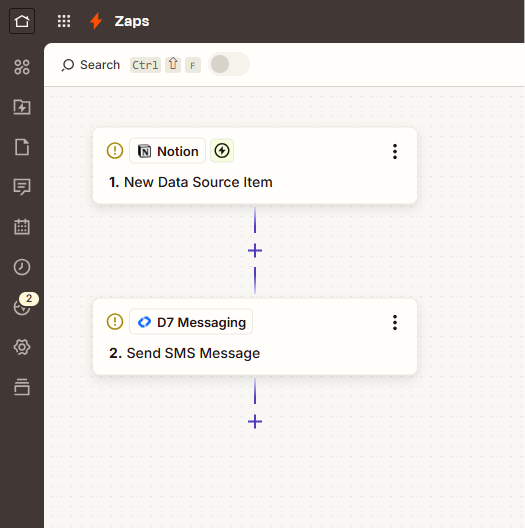
This integration connects Notion to D7 Messaging through Zapier. Whenever the Trigger App (Notion) fires the Trigger Event (New database item added), Zapier automatically sends the data to D7 Messaging to deliver an SMS. It’s a plug-and-play workflow automation that turns database updates into actionable mobile alerts—no code required.
How It Works
- In Zapier, choose Notion as the Trigger App.
- Select the Trigger Event: New database item added.
- Connect your Notion account and pick the relevant database (e.g., Tasks, Incidents, Orders).
- Add D7 Messaging as the Action app and choose Send workflow notification SMS.
- Map fields: set the recipient phone number (from Notion), craft your SMS template (include dynamic fields like title, status, assignee, due date).
- Test the Zap and turn it on. From now on, every new database item in Notion will trigger D7 Messaging to send an SMS through Zapier.
This setup leverages Zapier integrations to deliver SMS automation quickly, without engineering time. It’s ideal for customer notification systems and internal alerts.
Workflow Notification SMS for Notion Databases
Turn Notion into a real-time operations hub. As teams add new items—such as tickets, leads, approvals, or purchase orders—D7 Messaging delivers immediate SMS updates to stakeholders. This bridges the gap between your workspace and mobile devices, ensuring critical database alerts never get missed and elevating productivity messaging across your organization.
Business Benefits
- Real-time visibility: Keep assignees, managers, and customers informed the moment new work items are created.
- Fewer manual follow-ups: Automated SMS reduces Slack/Email noise and speeds up acknowledgments.
- Improved SLA performance: Time-sensitive database alerts reach mobile instantly, shrinking response times.
- Higher task completion rates: Direct, concise messages drive faster action than inbox-based reminders.
- Consistent messaging at scale: Standardize templates and personalization via Zapier mappings.
- Low effort, high impact: Launch in minutes—no code, no maintenance burden.
- Global-ready: Reach recipients worldwide with D7’s carrier-grade routes.
- Audit-friendly: Keep a complete record in Notion while D7 Messaging handles delivery and reporting.
Industry Applications
- SaaS & Product Teams: Notify on new bug reports, feature requests, or release tasks.
- IT & DevOps: Alert on incident tickets and change requests for faster triage.
- E-commerce & Retail: Inform staff of new orders, restock requests, or refund approvals.
- Logistics & Operations: Signal new shipments, pickups, or delivery exceptions.
- HR & Recruiting: SMS alerts for new candidate entries, interview tasks, or onboarding steps.
- Finance & Billing: Notify relevant owners on new invoices, payouts, or disputes.
Common Use Cases
- Task assignment alerts: Send an SMS to the assignee when a new task enters the queue.
- Incident creation: Ping on-call engineers the moment a new incident item is logged.
- Lead capture: Notify sales reps when a new lead or form entry posts to a Notion CRM database.
- Approval workflows: Alert approvers when purchase, content, or access requests are added.
- Order processing: Inform fulfillment teams about new orders or returns as they hit the database.
- Content publishing: SMS the editor or channel owner when new content is queued.
- Authentication workflows: Pair with D7’s OTP automation for login or verification flows, while logging events in Notion for traceability.
Why Use D7 Messaging
- Reliability: Carrier-grade routes, high deliverability, and robust redundancy keep messages flowing.
- Global reach: Send to 190+ countries with localized compliance and sender options.
- Automation: Flexible APIs, templates, and webhooks—ideal for Zapier integrations and SMS automation.
- Fast delivery: Low-latency delivery so time-critical alerts reach recipients in seconds.
- Security & compliance: Built-in safeguards for customer notification systems and authentication workflows.
- Transparent reporting: Track status, delivery receipts, and performance right from the dashboard.
FAQ
- Do I need to code to set this up?
No. The Notion → D7 Messaging flow is configured entirely in Zapier with a few clicks. - Which Notion properties can I use in the SMS?
Any field in the new database item (e.g., Title, Assignee, Status, Due Date, Phone) can be mapped into your SMS template. - How do I handle opt-in and compliance?
Store consent in Notion and use Zapier filters to send only to opted-in recipients. Include opt-out language where required. - Can I send messages internationally?
Yes. D7 Messaging supports global delivery. Use E.164 phone format for best results. - What if I only want alerts for high-priority items?
Add a Zapier filter step to send SMS only when Priority equals High (or matches your chosen condition). - Does D7 support OTP automation too?
Yes. Beyond database alerts, D7 provides dedicated OTP routes and templates for secure authentication workflows.
Get Started
Connect Notion to D7 Messaging in minutes with Zapier and start sending workflow notification SMS for your most important database events. Create your Zap, map your fields, and keep your teams and customers a step ahead.

Launch Notion → SMS Alerts with D7 Messaging
Create your Zap, map your Notion fields, and start sending fast, reliable database alerts to any mobile number worldwide.