


Automate QuickBooks invoice reminder SMS with Zapier
Send invoice reminder SMS automatically whenever a QuickBooks invoice becomes due using Zapier and D7 Messaging. Replace manual follow-ups with real-time billing SMS alerts and personalized payment reminders that accelerate collections and improve the customer experience.
Turn due invoices into on‑time payments
This integration connects QuickBooks, Zapier, and D7 Messaging so your team never has to chase overdue bills by hand. When an invoice reaches its due date in QuickBooks, Zapier instantly triggers D7 Messaging to deliver a concise SMS with the amount due, due date, and a secure link to pay—right on your customer’s phone. It’s simple, reliable, and built for finance teams who value cash flow and efficiency.
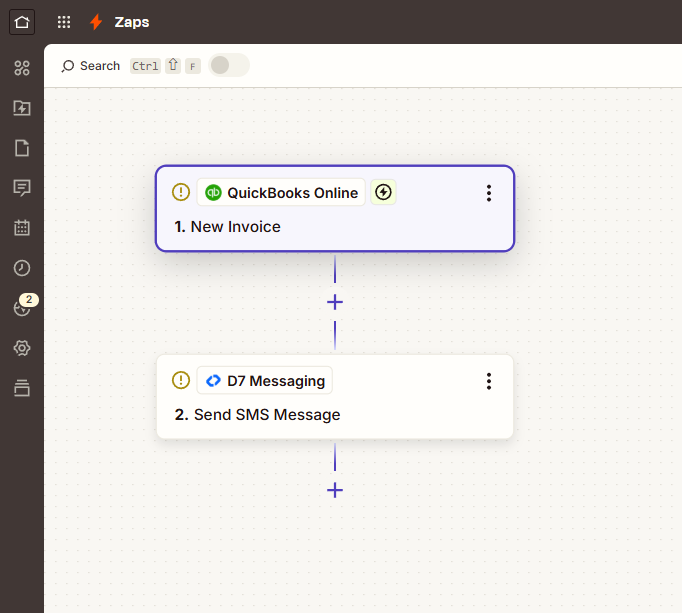
How the QuickBooks → Invoice Due → Send SMS flow works
- Trigger in QuickBooks: An invoice reaches its due date (Invoice Due).
- Zapier automation: Zapier captures the event and passes invoice data (customer name, amount, due date, phone number, and payment link) to D7 Messaging.
- D7 Messaging delivery: A tailored SMS is sent to the customer with clear payment instructions and your preferred sender ID (where supported).
- Optional controls: Add filters to skip contacts without mobile numbers, schedule messages for business hours, include opt-out text where applicable, and add delays or escalations for second reminders.
- Visibility: Track message status in D7 Messaging and add logs back to QuickBooks or a spreadsheet via Zapier for audit trails.
Key benefits of invoice reminder SMS
- Faster collections: Reach customers instantly with billing SMS alerts that prompt immediate action.
- Fewer manual tasks: Automate routine payment reminders so finance teams can focus on exceptions.
- Higher open rates: SMS cuts through inbox clutter to reduce late and missed payments.
- Personalized at scale: Merge invoice amounts, due dates, and payment links into each message.
- Consistent follow‑ups: Build multi-step reminder sequences with Zapier delays and filters.
- Global reach: Send compliant, reliable transactional messaging to customers wherever they are.
Popular use cases
- Accounting and bookkeeping firms: Automate payment reminders for client invoices and retainers.
- SaaS and subscriptions: Send due-date nudges and renewal payment reminders with direct pay links.
- Field services and trades: Follow up on job invoices with friendly SMS prompts to settle balances.
- Wholesale and B2B accounts: Nudge accounts payable teams with concise reminders and PO references.
- Property management: Deliver rent and fee reminders to tenants as transactional messaging.
- Nonprofits: Remind donors of pledge balances with clear, mobile-friendly instructions.
Why choose D7 Messaging for billing and reminders
- Enterprise-grade delivery: Reliable routes and real-time reporting.
- Global coverage: Reach customers in 190+ regions with local compliance in mind.
- Flexible sender options: Alphanumeric sender IDs where supported; fallback routing for consistency.
- Templates and variables: Standardize message content and personalize with invoice data.
- Time-window controls: Respect business hours with Zapier delays and schedules.
- Scales with you: From startups to finance teams sending thousands of reminders per day.
Frequently asked questions
How does the QuickBooks → Invoice Due → SMS workflow function with Zapier and D7 Messaging?
When an invoice reaches its due date in QuickBooks, Zapier triggers the workflow and sends the invoice details to D7 Messaging. D7 then delivers a transactional SMS containing key fields like amount, due date, and a payment link, helping customers pay promptly.
Can I include the invoice amount, due date, and a payment link in the SMS?
Yes. Use Zapier’s dynamic fields from the QuickBooks trigger to merge variables into your D7 Messaging template—such as customer name, invoice number, amount due, due date, and a secure payment URL.
What if a contact doesn’t have a valid mobile number in QuickBooks?
Add a Zapier filter to send only when a valid mobile number exists. You can also create a branch to notify the customer via email, update your team in Slack, or tag the invoice for follow-up.
Can I restrict billing SMS alerts to business hours or specific time zones?
Yes. Combine Zapier’s Schedule/Delay steps with your customer’s time zone or your company’s operating hours to send reminders at considerate times.
Is OTP required for customers to complete payment?
Not typically. Invoice reminders are transactional notifications and don’t require OTP. If you’d like to add an extra layer of security—such as verifying a payer before sharing a payment link—you can create a separate Zap to send an OTP via D7 Messaging and verify it before sending the payment URL.
How much does this workflow cost to run?
Costs include your D7 Messaging usage (per-SMS pricing varies by destination) and your Zapier plan based on task volume. QuickBooks subscription fees apply separately. You only pay for what you send, making it easy to scale as you grow.
Start sending invoice reminder SMS today
Connect QuickBooks to D7 Messaging with Zapier and turn due invoices into paid invoices—faster. Launch in minutes, standardize your payment reminders, and keep your cash flow moving.

Speed up collections with automated invoice reminder SMS
Connect QuickBooks, Zapier, and D7 Messaging to send timely billing SMS alerts and payment reminders—no code required.