


Bulk SMS Automation from New Rows via Zapier and D7 Messaging
Launch bulk SMS automation the moment a new row is added. With Zapier and D7 Messaging, every entry in your spreadsheet can trigger automated messaging to customers, staff, or leads—no manual uploads, no delays. Build a reliable spreadsheet SMS workflow that turns fresh data into timely communication for promotions, alerts, reminders, and more.
What this integration does
This integration watches for new rows in your spreadsheet and instantly instructs D7 Messaging to send bulk texts to the contacts you specify. Use Zapier to map columns like phone number, name, order ID, appointment time, or any other field to craft personalized, automated messaging at scale. The result: faster outreach, fewer manual steps, and consistent delivery of time-sensitive information.
How the automation works
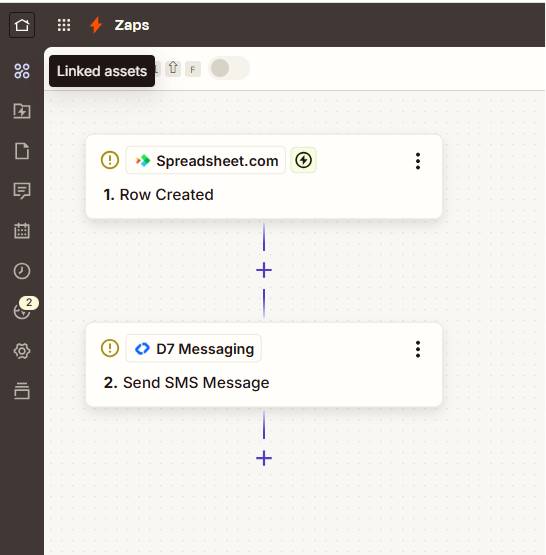
- Connect your spreadsheet to Zapier and set the trigger to “New Row Added.”
- Connect D7 Messaging as the action app and choose to send bulk SMS automatically.
- Map your phone number column and compose your message using column data for personalization.
- Optionally segment recipients (e.g., VIPs, regions) by using filtered Zaps or paths.
- Test your Zap to confirm delivery and publish it live for real-time notifications.
Key benefits of bulk SMS automation
- Real-time notifications: Instantly message customers the moment a new row appears.
- Scalable communication: Send to dozens, hundreds, or thousands with consistent performance.
- Personalization at scale: Pull names, order details, or dates from columns for higher engagement.
- Error reduction: Remove manual copy-paste steps and reduce delivery mistakes.
- Better customer engagement: Reach customers on the channel they open first—SMS.
- Operational efficiency: Automate repetitive outreach so your team can focus on growth.
Popular use cases
- Transactional messaging: Order confirmations, delivery updates, and payment alerts as soon as data lands in your sheet.
- Promotional campaigns: Limited-time offers broadcast to segmented lists maintained in your spreadsheet.
- Reminders: Appointment confirmations, class reminders, and subscription renewals.
- Internal alerts: Sales team pings when new leads are added; ops alerts for inventory thresholds.
- Event communications: RSVP confirmations, schedule changes, and last-minute venue updates.
- Customer support: Case updates and feedback requests triggered from support logs.
Why choose D7 Messaging
- Global, reliable delivery: Carrier-grade routes and high throughput for time-critical texts.
- Compliance-ready: Support for opt-out handling and regional regulations.
- Brand presence: Sender ID options and rich features like short links and templates.
- Analytics & DLRs: Track delivery with detailed receipts and performance insights.
- Scales with you: From small lists to enterprise-level volume without performance drops.
- Multi-language support: Unicode-ready for international audiences.
Frequently asked questions
How do I trigger texts when a new row is added to my spreadsheet?
Use Zapier’s “New Row Added” trigger for your spreadsheet. When a new entry appears, Zapier passes the row’s details to D7 Messaging, which then sends your configured SMS to the desired recipients—automatically and in real time.
Can this workflow send bulk SMS to large lists?
Yes. D7 Messaging supports high-volume sending, and Zapier can process rows to deliver messages to hundreds or thousands of contacts. For very large lists, consider batching by segment or time window to align with your campaign goals and compliance requirements.
Can I personalize each message with column data from my sheet?
Absolutely. Within the Zap, you can reference column values—like name, order number, or appointment date—to tailor each SMS. This boosts engagement and keeps communication highly relevant to each recipient.
Is this setup suitable for OTP delivery and critical alerts?
Yes. D7 Messaging excels at time-sensitive communication. While this flow focuses on bulk SMS automation, you can create a separate Zap for OTP or use D7’s OTP endpoints for verification workflows. Keep expirations short, rate-limit requests, and log attempts for security and compliance.
How do I manage opt-outs and compliance when sending SMS at scale?
Include clear opt-out instructions in your messages and maintain suppression lists. D7 Messaging supports compliance best practices, while Zapier can route opt-out events to a master list so future sends automatically exclude those numbers.
What happens if a number is invalid or a message fails to deliver?
D7 Messaging provides delivery receipts and error codes you can log or route back into your sheet via Zapier. Create paths or filters to flag invalid numbers, retry certain failures, or notify a team channel when attention is needed.

Start sending smarter SMS
Connect your spreadsheet to D7 Messaging through Zapier and turn every new row into instant, personalized communication. Try it free and experience reliable delivery, real-time notifications, and effortless scaling.