


Automate Trello Project Update SMS with Zapier
Send project update SMS automatically when a Trello card moves to Done using Zapier and D7 Messaging. Keep stakeholders informed with timely task completion notifications and workflow SMS that land instantly and drive action—no code required.
Overview: Trello + D7 Messaging via Zapier
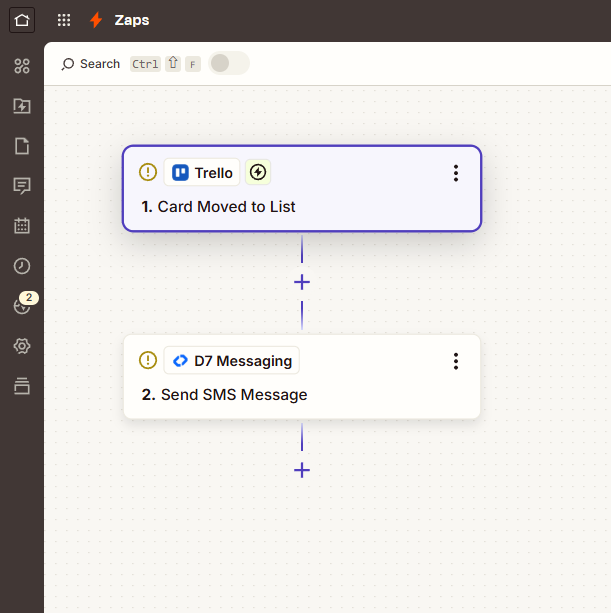
This integration connects Trello with D7 Messaging through Zapier so your team never misses a milestone update. The moment a card is moved to Done, Zapier triggers D7 Messaging to send a personalized project completion SMS to clients, stakeholders, or team members. It’s the fastest way to close the loop on task completion notifications, reduce manual follow-ups, and streamline your workflow SMS strategy—all without writing code.
How It Works
- Trigger App: Trello
- Trigger Event: Card moved to Done
- Automation Platform: Zapier orchestrates the workflow
- Action App: D7 Messaging
- Action: Send project completion SMS to one or more recipients
- Personalize your SMS: Insert dynamic fields from the Trello card—card name, assignee, due date, board, list, and a direct card link.
- Target precisely: Use Zapier Filters/Paths to send only when specific boards, lists, labels, or members apply.
- Track and improve: Log Zap runs, monitor D7 delivery status, and handle retries to maintain reliable communication.
Business Benefits
- Instant visibility: Automatically notify clients and stakeholders the second a task is done—no more manual updates.
- Higher satisfaction: Proactive task completion notifications reduce guesswork and incoming status requests.
- Operational efficiency: Replace repetitive update work with a scalable workflow SMS automation.
- Reliable delivery: Carrier-grade routing from D7 Messaging helps messages arrive quickly and consistently.
- Global scalability: Reach recipients worldwide with localized templates and time-based sending controls.
- Better governance: Centralize message templates and approvals in Zapier flows for consistent communications.
Industry Applications
- Agencies & Professional Services: Notify clients when deliverables are completed.
- Software & IT Teams: Announce release tasks, bug fixes, or sprint completion.
- Construction & Field Services: Alert site managers and customers when on-site work is finished.
- Ecommerce & Logistics: Signal warehouse or customer service when packaging tasks reach Done.
- Education & Training: Inform students or staff when modules, lessons, or onboarding steps are completed.
- Healthcare Admin (non-PHI): Confirm scheduling or paperwork tasks are finalized.
Common Use Cases
- Client-facing alerts when project milestones or tasks are completed
- Internal SMS to account managers the moment a deliverable is ready for review
- Handover notifications from implementation to success/support teams
- QA completion updates with direct links to Trello cards
- Multi-language workflow SMS based on board or label
- Follow-up sequences (e.g., feedback request) after completion alerts
Why Use D7 Messaging
- Reliability: Built for dependable, high‑deliverability messaging with smart retry behavior.
- Global reach: Send SMS at scale to recipients across major carriers worldwide.
- Automation-first: Powerful APIs, templates, and Zapier integration streamline communication across your stack.
- Fast delivery: Low-latency routes help ensure your completion alerts arrive when they matter most.
- Security-ready: Expand beyond alerts into OTP automation and authentication workflows whenever you need them.
FAQs
Do I need to code to set this up?
No. You can build the entire workflow in Zapier by connecting Trello (trigger) to D7 Messaging (action).
Can I customize the SMS content?
Yes. Use dynamic fields from Trello (e.g., card title, assignee, due date, list, and card URL) to personalize each message.
Where do recipient phone numbers come from?
Store numbers in Trello custom fields, card descriptions, checklists, or link them from another Zapier step (e.g., CRM lookup) and map them to D7 Messaging.
Can I send messages only for specific cards?
Absolutely. Use Zapier Filters or Paths to target by board, list, label, due date, or member assignment.
How does this work for international recipients and cost control?
D7 Messaging supports global delivery. You can add rules in Zapier to segment recipients by country or schedule sends by timezone. Pricing depends on destination—review your D7 dashboard for current rates.
Can I extend this into OTP or authentication flows?
Yes. Create additional Zaps or API flows with D7’s OTP services to verify users, protect sign-ins, or confirm critical actions alongside your project update SMS.
Start Sending SMS Updates in Minutes
Create your D7 Messaging account, connect Trello in Zapier, and launch automated completion alerts today. Speed up communication, impress clients, and keep your projects moving—without manual work.

Connect Trello and D7 Messaging in Minutes
Use Zapier to send project completion SMS automatically when Trello cards move to Done. Start free and scale your task completion notifications with reliable workflow SMS.