


Automate billing reminder SMS from Xero with Zapier
Connect Xero and D7 Messaging through Zapier to send a billing reminder SMS the moment an invoice becomes overdue. Reduce late payments with timely invoice notifications and payment alerts that reach customers instantly—no manual chasing required.
Overview: Xero to D7 Messaging via Zapier
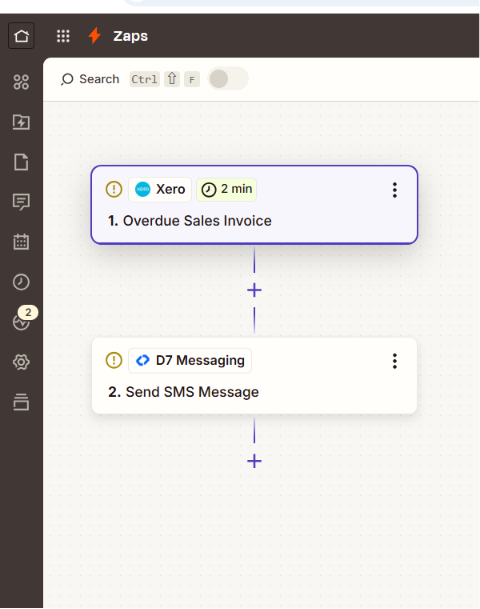
This integration uses Zapier to listen for the Invoice overdue event in Xero and automatically triggers D7 Messaging to send a personalized payment reminder SMS. It’s a zero-code workflow that combines your accounting data with a reliable SMS automation layer, ensuring customers receive clear, actionable reminders that help you get paid faster.
How it works
- Trigger App: Xero
- Trigger Event: Invoice overdue
- Automation Platform: Zapier routes data from Xero to D7 Messaging
- Action App: D7 Messaging
- Action: Send payment reminder SMS to the customer’s phone number on file
Customize your SMS template with dynamic fields such as invoice number, amount due, due date, and a secure payment link. Zapier passes the invoice and contact data from Xero, and D7 Messaging delivers the message instantly.
Business benefits
- Accelerate cash flow: Prompt, direct payment alerts shorten days sales outstanding (DSO).
- Reduce manual follow-ups: Eliminate repetitive outreach with hands-free SMS automation.
- Higher reach than email: SMS boasts superior open and response rates for invoice notifications.
- Better customer experience: Clear, concise reminders with links make it easy to pay on time.
- Lower operational costs: Automate at scale instead of spending hours on phone calls.
- Audit-ready records: Keep consistent, timestamped reminders for finance and compliance teams.
- Scalable globally: Use one workflow for domestic and international customers with localized sender options.
Industry applications
- Professional services: Agencies, consultancies, legal, accounting—automate overdue invoice reminders.
- Wholesale and distribution: Nudge trade accounts with timely payment alerts.
- SaaS and subscriptions: Notify customers about missed renewals and outstanding balances.
- Healthcare and clinics: Streamline patient billing follow-ups with clear, secure links.
- Education and training: Remind students or sponsors about overdue tuition and course fees.
- Property management: Send rent and maintenance invoice notifications at scale.
Common use cases
- Automatically send a payment reminder SMS when an invoice crosses its due date in Xero.
- Include a secure payment URL to speed up settlement right from the message.
- Trigger tiered reminders (e.g., 1, 7, and 14 days overdue) using multi-step Zapier workflows.
- Route high-value or long-overdue invoices to a team inbox while sending the customer an SMS.
- Complement email invoice notifications with SMS for higher visibility.
- Localize sender names and content by customer country or region.
Why use D7 Messaging
- Reliability: Redundant routing and enterprise-grade deliverability ensure your reminders arrive.
- Global reach: Deliver payment alerts to 190+ countries with network-optimized routes.
- Automation: Powerful APIs and Zapier integrations make it simple to build end-to-end workflows.
- Fast delivery: Low-latency messaging gets in front of customers right when it matters.
- Security-first: Best practices for data handling and links; separate OTP and authentication workflows supported.
Beyond billing reminders, D7 also powers OTP automation for account authentication and secure customer notification systems—so you can consolidate messaging in one platform.
FAQ: Xero and D7 Messaging payment alerts
How do I connect Xero to D7 Messaging with Zapier?
In Zapier, create a new Zap. Choose Xero as the Trigger App and select the Invoice overdue event. Connect your Xero account, then add D7 Messaging as the Action App and choose Send SMS. Map fields like phone number, invoice number, due date, amount, and payment link, then turn the Zap on.
Can I personalize each billing reminder SMS with invoice details?
Yes. Use Zapier field mapping to insert dynamic data from Xero (e.g., contact name, invoice number, due date, amount, and a secure payment URL) directly into your SMS template sent via D7 Messaging.
How many reminders can I send and can I space them out?
You can create single or multi-stage workflows in Zapier (e.g., 1, 7, 14 days overdue). Add filters and delays to control frequency, or branch logic for high-value invoices to escalate internally.
Does this replace email invoice notifications or work alongside them?
It’s designed to complement email. Keep your existing email invoice notifications and add SMS for higher visibility and faster responses. Many teams see the best results using both channels together.
Is D7 Messaging suitable for OTP and authentication workflows too?
Yes. In addition to payment alerts, D7 supports OTP automation for secure logins, account verification, and other authentication workflows—so you can centralize all your critical customer communications in one platform.
Get started with D7 Messaging
Automate overdue invoice reminders in minutes. Connect Xero to D7 Messaging with Zapier, customize your SMS template, and start reducing late payments today.

Start sending automated payment alerts from Xero
Connect Xero to D7 Messaging via Zapier and turn overdue invoices into faster payments with real-time SMS reminders.