


Automate Google Calendar Meeting Reminder SMS with Zapier
Send meeting reminder SMS to every attendee automatically—no manual follow-ups required. Use Zapier to connect Google Calendar with D7 Messaging so your attendee reminders and calendar notification automation run reliably in the background.
Overview
This integration uses Zapier to watch your Google Calendar for upcoming meetings and instantly trigger D7 Messaging to send clear, timely SMS reminders to attendees. It streamlines calendar notification automation for teams that need dependable attendee reminders—ideal for sales calls, demos, consultations, classes, and events. With no code required, you can stand up a powerful workflow automation that reduces no-shows and improves customer notification systems in minutes.
How It Works
- Trigger App: Google Calendar
- Trigger Event: Upcoming meeting (fired a set time before the event starts)
- Zapier: Captures event details (title, start time, attendee list) and passes the data to D7 Messaging.
- Action App: D7 Messaging
- Action: Send attendee reminder SMS to each invitee’s phone number.
- Personalization: Include variables like attendee name, meeting title, date/time, and join link.
- Controls: Choose reminder timing (e.g., 24 hours and/or 1 hour before), filter internal events, and apply templates.
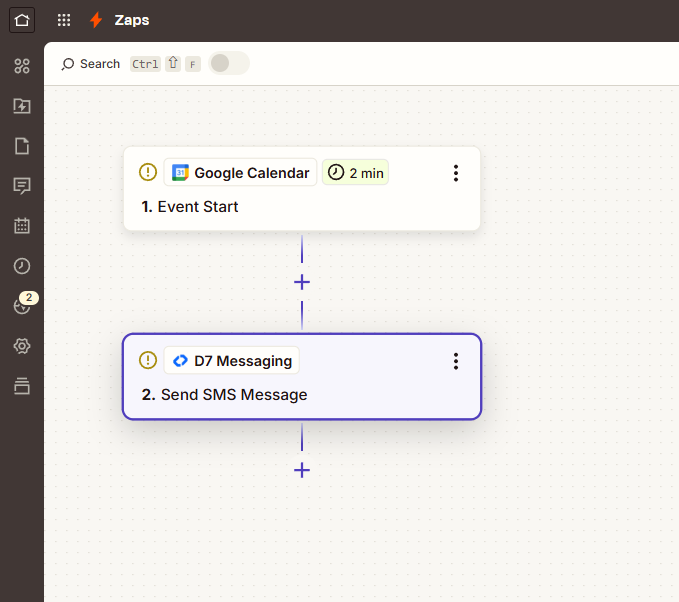
Automate meeting reminder SMS from Google Calendar
Build a Zap that sends SMS reminders based on your preferred lead time, message template, and attendee list. D7 Messaging handles fast, global delivery, while Zapier orchestrates the workflow between Google Calendar and your SMS action—keeping attendee reminders accurate and on time.
Business Benefits
- Reduce no-shows: Timely SMS nudges increase attendance for calls, demos, and appointments.
- Save time: Eliminate manual follow-ups with hands-off calendar notification automation.
- Improve customer experience: Clear, personalized reminders with links and instructions reduce confusion.
- Scale with confidence: Handle high event volume with reliable, high-deliverability SMS infrastructure.
- Stay consistent: Standardize reminder timing and messaging across teams and calendars.
- Better accountability: Automatically remind internal stakeholders and keep meetings on track.
Industry Applications
- Professional services: Consultations, onboarding calls, account reviews.
- Healthcare: Telehealth sessions, follow-up visits, care coordination.
- Sales & CS: Demos, renewals, QBRs, implementation check-ins.
- Education & training: Classes, tutoring, webinars, workshops.
- Recruiting: Interviews, screenings, offer discussions.
- Events & marketing: Webinars, sponsor meetings, speaker briefings.
Common Use Cases
- Send a 24-hour reminder with agenda and preparation steps.
- Send a 60-minute reminder with the video conference link.
- Notify attendees when a meeting is rescheduled or location changes.
- Send internal standup reminders to team members.
- Trigger additional notifications for VIP or high-value meetings.
- Add a follow-up SMS prompt after missed meetings to reschedule.
Why Use D7 Messaging
- Reliability: Enterprise-grade infrastructure and intelligent routing help keep delivery rates high.
- Global reach: Send reminders to attendees across countries and carriers with localized sender options where available.
- Automation-ready: Works seamlessly with Zapier and APIs for scalable workflow automation.
- Fast delivery: Low-latency message delivery keeps time-sensitive reminders accurate.
- Security & compliance: Built for business use cases, including customer notification systems and authentication workflows like OTP automation.
FAQ
How do I choose when reminders are sent?
In Zapier, set the Google Calendar trigger to fire a specific time before the event (e.g., 24 hours or 1 hour). You can also create multiple Zaps for multi-touch reminders.
Can I personalize each SMS?
Yes. Map Google Calendar fields (attendee name, event title, date/time, meeting link) into your D7 Messaging template to personalize every reminder.
What if an attendee has no phone number?
Use a Zapier filter or lookup step to send SMS only to attendees with valid numbers. You can add a secondary email step if needed.
How are time zones handled?
Google Calendar stores event time zones. Zapier uses this data so your reminder timing aligns with each event’s configured time zone.
How do I stay compliant?
Only message attendees who have consented to receive SMS. Include clear identification and, where applicable, opt-out instructions per local regulations.
What does it cost?
You’ll need a Zapier plan appropriate for your task volume and a D7 Messaging account. Messaging costs depend on destination and volume. Review your D7 pricing and usage inside your account.
Get Started with Google Calendar SMS Reminders
Connect Google Calendar to D7 Messaging in Zapier and start sending attendee reminders today. Build your workflow in minutes and keep every meeting on schedule.

Send your first reminder in minutes
Create a Zap, choose Google Calendar as the trigger, and D7 Messaging as the action. Personalize your template and go live—no code required.