


Automate Monday.com Team Notification SMS with Zapier
Automate team notification SMS the moment a Status changes in Monday.com. With Zapier connecting Monday.com and D7 Messaging, your organization can deliver instant workflow alerts and employee updates to the right people, at the right time, no manual follow-ups or missed changes.
Overview
This integration uses Zapier to watch for a Status change in Monday.com and then triggers D7 Messaging to send a concise, reliable SMS to your team. It’s built for busy teams who need dependable SMS automation, whether you’re coordinating projects, escalating incidents, sharing approvals, or keeping everyone aligned with timely employee updates.
How It Works
- Trigger App: Monday.com
- Trigger Event: Status changed (e.g., from In Progress to Stuck, or Done)
- Automation Platform: Zapier handles the workflow logic—filters, delays, and formatting.
- Action App: D7 Messaging executes the Send team notification SMS action.
- Message Delivery: D7 Messaging delivers fast, global SMS to your selected teammates or distribution list.
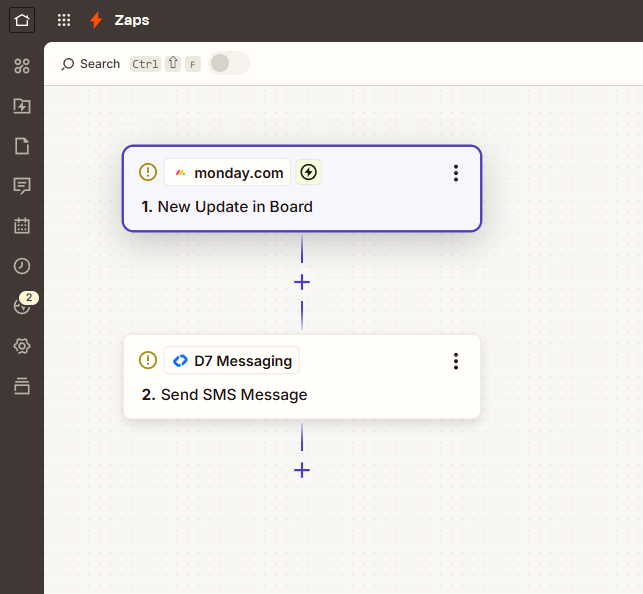
Set up in minutes: connect Monday.com in Zapier, choose the “Status changed” trigger, map your phone number fields, compose the SMS template, and turn the Zap on. D7 Messaging ensures reliable delivery across countries and carriers.
Business Benefits
- Real-time visibility: Get immediate workflow alerts when work gets blocked, completed, or escalated.
- Higher team responsiveness: Reach on-the-go teammates via SMS, not just email or app notifications.
- Fewer manual pings: Replace handoffs and check-ins with automated, consistent employee updates.
- Standardized communication: Use templates that keep alerts clear, compliant, and on-brand.
- Proof of delivery: Track delivery status and performance through D7 Messaging.
- Global coverage: Notify distributed teams in 190+ countries with local sender options where supported.
- Scalable automation: Add filters, schedules, and branching logic with Zapier as processes grow.
Industry Applications
- IT & DevOps: Escalate incidents when priorities change to Critical.
- Field Services: Alert technicians on new job statuses or dispatch updates.
- Logistics & Operations: Notify drivers and coordinators about shipment milestones.
- Manufacturing: Flag production holds or quality status changes to supervisors.
- Healthcare Administration: Share scheduling or approval updates with staff securely.
- Agencies & PMOs: Inform stakeholders when tasks move to Review/Done.
- HR & People Ops: Send shift changes and urgent policy updates to employees.
Common Use Cases
- Status updated to Blocked → SMS the project lead with task, owner, and link.
- Deal moves to Won → Notify finance and account managers for onboarding.
- Bug priority set to Critical → Page the on-call engineer instantly.
- Shift assignment changed → Send employee updates with new start time and location.
- Purchase order Approved → Alert procurement and warehouse teams.
- SLA breach approaching → Nudge service teams before deadlines are missed.
Why Use D7 Messaging
- Reliability: Carrier-grade infrastructure and direct routes with industry-leading uptime.
- Global reach: Deliver to 190+ countries with sender IDs where supported.
- Automation-first: Robust APIs, Zapier integrations, and webhooks for flexible workflows.
- Fast delivery: Low-latency routing ensures urgent alerts land quickly.
- Security & compliance: Features to support opt-outs, templates, and audit needs.
FAQ
Do I need to code to set this up?
No. This is a no-code setup using Zapier. Connect Monday.com, choose the “Status changed” trigger, select D7 Messaging as the action, and publish your Zap.
Can I send alerts to multiple team members at once?
Yes. Store multiple phone numbers in Monday.com (e.g., a multivalue field) or use a fixed distribution list in Zapier. You can also branch recipients with filters.
Where do the phone numbers come from?
Typically from a Phone or Text column in Monday.com. Map that field in Zapier to the D7 Messaging recipient field. You can also pull numbers from another app via Zapier if needed.
Can I add conditions, delays, or schedules?
Yes. Use Zapier Filters to alert only on specific Status values, and add Delay/Schedule steps to control timing. D7 Messaging also supports scheduling through the API for advanced cases.
Does this support two-way replies?
D7 Messaging supports inbound SMS and virtual numbers in select countries. For reply-based workflows, combine D7 two-way numbers with Zapier to route responses to the right channels.
Can I use D7 for OTP automation and authentication workflows?
Yes. Beyond team notifications, D7 offers OTP automation and APIs to power secure authentication workflows and customer notification systems across your stack.
Get Started in Minutes
Create a D7 Messaging account, connect Monday.com and D7 Messaging in Zapier, and publish your first team notification SMS workflow. Start free, scale confidently, and keep every stakeholder in the loop.

Start Sending Team Notification SMS from Monday.com
Sign up for D7 Messaging and build your first Zapier workflow for instant workflow alerts and employee updates.