


Automate SMS Notifications with Shopify and Zapier
Connect Shopify with D7 Messaging through Zapier to automate SMS notifications, OTP delivery, and real-time business alerts—without writing code. When the New Order Created event fires in Shopify, your Zap can instantly run the action Send order confirmation SMS via D7 Messaging to keep customers informed the moment they buy.
Key Benefits
- Real-time alerts: Notify customers and teams the second an order is placed, updated, or fulfilled.
- OTP automation: Deliver fast, secure one-time passwords for account verification and checkout flows.
- No-code setup: Build and launch Zapier workflows in minutes—no engineering required.
- Reliable delivery: D7 Messaging ensures high deliverability and global reach.
- Scalable and compliant: Handle high volumes with opt-out and regional compliance best practices.
Popular Use Cases
- Order confirmations: Triggered by New Order Created, automatically Send order confirmation SMS via D7 Messaging.
- OTP authentication: Send one-time passcodes for new account sign-ups, password resets, or high-value actions.
- Shipping and fulfillment updates: Keep customers informed with status changes and tracking info.
- Team notifications: Alert staff about high-value orders, low stock, or payment issues.
- Abandoned checkout nudges: Send timely reminders to boost conversions.
How This Integration Works
- Choose your trigger: In Zapier, set Shopify as the Trigger App and select New Order Created.
- Add the action: Choose D7 Messaging as the Action app and pick the action that fits—e.g., Send order confirmation SMS via D7 Messaging or Send OTP.
- Map fields: Connect Shopify data (customer phone, order number, total, tracking link) to your SMS template.
- Personalize content: Use dynamic variables for names, order IDs, and CTA links.
- Test and launch: Run a test message, turn on your Zap, and start sending real-time SMS.
Example Zap Configuration
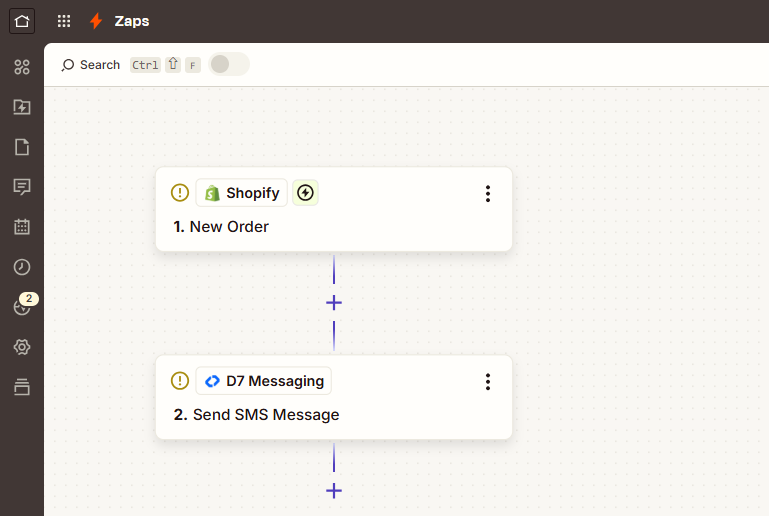
- Trigger App: Shopify
- Trigger Event: New Order Created
- Action Using D7 Messaging: Send order confirmation SMS via D7 Messaging
Sample message: Thanks for your order #{order_number}! We’re processing it now. Total: {order_total}. We’ll text you when it ships.
Why D7 Messaging for Shopify SMS
- Global coverage and speed: Reach customers worldwide with low latency.
- High deliverability: Direct routes and smart routing to reduce failures.
- OTP-optimized routes: Ensure time-sensitive codes arrive quickly and reliably.
- Sender ID options: Brand your messages where supported.
- Analytics and logs: Track delivery status from Zapier task history and D7 reports.
Frequently Asked Questions
Can I send both transactional SMS and OTPs?
Yes. Use one Zap for transactional alerts (e.g., order confirmations) and another for OTP delivery. D7 Messaging supports both within Zapier.
Do I need a developer to set this up?
No. Zapier provides a no-code interface. Select the Shopify trigger, choose the D7 Messaging action, map fields, test, and publish.
How fast are messages delivered?
Messages are sent in real time as soon as the Shopify trigger occurs. D7’s infrastructure is optimized for low latency, especially for OTPs and critical alerts.
Can I personalize messages?
Absolutely. Use dynamic fields from Shopify like customer first name, order number, total amount, and tracking link to personalize each SMS.
Is international messaging supported?
Yes. D7 Messaging offers global reach. Be sure to store phone numbers in E.164 format for best results.
How do I handle opt-outs and compliance?
Include clear opt-out instructions where required (e.g., Reply STOP). Follow regional guidelines such as TCPA and GDPR. D7 provides features and best practices to help you stay compliant.

Start Automating SMS Workflows Today
Connect Shopify with D7 Messaging using Zapier and automate SMS notifications and OTP delivery instantly.