


Automate customer support SMS from Zendesk via Zapier
Turn every Zendesk status change into a customer support SMS in real time. With Zapier connecting Zendesk to D7 Messaging, you can automatically send support update SMS the moment a ticket status is updated, keeping customers informed with timely support ticket notifications and clear helpdesk SMS alerts.
Introduction
Customers want fast, transparent updates, especially when they’ve opened a support request. This integration links Zendesk (trigger: Ticket Status Updated) to D7 Messaging (action: Send support update SMS) via Zapier so your team can deliver concise, professional updates without lifting a finger. Reduce inbound “any update?” calls, improve CSAT, and keep every stakeholder aligned with consistent, automated support ticket notifications.
How the Integration Works
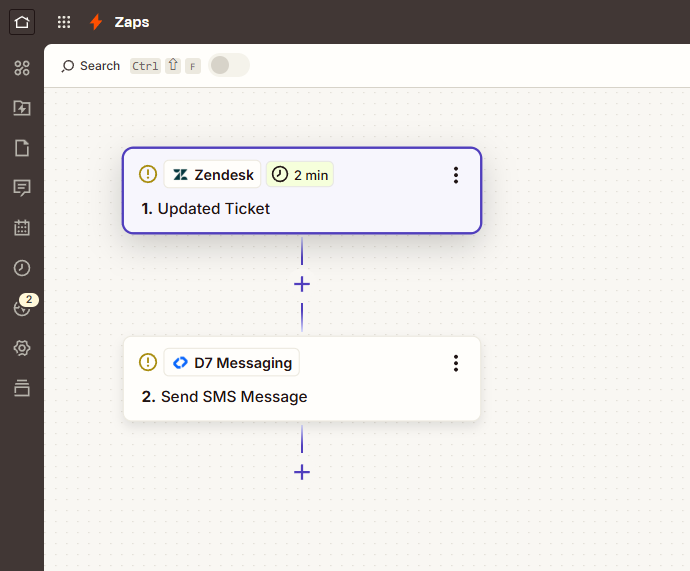
Here’s how the Zendesk → Ticket Status Updated → D7 Messaging flow runs through Zapier:
- Trigger: In Zapier, the Zendesk event “Ticket Status Updated” fires whenever a ticket moves between statuses (New, Open, Pending, On-hold, Solved, Closed).
- Filters & routing: Choose which statuses send SMS (e.g., only Pending and Solved), and route messages to the requester, assignee, or a custom number field.
- Personalization: Build a D7 Messaging template with dynamic fields like ticket ID, current status, expected response time, or a direct ticket link.
- Delivery: Zapier passes the mapped data to D7 Messaging, which sends reliable, global SMS using high-quality routes.
- Safety & compliance: Set quiet hours, add opt-out instructions where required, and respect country-specific sender rules. Track delivery with detailed logs and error handling.
Example message: “Hi {{requester.first_name}}, your ticket #{{ticket.id}} is now {{ticket.status}}. We’ll follow up by {{next_update_time}}. View details: {{ticket.url}} — {{brand.name}} Support”
Key Benefits of customer support SMS
- Proactive communication: Send real-time notifications at every critical stage to set clear expectations.
- Lower support load: Fewer follow-up emails and calls asking for updates.
- Higher CSAT: Customers feel informed and valued throughout the resolution process.
- Global reach: Dependable international delivery with D7 Messaging’s robust routes.
- Faster resolutions: Alert agents or managers via SMS on escalations or SLA risks.
- Easy to manage: No code required, configure in Zapier, manage templates in D7 Messaging.
Popular Use Cases
- Pending → Next steps: When a ticket moves to Pending, send an SMS explaining what information is needed from the customer, plus a link to reply.
- On-hold → Reason and ETA: Notify customers why the case is on-hold (e.g., awaiting vendor) and when to expect the next update.
- Solved → Resolution + CSAT: Share a brief resolution summary and a survey link the moment the ticket is solved.
- Escalated/Priority change: Alert a team lead or on-call engineer via SMS when ticket priority rises.
- SLA risk alerts: Nudge the assignee by SMS when a ticket nears a breach, ensuring faster action.
- After-hours intake: If a ticket is opened outside business hours and then updated, send a courteous ETA via SMS.
Why Choose D7 Messaging for Support Notifications
- Reliable, fast delivery: Enterprise-grade routing for transactional messaging and alerts.
- Global scale: Reach customers in 190+ regions with carrier-grade connectivity.
- Template-friendly: Build reusable, branded SMS templates for consistent communication.
- Sender flexibility: Use approved sender IDs or numbers where supported by local regulations.
- Transparency: Real-time delivery reports and error logs for every message.
- Built for automation: A clean Zapier action that maps Zendesk fields to SMS with ease.
Frequently Asked Questions
How does the Zendesk “Ticket Status Updated” trigger work with Zapier?
Zapier listens for changes to a ticket’s status in Zendesk. When a specified status change occurs (e.g., Open → Pending, Pending → Solved), the Zap runs and passes ticket details—such as requester, assignee, ID, and links—into D7 Messaging to send an SMS.
Can I personalize each SMS with ticket data?
Yes. Map Zendesk fields (ticket ID, current status, requester name, ticket URL, priority, next update time) directly into your D7 Messaging template so each message is clear and contextual for the customer or agent.
Will messages deliver internationally and how reliable is it?
D7 Messaging supports global SMS delivery using high-quality routes. You’ll get delivery reporting and error logs to monitor performance and troubleshoot if a carrier blocks or delays a message due to local policies.
Can I set quiet hours or add conditions to avoid sending at night?
Yes. Use Zapier’s Filters and Schedule/Delay steps to restrict sending by time zone or day, and apply conditions so only certain statuses or priorities trigger an SMS during specific windows.
Can I also send OTPs or verification codes with D7 Messaging if needed?
Absolutely. While this setup focuses on support ticket notifications, D7 Messaging also supports OTP delivery and verification workflows. You can build additional Zaps or app logic to send one-time passwords for account actions, using D7’s fast, reliable OTP routes.
Do I need a special sender ID or opt-out handling for compliance?
Sender ID and opt-out requirements vary by country. D7 Messaging guides you on compliant sender options (alphanumeric IDs or numbers) and recommended opt-out language. Always include clear instructions where required and follow local regulations.
Get Started in Minutes
Connect Zendesk to D7 Messaging through Zapier, select the “Ticket Status Updated” trigger, and start sending automated customer support SMS right away. Keep customers informed, reduce ticket friction, and boost satisfaction—without adding workload to your team.

Start sending support update SMS today
Create your D7 Messaging account, connect Zapier, and launch automated support ticket notifications from Zendesk in just a few clicks.