


Appointment Confirmation Templates for Healthcare
Appointment confirmations are the backbone of a reliable patient experience. From first-time consultations to ongoing checkups, patients expect quick, clear, and mobile-friendly communication. WhatsApp is where many patients already are—making it the most natural channel to confirm bookings, send reminders, share preparation steps, and handle last-minute changes.
With the WhatsApp Business API by Direct7 Networks, clinics, hospitals, labs, and private practices can standardize appointment messages with reusable, approved templates. These templates help you send compliant, consistent notifications at scale—triggered automatically from your booking system—while preserving a personal tone that reassures patients.
On this page, you’ll find best-practice guidance and ready-to-use appointment confirmation templates designed for healthcare use cases. Adapt the examples, submit for WhatsApp approval via Direct7 Networks, and start reducing no-shows while improving patient satisfaction.
How WhatsApp Business API Helps in Appointment Confirmation
The WhatsApp Business API enables automated, two-way patient communication at scale, without sacrificing clarity or control. Here’s how it addresses common scheduling pain points:
- Reliable delivery and visibility: WhatsApp notifications arrive where patients already spend time, helping confirmations get noticed promptly.
- Template approvals: Pre-approved templates ensure messages go through even outside the 24-hour service window.
- Interactivity: Add quick-reply buttons (e.g., Confirm, Reschedule, Cancel) to reduce friction and speed up patient responses.
- Personalization: Use variables for patient names, times, practitioner names, and location details—preserving a human touch.
- Automation: Trigger messages from your EHR/EMR, booking app, or CRM with minimal manual work—via Direct7 Networks’ APIs and webhooks.
- Compliance-friendly structure: Templates encourage standardized, necessary info only. Keep sensitive data minimal and route detailed conversations to secure, approved workflows.
Direct7 Networks provides the infrastructure—API endpoints, dashboard, phone number onboarding, and template submission—to make this approach manageable for operations teams and developers alike.
What Makes a Strong Healthcare Appointment Template
A great template is short, unambiguous, and actionable. Patients should know exactly what the appointment is for, when it is, where it is, and what to do next. Consider these building blocks:
- Clear identifier: Clinic name and friendly greeting.
- Essentials upfront: Date, time, clinician, and location or link.
- Action choices: Confirm, Reschedule, Cancel—ideally with interactive buttons.
- Preparation steps: Fasting, documents to bring, arrival timing—keep it concise.
- Support path: Provide a tap-to-call number or direct reply instruction for help.
- Privacy awareness: Avoid overly detailed medical info in messages. Use secure systems for sensitive records.
When you submit templates for approval via Direct7 Networks, keep formatting consistent and avoid promotional language. WhatsApp prioritizes utility and clarity for conversation-based service messages.
Ready-to-Use WhatsApp Appointment Templates (Edit and Submit via Direct7 Networks)
Copy, adapt variables, and submit these examples for WhatsApp approval through your Direct7 Networks dashboard or API. Replace placeholders like {{1}} with your actual values programmatically.
1) Appointment Confirmation (with buttons)
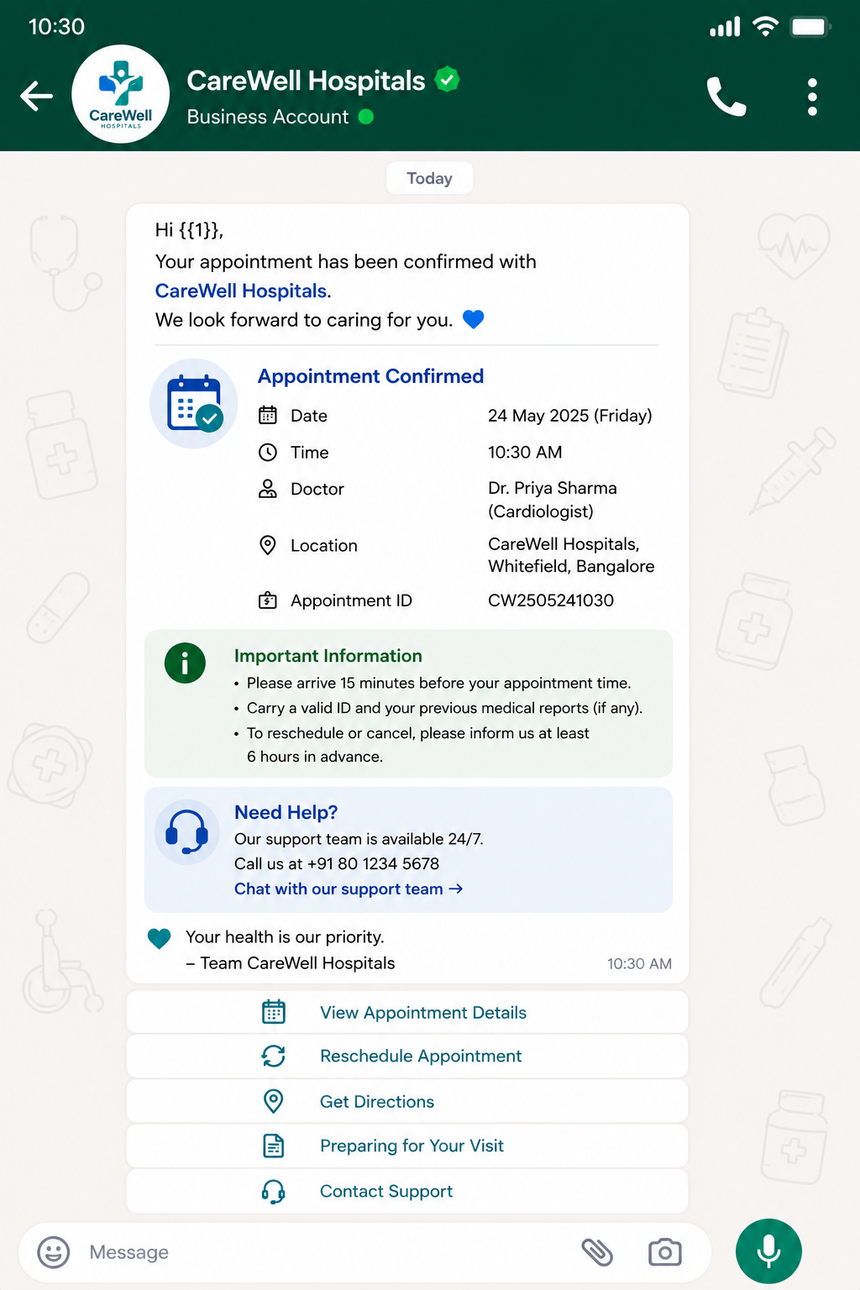
Hi {{1}}, this is {{2}} from {{3}}. Your appointment with {{4}} is scheduled for {{5}} at {{6}}. Please choose an option: - Confirm - Reschedule - Cancel Location: {{7}} Need help? Call: {{8}}
Variables: 1=Patient name, 2=Agent/clinic staff (optional), 3=Clinic name, 4=Clinician, 5=Date, 6=Time, 7=Address or link, 8=Phone
2) Reminder (24–48 hours before)
Reminder: {{1}}, your appointment at {{2}} is on {{3}} at {{4}} with {{5}}. Arrive {{6}} minutes early with a valid ID. Reply: - CONFIRM - RESCHEDULE - CANCEL
Variables: 1=Patient name, 2=Clinic, 3=Date, 4=Time, 5=Clinician, 6=Arrival buffer
3) Pre-Visit Instructions
{{1}}, to prepare for your {{2}} on {{3}} at {{4}}: - Fasting required: {{5}} - Documents: {{6}} - Special notes: {{7}} Questions? Reply here or call {{8}}.
Variables: 1=Patient name, 2=Visit type (e.g., blood test), 3=Date, 4=Time, 5=Yes/No, 6=Items to bring, 7=Notes, 8=Phone
4) Quick Reschedule Offer
Hi {{1}}, we noticed a conflict for your appointment on {{2}} at {{3}}. Tap a new time: - {{4}} - {{5}} - {{6}} Or reply with a preferred time.
Variables: 1=Patient name, 2=Date, 3=Time, 4–6=Alternative slots
5) Cancellation Confirmation
{{1}}, your appointment at {{2}} on {{3}} at {{4}} has been canceled. Would you like to rebook? - Rebook now - Contact support
Variables: 1=Patient name, 2=Clinic, 3=Date, 4=Time
6) No-Show Follow-Up
We missed you today, {{1}}. Let’s get you back on the calendar at {{2}}. Choose an option: - Rebook - Talk to support
Variables: 1=Patient name, 2=Clinic
7) Telehealth Link & Consent
{{1}}, your telehealth visit with {{2}} starts at {{3}}. Join: {{4}} Tech check: {{5}} By joining, you accept our visit terms: {{6}}
Variables: 1=Patient name, 2=Clinician, 3=Time, 4=Meeting link, 5=Test link, 6=Terms URL
These templates are designed to pass WhatsApp utility criteria and are easy to personalize via the Direct7 Networks API. Keep wording neutral and service-oriented to streamline approval.
Workflow Examples: From Booking to Confirmation to Follow-Up
Below are practical flows you can implement with Direct7 Networks to automate confirmations and reduce manual effort:
- Instant Confirmation on Booking: When a patient books via your website, app, or front desk, your system sends a template message with Confirm/Reschedule/Cancel buttons. Confirmation status syncs back to your calendar.
- Reminder Sequence: Automatically send a reminder 48 hours prior and another 3–6 hours before the slot. If the patient taps Reschedule, open a routed chat to propose new times or push interactive time options.
- Preparation Checklist: If a procedure requires fasting or lab paperwork, trigger a concise checklist 24 hours before the appointment with a link to full instructions.
- Telehealth Readiness: 30 minutes ahead of a virtual visit, share the join link and recommend a connectivity test. Offer a support button for last-minute troubleshooting.
- No-Show Safety Net: If the patient does not check in, send a polite follow-up offering to rebook. Capture reasons (e.g., transport, illness) via quick replies to inform operational improvements.
Each interaction is orchestrated through the WhatsApp Business API and managed by Direct7 Networks—so you maintain consistency, auditability, and speed across all patient communications.
Submitting Templates and Managing Approvals with Direct7 Networks
Getting templates approved is straightforward when you follow WhatsApp’s utility-first guidelines. Direct7 Networks streamlines each step:
- Draft: Start with one of the examples here. Finalize text, button labels, and variables.
- Classify: Choose a category (e.g., Appointment Update). Avoid promotional phrasing.
- Submit: Send via the Direct7 Networks dashboard or API. Include sample parameter values for faster review.
- Review: If WhatsApp asks for tweaks, adjust wording and resubmit. Direct7 Networks notifies you of status updates.
- Automate: Once approved, connect your booking system using Direct7’s webhooks and APIs to trigger messages at the right moments.
Tip: Keep message content precise and helpful. Limit sensitive medical details in outbound templates, and handle extended conversations within approved, secure workflows.
Personalization Without Complexity: Variables, Buttons, Media, and Links
Add a personal touch while preserving structure:
- Variables: Populate names, dates, times, and locations programmatically. Keep variable count manageable and predictable.
- Quick Replies & Call-to-Action Buttons: Use buttons like Confirm, Reschedule, Cancel, Call clinic, or Open map to simplify next steps.
- Media: Where appropriate, attach a map image, clinic instructions PDF, or short explainer to reduce confusion. Use media selectively and keep file sizes modest.
- Links: Provide navigation links (Google Maps), telehealth join URLs, or preparation guides hosted on your domain.
Direct7 Networks’ API supports interactive templates, helping your team move from one-way reminders to actionable patient conversations that update your scheduling system in real time.
Measuring Success: What to Track and Improve Over Time
Great messaging is iterative. Use Direct7 Networks to monitor and refine the patient journey:
- Delivery and Read Rates: Check whether confirmations reach patients and are seen promptly.
- Response Rate by Template: Which wording or button labels encourage faster confirmations?
- Reschedule vs. Cancel Ratio: Offer smarter alternatives (e.g., same-day slots) if cancellations are high.
- Lead Time Sensitivity: Test reminder timing (48h vs. 24h vs. same-day) by appointment type.
- Opt-Out Management: Respect patient preferences and keep your contact policy clear.
Small edits—like clarifying arrival instructions or adding a direct support button—can reduce no-shows and last-minute support calls significantly over time.
Implementation Steps: Launch in Days with Direct7 Networks
Bring your confirmation journey live quickly:
- Sign up and verify: Create your Direct7 Networks account, verify your business, and connect a WhatsApp-enabled number.
- Import or draft templates: Use the examples provided here. Localize where needed.
- Submit for approval: Send templates for WhatsApp review via the dashboard or API.
- Integrate scheduling: Connect your booking system or EHR/EMR via Direct7 Networks’ APIs or webhooks. Map triggers like “appointment_created,” “appointment_updated,” and “no_show.”
- Enable interactive flows: Add buttons and set up follow-up logic based on patient actions.
- Test and refine: Run a pilot with a subset of appointments. Adjust text, timing, and buttons before scaling.
Direct7 Networks is here to help your team from first submission to full automation, whether you’re a single clinic or a multi-location provider network.
FAQs: WhatsApp Appointment Confirmation Templates for Healthcare
Do I need patient opt-in to send WhatsApp appointment confirmations?
Yes. Patients must provide clear consent to be contacted on WhatsApp. Collect opt-in during online booking, intake forms, or front-desk registration. Store timestamped consent and give an easy way to opt out.
What’s the difference between a template message and a session message?
Template messages are pre-approved by WhatsApp and can be sent anytime, including outside the 24-hour service window. Session messages are free-form replies allowed within 24 hours of the patient’s last message.
How long does template approval take?
Approval times vary. Most utility-focused templates are reviewed quickly. Submit clear samples and avoid promotional content to speed up the process. Direct7 Networks notifies you of status updates.
Can I include interactive buttons like Confirm or Reschedule?
Yes. WhatsApp supports quick-reply and call-to-action buttons in templates. Use them for Confirm, Reschedule, Cancel, Call clinic, or Open map to streamline patient actions.
How should I handle sensitive medical information?
Keep WhatsApp templates focused on logistics (date, time, location, preparation steps). Avoid sharing detailed medical data. Route sensitive details to secure, compliant systems and approved workflows.
Can I send templates in multiple languages?
Absolutely. Submit each language variant for approval. Keep variables consistent across languages and personalize at send time.
How do I integrate my calendar or EHR with Direct7 Networks?
Use Direct7 Networks’ APIs and webhooks to trigger messages on key events—appointment created, updated, confirmed, or missed. Your system passes patient parameters to fill template variables and receive action callbacks.

Automate WhatsApp Appointment Confirmations
Launch approved templates, connect your scheduling system, and reduce no-shows with Direct7 Networks’ WhatsApp Business API. Start in days.