


Appointment Reminder Templates for Healthcare
No shows drain revenue, stretch staff, and delay care. Phone tags and email reminders often get lost, while patients increasingly prefer quick, mobile first communication. WhatsApp offers a fast and familiar channel for patients to confirm, reschedule, or ask questions without logging in to a portal. With conversational flows, clinics and hospitals can reduce last minute gaps, keep schedules full, and improve satisfaction. WhatsApp also supports read indicators and simple two way replies, making it easier to close the loop on every booking. When combined with structured templates and automation, appointment communications become timely, clear, and consistent across locations and specialties. Direct7 Networks offers a practical way to run these programs at scale using WhatsApp Business API, helping you send the right message at the right time while staying aligned with patient privacy expectations and consent requirements.
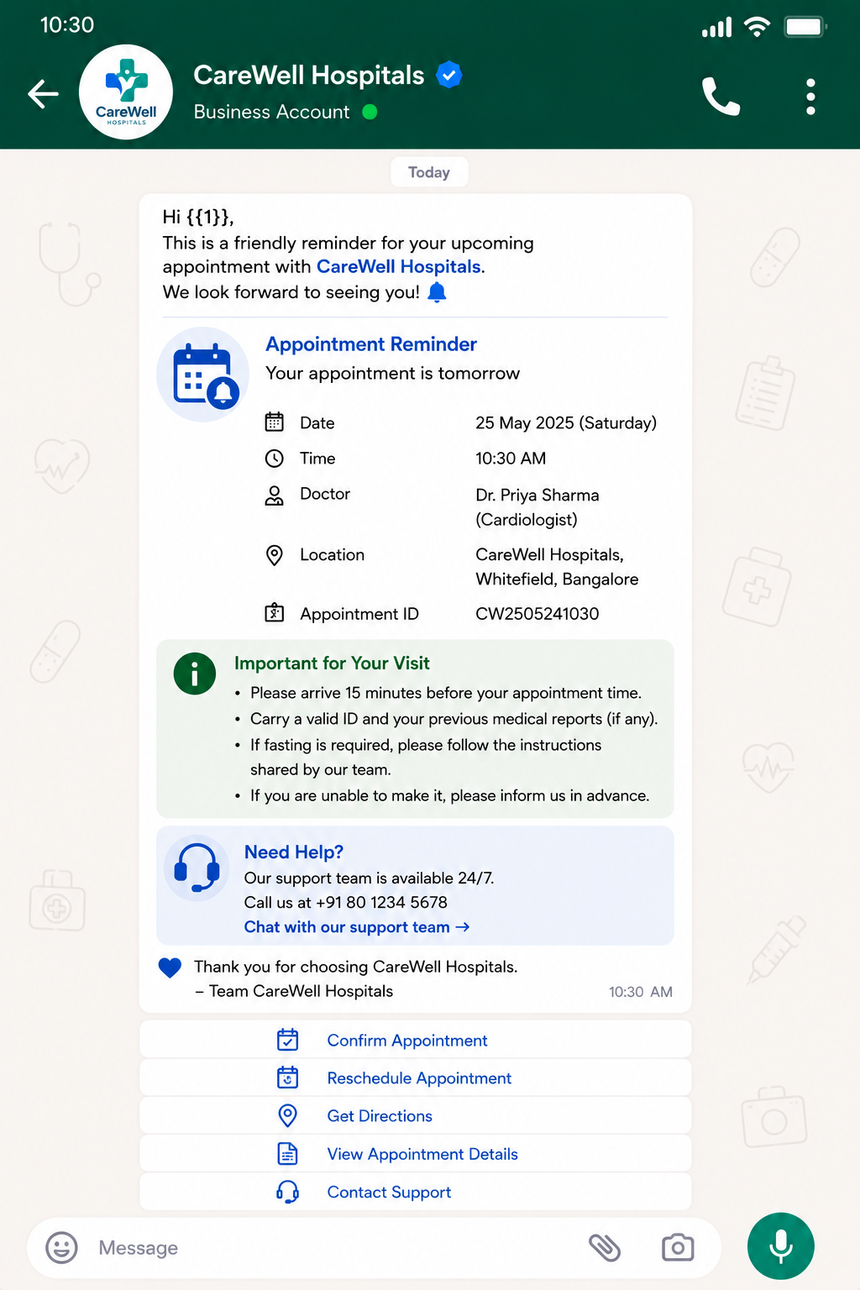
How Direct7 Networks Powers WhatsApp Reminders
Direct7 Networks connects your scheduling systems to WhatsApp Business API so your team can automate confirmations, reminders, reschedules, and follow ups with ease. Build message templates once, apply variables such as patient name, date, and provider, and trigger sends based on booking or EHR events. Use two way messaging to capture a quick confirm or reschedule, then route complex questions to staff. Template management streamlines approvals and ensures consistent, compliant language. Webhooks and APIs enable real time updates, while delivery and read events support reliable tracking. You can run multilingual messaging, filter by clinic or department, and maintain unified branding across all locations. By centralizing WhatsApp orchestration with Direct7 Networks, healthcare organizations replace manual outreach with scalable workflows that are clear, respectful, and patient friendly.
Ready to Use WhatsApp Appointment Templates
Use these editable templates as a starting point. Replace variables like {{patient_name}}, {{date}}, {{time}}, {{clinic}}, {{doctor_name}}, and {{location}}. Keep messages utility focused and include easy next steps and opt out instructions.
- New appointment confirmation Hi {{patient_name}}, your appointment with {{doctor_name}} at {{clinic}} is confirmed for {{date}} at {{time}}. Reply 1 to confirm, 2 to reschedule, 3 to cancel.
- 24 hour reminder Reminder for {{patient_name}}. You are scheduled on {{date}} at {{time}} at {{location}}. Reply 1 to confirm or 2 to reschedule. Save our number for future updates.
- Same day reminder Today is the day, {{patient_name}}. Your visit with {{doctor_name}} is at {{time}}. Please arrive 10 minutes early with a photo ID and insurance card. Need to change plans Use this link: {{reschedule_link}}
- Pre visit instructions Hi {{patient_name}}. To prepare for your {{procedure_name}} on {{date}} at {{time}}, please review: {{portal_link}}. Questions Reply and our team will help.
- Telehealth link Your virtual visit with {{doctor_name}} starts at {{time}} on {{date}}. Join here: {{telehealth_link}}. Test your audio and camera a few minutes before.
- Reschedule prompt We noticed you could not make your appointment, {{patient_name}}. Reschedule in seconds: {{reschedule_link}} or reply with a preferred day and time.
- Missed appointment follow up We are sorry we missed you today, {{patient_name}}. Your health matters to us. Book a new slot here: {{reschedule_link}} or reply for assistance.
- Post visit check in Thank you for visiting {{clinic}}, {{patient_name}}. If symptoms change or you have questions, reply here. View care summary: {{portal_link}}.
- Co pay reminder A friendly reminder for your {{clinic}} co pay from your recent visit. Pay securely: {{billing_link}}. Need help Reply for billing support.
- Vaccination recall Hi {{patient_name}}, it is time for your next {{vaccine_name}} dose. Book now: {{booking_link}}. Reply STOP to opt out of reminders.
Tip Keep variables consistent with your data sources. For sensitive details, share through secure links rather than placing protected health information in the message body.
Patient Centric Messaging Best Practices
Effective reminders are brief, personal, and actionable. Use friendly language and remove friction at every step.
- Personalize with name, date, time, and location to reduce confusion.
- Send timelines patients expect, such as booking confirmation, 24 hour reminder, and a same day nudge.
- Provide one clear call to action, like a confirm button or reschedule link.
- Localize language and time format, and accommodate accessibility needs such as concise text and clear contrast in shared visuals.
- Avoid medical specifics in the message body; link to your secure portal for test results and care instructions.
- State opt out instructions, for example Reply STOP to opt out, and honor consent choices promptly.
- Use a consistent clinic signature so patients recognize your messages from Direct7 Networks powered WhatsApp outreach.
Keep testing short variations. Even small wording changes can improve response rates and reduce missed visits.
Automation Flows for Common Healthcare Scenarios
Direct7 Networks makes it simple to translate clinic workflows into WhatsApp automation. Here are practical blueprints you can adapt.
- New booking flow Trigger on appointment creation. Send confirmation template with confirm and reschedule options. If confirm, mark status in your system; if reschedule, open a self service link or route to staff.
- Pre visit preparation Trigger 48 to 72 hours before procedures. Send prep guide link and a yes or no readiness check. If no, offer a quick reschedule to avoid no shows.
- 24 hour reminder Verify time zone, send reminder with location and arrival guidance. If patient sends questions, route to a shared inbox for swift replies.
- Telehealth session Send device check 4 hours prior and join link 15 minutes before. If the patient has not joined at start time, send a gentle prompt.
- Missed visit safety net If status is no show, send a same day reschedule prompt, then follow up after 48 hours if no response.
- Chronic care check ins For ongoing programs, schedule periodic WhatsApp check ins with short symptom surveys and links to care plans.
Use webhooks to keep statuses in sync, maintain a full audit trail, and escalate to live agents for complex needs.
Seamless Integration With Your Existing Tools
Connect Direct7 Networks to your EHR, scheduling, or CRM system using APIs, webhooks, or flat file imports. Map appointment fields to template variables and standardize time zones and date formats. De duplicate messages by referencing a unique appointment ID and patient contact. For clinics using multiple tools, centralize WhatsApp sends through Direct7 Networks to ensure consistent branding and opt out handling. Many teams begin with a simple CSV export of next day bookings, then upgrade to a real time integration as volumes grow. Make sure staff see patient WhatsApp conversations alongside booking data so they can resolve questions quickly and keep the day on track.
Measuring Success and Optimizing Over Time
Start with clear goals such as higher confirmation rates, fewer gaps, and faster reschedules. Useful metrics include delivery and read rates, confirms versus reschedules, cancellations with reason codes, and time to response. Compare outcomes by location, provider, and visit type to find tuning opportunities. Test message timing windows, tweak wording, and try different calls to action like numbers 1 to 3 versus simple links. Track what happens after a message is read, not just before, to understand whether patients complete the intended action. With Direct7 Networks, teams can iterate on templates quickly, roll out improvements across departments, and keep a reliable feedback loop with operations.
Security, Consent, and Compliance Guidelines
Healthcare messaging requires special care. Use these guidelines to align with privacy expectations and platform policies.
- Collect explicit patient opt in for WhatsApp and document how and when consent was captured.
- Provide a clear opt out path such as Reply STOP and honor preferences promptly.
- Avoid including protected health information in message bodies. Share sensitive details through secure portal links with authentication.
- Use approved WhatsApp templates for business initiated outreach and keep content utility focused.
- Limit message access to authorized staff, and maintain audit trails for review.
- Work with your compliance team to validate workflows and data retention policies for your region and care setting.
Direct7 Networks helps you apply these practices at scale so your team can automate reminders without compromising patient trust.
Frequently Asked Questions
Do we need patient opt in to message on WhatsApp
Yes. Obtain clear consent before sending business initiated messages. Capture opt in during online booking, intake forms, or front desk check in, and keep an easy opt out path in every message.
How are WhatsApp templates approved
You submit templated messages for approval before business initiated use. Keep the content transactional and useful, define variables, and avoid promotional language. Direct7 Networks guides you through template creation and submission.
Can patients reschedule directly from WhatsApp
Yes. Include a reschedule link to your booking page or offer numbered quick replies. When patients ask for help, route the chat to staff so changes are captured in your scheduling system.
How do we handle time zones and send windows
Store a patient time zone or offset, then schedule reminders relative to the appointment time. Configure quiet hours to avoid late night messages. Direct7 Networks supports time based triggers aligned to patient location.
Can multiple clinics share one WhatsApp number
Many groups use a single branded number with templates that reference clinic name and location. Others choose separate numbers for each brand or region. Direct7 Networks supports both models.
How quickly can we go live
Typical steps include business verification, connecting a phone number, preparing and submitting templates, and mapping fields from your scheduling system. With existing data ready, teams often launch in days rather than weeks.

Automate Healthcare Reminders on WhatsApp
Launch patient friendly confirmations, reminders, and follow ups in minutes with Direct7 Networks and WhatsApp Business API.