


Cancellation Templates for Healthcare
Cancellations happen in every clinic and hospital, whether due to provider scheduling conflicts, unexpected events, or patients who can no longer attend. The difference between an empty slot and a fully booked day often comes down to how fast and how clearly you communicate. With WhatsApp Business API from Direct7 Networks, healthcare teams can send compliant, patient-friendly cancellation messages that confirm the change, offer alternatives, and reopen time slots in minutes. This page provides proven cancellation templates designed for healthcare use, plus guidance on automation and best practices to keep your schedule optimized.
Use these templates to notify patients when an appointment is canceled, guide them to reschedule, or confirm a patient-initiated cancellation. Each example is built for high clarity, minimal PHI, and rapid action. Connected through Direct7 Networks, your team gains reliable delivery, two-way messaging, and audit-ready logs so nothing falls through the cracks.
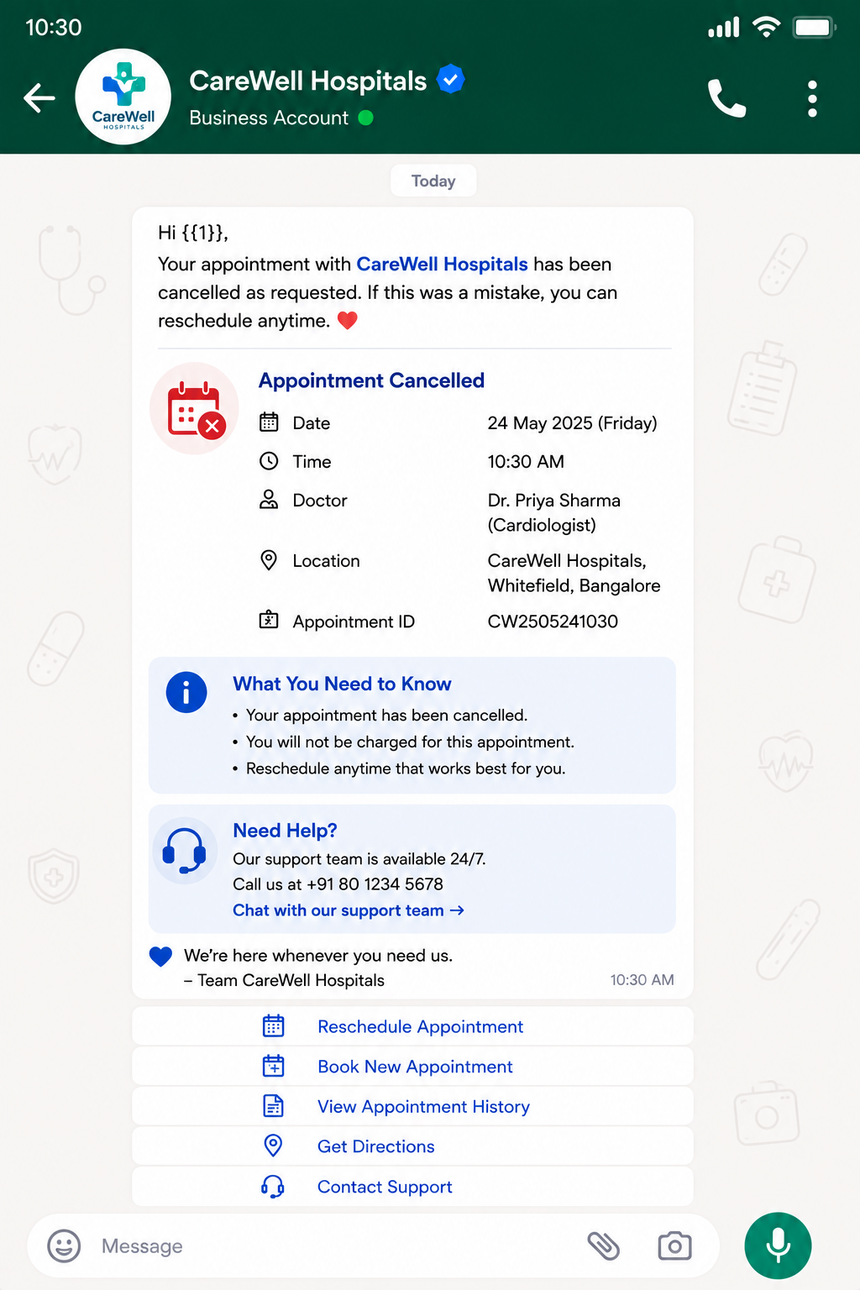
Why WhatsApp for Healthcare Cancellations?
When time-sensitive updates matter, WhatsApp stands out for speed and engagement. Patients already use the app daily, which means cancellation notices are more likely to be seen and acted upon quickly. Direct7 Networks connects your systems to WhatsApp Business API so staff can send approved templates at scale and handle replies effortlessly.
- Trusted, familiar channel with clear sender identity for your clinic or hospital
- Delivery and read indicators help prioritize follow-ups for unread notices
- Approved message templates ensure consistent, compliant notifications
- Interactive buttons (where applicable) to reschedule, call, or open a booking link
- Two-way chat for clarifications without phone tag or voicemail gaps
- Centralized logs and routing so operations, front desk, and care teams stay aligned
For healthcare operations, the result is fewer no-shows, faster rescheduling, and better patient experience with less back-and-forth.
Template Library: Ready-to-Send Cancellation Messages
Use the following WhatsApp cancellation templates as a starting point. Replace variables with patient-specific details and keep content minimal to protect privacy. Templates can be localized and adapted for your specialty via Direct7 Networks.
- Provider-initiated cancellation: Hello {patient_name}, your appointment with {provider_name} on {date} at {time} at {clinic_name} has been canceled. Tap to reschedule: {reschedule_link}. If needed, call us: {phone}.
- Same-day disruption: Hi {patient_name}, due to an urgent change, we must cancel your visit today at {time}. Please pick a new time here: {reschedule_link}. We are available to assist at {phone}.
- Weather or facility closure: Important: {clinic_name} is closed on {date} due to {reason}. Your appointment is canceled. Choose a new slot: {reschedule_link}. Thank you for understanding.
- Waitlist backfill after cancellation: A {service} slot opened on {date} at {time}. Reply 1 to take it, 2 to see more times, or open: {reschedule_link}. First confirmed, first booked.
- Patient-initiated cancellation confirmation: We received your request to cancel {service} on {date} at {time}. Your appointment is now canceled. Need a new time? {reschedule_link}.
- Policy-friendly reminder: Your appointment on {date} at {time} is canceled. Please reschedule within {window} to avoid delays in care. Book now: {reschedule_link}. Questions? {phone}.
Tips for clarity: use a direct subject line at the start (Important, Update, Reminder), provide one primary action (reschedule link or quick reply), include a fallback contact, and avoid clinical details. Direct7 Networks can help format and submit these templates for WhatsApp approval.
Personalization and Variables That Matter
Personalized messages drive faster action because they remove ambiguity and build trust. With WhatsApp Business API via Direct7 Networks, you can map variables from your scheduling or EHR system to each outgoing template, ensuring your notice is accurate and immediately useful.
- Identity basics: {patient_name}, {provider_name}, {clinic_name}
- Logistics: {date}, {time}, {location}, {map_link}
- Actions: {reschedule_link}, {call_button}, {quick_reply_options}
- Context: {service}, {department}, {reason} (keep non-sensitive)
- Policy cues: {window} for reschedule deadlines or deposit windows
Use concise copy, remove any non-essential health details, and stick to the minimum data needed for the action. Direct7 Networks provides a straightforward mapping layer so your variables populate correctly every time, even across multiple locations or providers.
Automation Flows that Keep Schedules Full
Automation turns a canceled slot into an opportunity. Direct7 Networks connects your scheduling system to WhatsApp Business API so every cancellation triggers a smart workflow that attempts to rebook the time with minimal staff effort.
- Trigger: Appointment marked canceled in your EHR or booking tool
- Notify: Send a clear WhatsApp cancellation to the patient with a reschedule button
- Backfill: Offer the open slot to a segmented waitlist via quick replies
- Escalate: If no response within a set window, route to a live agent or call center
- Confirm: On successful reschedule, send a confirmation template and update the calendar
- Log: Store delivery and response outcomes for audit and quality improvement
These flows reduce phone calls, keep clinicians productive, and give patients fast, convenient choices. With Direct7 Networks, you can start simple and scale to advanced routing, multiple sites, and service lines without rebuilding core processes.
Compliance, Consent, and Patient Trust by Design
Healthcare messaging must balance speed with privacy. Direct7 Networks helps your team send lawful, respectful updates through WhatsApp Business API while honoring patient preferences.
- Obtain clear opt-in for WhatsApp communications and document the consent source
- Keep messages minimal: avoid diagnoses, lab results, and sensitive clinical details
- Use approved templates for business-initiated notifications outside the 24-hour window
- Offer an easy opt-out path (for example, reply STOP) and honor it consistently
- Include concise disclaimers when helpful (e.g., not a medical emergency channel)
- Respect quiet hours and local regulations for patient communications
WhatsApp provides a secure environment for messaging, and Direct7 Networks adds governance controls, access management, and logging to support your compliance program and internal policies.
Measure What Matters: From Cancellations to Rebookings
Visibility turns cancellations into improvement opportunities. With Direct7 Networks, your teams can monitor performance across locations and refine templates for better outcomes.
- Delivery and read rates for each template
- Time-to-reschedule after a cancellation notice
- Quick reply engagement and link click-through
- Waitlist fill speed and first-response success
- Template comparisons to identify the highest-performing copy
- Agent handoff volume to calibrate automation vs. live support
Share these metrics with operations and clinical leadership to align capacity planning with patient demand. Small copy changes can meaningfully improve rebook rates and clinic productivity.
Implementation with Direct7 Networks: Fast, Practical, Scalable
Getting started is straightforward. Direct7 Networks guides your team from template design to go-live so you can deliver reliable, compliant cancellation messages quickly.
- Connect your WhatsApp Business API account and verify your business
- Select or provision your WhatsApp number and display name
- Import the cancellation templates and submit for WhatsApp approval
- Map variables from your EHR or scheduling system to each template
- Configure triggers for provider-initiated and patient-initiated cancellations
- Set up waitlist outreach and escalation to agents where needed
- Pilot with one department, measure results, and expand across service lines
Direct7 Networks makes it easy for healthcare teams to reduce no-shows, protect patient experience, and keep clinicians fully booked. Ready to streamline cancellations and reschedules today? Start free or book a demo and see it in action.
FAQs: Cancellation Templates for Healthcare
What is a WhatsApp cancellation template in healthcare?
A cancellation template is a preapproved message you send to patients when an appointment is canceled or changed. It contains essential logistics only, such as date, time, location, and a single next step like rescheduling. Through Direct7 Networks, these templates are managed within WhatsApp Business API so teams can send consistent, compliant notices at scale and track delivery and responses.
Do we need template approval before sending notifications?
Yes. WhatsApp requires business-initiated messages sent outside an active 24-hour chat to use approved templates. Direct7 Networks helps you format and submit your cancellation and reschedule templates for approval, localize them when needed, and keep versions organized by clinic, specialty, or region.
Can we include clinical information or PHI in a cancellation message?
Keep messages minimal and operational. Avoid diagnoses, lab details, or sensitive data. Focus on the appointment logistics and the action required, such as rescheduling. If you need a clinical discussion, route to a secure channel with appropriate consent. Direct7 Networks can help you shape message content to align with your internal privacy policies.
How do patients reschedule directly from WhatsApp?
Provide a clear reschedule link or interactive buttons that open your booking page. You can also offer quick replies like 1 Accept new time, 2 See other times, or 3 Speak to agent. Direct7 Networks connects these actions to your scheduling system so confirmations are automatic and calendars update in real time.
What happens if a patient replies after 24 hours?
When the 24-hour session window has closed, you can re-engage with a new approved template or wait until the patient sends another message, which opens a new session. Direct7 Networks automates this logic so staff do not have to track windows manually, reducing the risk of missed follow-ups.
How long does it take to go live with cancellation templates?
Timelines vary by organization and approval cycles, but many teams move from template design to first pilot within a short onboarding period. Direct7 Networks provides guidance on verification, number setup, template submission, variable mapping, and workflow configuration to help you launch efficiently and scale confidently.

Cut No-Shows with Cancellations
Launch compliant cancellation templates, automate rescheduling, and keep your schedule full with Direct7 Networks’ WhatsApp Business API.