


Reschedule Templates for Healthcare
When patients need to change an appointment, every extra step increases the chance of a missed visit. Phone queues, email delays, and portal logins add friction at the worst time—when a patient is juggling work, family, or sudden symptoms. WhatsApp changes that. With messages delivered where patients already communicate daily, rescheduling becomes quick, familiar, and low effort.
For clinics and hospitals, a fast reschedule path means fewer no-shows, steadier provider utilization, and better patient experience scores. Using the WhatsApp Business API through Direct7 Networks, you can automate and personalize reschedule flows without sacrificing control or oversight.
Key benefits healthcare teams report when moving reschedules to WhatsApp include:
- Convenience for patients who prefer messaging over phone calls
- Faster rebooking after cancellations or no-shows
- Higher attendance due to timely confirmations and reminders
- Reduced staff time on back-and-forth scheduling
- A friendly, human tone that builds confidence and adherence
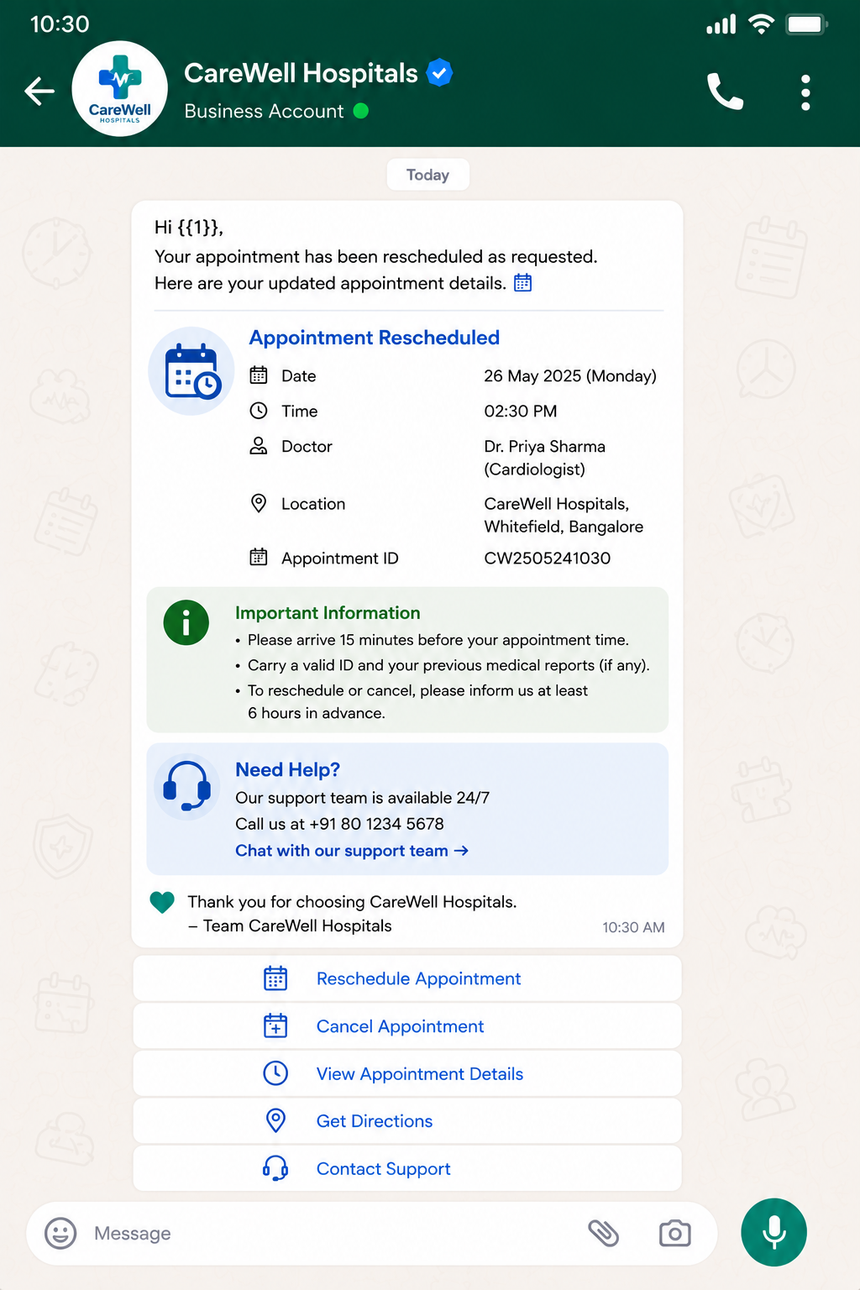
How Direct7 Networks Streamlines Reschedules with WhatsApp Business API
Direct7 Networks provides a robust, developer-friendly implementation of the WhatsApp Business API that healthcare teams can rely on. Whether you operate a single clinic or a multi-location network, Direct7 helps you move from manual rescheduling to automated, guided conversations that stay compliant with platform policies.
With Direct7 Networks you can:
- Send approved WhatsApp message templates for appointment changes, confirmations, and follow-ups
- Use interactive buttons and list messages so patients pick new times in a tap
- Trigger webhooks to update your scheduling system when a patient confirms
- Route complex cases to a human coordinator while keeping the chat history in one place
- Track delivery, read, and response events to understand performance
Direct7 Networks brings dependable API endpoints and clear documentation, so your IT team can integrate fast. Prefer low-code? Build common reschedule flows using prebuilt templates and adjust the text, timing, and languages as needed.
Ready-to-Send Reschedule Message Templates for Healthcare Teams
Use these WhatsApp-ready examples as a starting point. Adapt the tone to your brand and configure variables (such as patient name, clinic, time, and provider) in the Direct7 Networks console or via API.
1) Clinic-Initiated Reschedule (provider unavailable)
Hello {{patient_name}}, this is {{clinic_name}}. We need to reschedule your appointment with {{provider_name}} on {{old_date}} at {{old_time}}. Please choose a new time:
• Option A: {{slot_1}}
• Option B: {{slot_2}}
• Option C: {{slot_3}}
Reply A, B, or C to confirm.
2) Patient-Initiated Reschedule (self-service)
Hi {{patient_name}}. We can help you reschedule your {{visit_type}} at {{clinic_name}}. Which day works best?
• 1) {{day_1}}
• 2) {{day_2}}
• 3) {{day_3}}
Reply 1, 2, or 3. We will then share available times.
3) No-Show Recovery
We missed you today, {{patient_name}}. Would you like to rebook your {{visit_type}}? Choose a time:
• {{slot_1}}
• {{slot_2}}
• {{slot_3}}
Reply with the option number. If you need a different day, reply OTHER.
4) Pre-Op / Special Prep Appointments
Reminder: Your prep instructions are time-sensitive. If you must change your {{visit_type}} on {{old_date}} at {{old_time}}, please choose a new slot today:
• {{slot_1}}
• {{slot_2}}
• {{slot_3}}
Questions? Reply HELP to reach our team.
5) Multi-Location Availability
We can move your {{visit_type}} to a nearby location for earlier availability. Choose a site:
• 1) {{location_1}} – next: {{slot_1}}
• 2) {{location_2}} – next: {{slot_2}}
• 3) {{location_3}} – next: {{slot_3}}
Reply 1, 2, or 3 to confirm.
6) Language Preference First
Welcome, {{patient_name}}. Choose your language to continue rescheduling:
• 1) English
• 2) Español
• 3) Français
We will send the next steps in your language.
7) Insurance or Referral Check
Before we reschedule your {{visit_type}}, do you have updated insurance or referral info? Reply YES to confirm it is unchanged, or UPDATE to share new details. We will hold your new time for {{hold_minutes}} minutes.
Each template above can use WhatsApp interactive buttons for cleaner responses. In Direct7 Networks, you can version templates, request approvals, and roll out adjustments clinic by clinic without code freezes.
Automated Flow Examples and Smart Triage Logic
Design flows that feel personal while saving your team time. Below are sample automations you can assemble with Direct7 Networks and the WhatsApp Business API:
- Simple Switch: Patient taps a preferred time → API checks availability → confirms instantly → sends calendar-friendly confirmation text with clinic address, parking, and prep notes.
- Reason-Aware Reschedule: Patient selects a reason (work, childcare, transport, symptom change). Your system auto-expands or shortens time windows based on reason. If symptoms change, triage to a coordinator.
- Pre-Check Blockers: If insurance is expired or referral is missing, send a quick-link checklist and hold a tentative slot for a set time. When the patient confirms documents, finalize the booking.
- Waitlist Upgrade: Offer sooner times when cancellations occur. Patients opt in to a smart waitlist and receive a one-tap claim message when a slot opens.
- Human Escalation: If the patient replies HELP or needs complex coordination (e.g., multi-modality imaging), route to a live agent and display the chat context so patients never repeat themselves.
All flows can be logged via webhooks so your scheduling platform stays the source of truth. Direct7 Networks helps teams adopt a “respond in channel” standard—patients initiate, confirm, and get instructions inside the same WhatsApp thread.
Consent, Policy, and Patient Privacy on WhatsApp
Healthcare messaging must balance speed with privacy. The WhatsApp Business API supports a consent-based model for business-initiated messages and requires the use of approved templates outside the 24-hour service window.
Practical safeguards to adopt with Direct7 Networks:
- Obtain Opt-In: Collect consent at registration, onsite, via web form, or by patient-initiated WhatsApp messages.
- Template Discipline: Use clear, patient-friendly templates for reschedules, reminders, and confirmations. Keep sensitive details minimal and steer identity verification to secure steps.
- Session Messaging: Reply to inbound patient questions within the service window to reduce template usage and keep conversations flowing.
- Data Minimization: Avoid sending sensitive diagnosis info in chat. Use neutral visit types (e.g., “follow-up visit”).
- Record-Keeping: Store communication logs and preferences in your system for auditing and care continuity.
Consult your legal and compliance teams for local regulations and organizational policies. Direct7 Networks provides the tooling to implement compliant workflows, while your team controls content, consent capture, and retention settings in your own systems.
Integrate with EHR, PMS, and Calendar Systems Smoothly
You do not have to replace your scheduler to improve rescheduling. Instead, integrate Direct7 Networks with your existing EHR or practice management system using APIs and webhooks. A common pattern looks like this:
- Availability Fetch: Your system exposes or aggregates time slots per provider and location.
- Offer Slots: Direct7 sends interactive choices via WhatsApp.
- Hold and Confirm: When the patient chooses a time, you hold the slot for a short window and then confirm upon final acknowledgment.
- Sync Records: Update the appointment in your EHR/PMS (date, time, location, provider, notes).
- Notify Stakeholders: Send internal notifications to the care team and prep departments as needed.
This event-driven design avoids double-booking and keeps clinical calendars authoritative. If a slot disappears mid-conversation, the bot posts a polite message and refreshes alternatives—no dead ends, no confusion.
Measure What Matters: KPIs for Rescheduling Success
Set goals early and review weekly during rollout. With Direct7 Networks you can instrument events and map results back to appointment outcomes.
- Rebook Rate: What percent of canceled/no-show appointments are rebooked within 24–72 hours?
- Time to Reschedule: Median minutes from outreach to confirmed slot.
- Attendance After Reschedule: Are rescheduled patients arriving at higher rates?
- Template Response Rate: Which message variants produce the fastest confirmations?
- Opt-Out and Help Rates: Are patients leaving the channel or requesting human help more than expected?
- Agent Workload: How many reschedules complete automatically versus needing manual intervention?
Use these insights to refine timing (e.g., send offers at lunch or evenings), adjust the number of options shown, and tailor copy for different visit types.
Implementation Checklist and Best Practices
Follow this checklist to launch quickly and confidently with Direct7 Networks:
- Define Scope: Start with one specialty or location and 3–5 common reschedule templates.
- Map Data: Identify the source of truth for providers, locations, slot duration, and eligibility rules.
- Draft Templates: Keep copy short, friendly, and clear. Include interactive options and a HELP path.
- Consent and Policies: Capture opt-in and document how and when you will message patients.
- Build Flows: Implement slot fetch, hold, confirm, and cancel steps. Add escalation triggers.
- Test End-to-End: Use staff test numbers to simulate different outcomes, including conflicts and errors.
- Train Teams: Provide scripts for agents who join a chat mid-flow to maintain continuity.
- Iterate: Review KPIs after the first week; tweak timing, language, and slot counts.
Direct7 Networks is your partner from template setup to go-live. We help healthcare teams adopt WhatsApp rescheduling in days, not months—so your patients get care when they need it, and your schedules stay full.
Ready to reduce no-shows and improve patient experience? Start free with Direct7 Networks and launch your first WhatsApp reschedule flow today.
FAQs: Reschedule Templates for Healthcare on WhatsApp
Do we need prior consent to message patients about rescheduling?
Yes, obtain patient opt-in for WhatsApp communications. You can collect consent during registration, via your website, or when patients message your clinic first. Direct7 Networks supports using approved templates for outbound messages when required.
How do WhatsApp templates get approved?
You submit templates for review, and approval is handled according to platform policies. Keep content clear, non-promotional, and purpose-driven (e.g., appointment changes). Direct7 Networks provides guidance on best practices to help speed approvals.
Can patients pick times with buttons instead of typing?
Yes. Use WhatsApp interactive buttons or list messages to present options like time slots and locations. This reduces errors and speeds conversion. Direct7 Networks helps configure these interactions and connect them to your scheduling logic.
What if a patient needs to talk to a real person?
Include a HELP option in each flow. When selected, the conversation routes to a human coordinator who sees prior steps. Direct7 Networks enables smooth handoffs so patients stay in the same WhatsApp thread.
Will this work across multiple clinics and time zones?
Yes. Your system can map the patient’s preferred location and time zone, then show localized slots. Direct7 Networks supports sending the correct options and timestamps based on your data.
What metrics should we monitor after launch?
Track rebook rate, time to reschedule, attendance after reschedule, opt-out rate, and template response rates. Use this data to adjust copy, timing, and slot presentation for continuous improvement.

Cut No-Shows with Smart WhatsApp Reschedules
Launch ready-to-send reschedule templates, automate confirmations, and keep calendars full. Start free with Direct7 Networks today.