


Feedback Request Templates for Ecommerce That Drive Replies
Customer feedback is the engine that powers better products, smoother support, and repeat purchases. As part of the broader Customer Support Templates for Ecommerce, this guide focuses on Feedback Request Templates for Ecommerce you can send over WhatsApp. With Direct7 Networks and the WhatsApp Business API, you can ask at the right moment, on the right channel, and receive actionable responses—without adding strain to your support team.
WhatsApp is where your customers already chat daily. By meeting them there with short, clear requests, you can capture authentic reviews, resolve issues quickly, and boost your store’s credibility. Below you’ll find why feedback outreach matters, best practices, and five ready-to-send WhatsApp templates you can roll out today using Direct7 Networks.
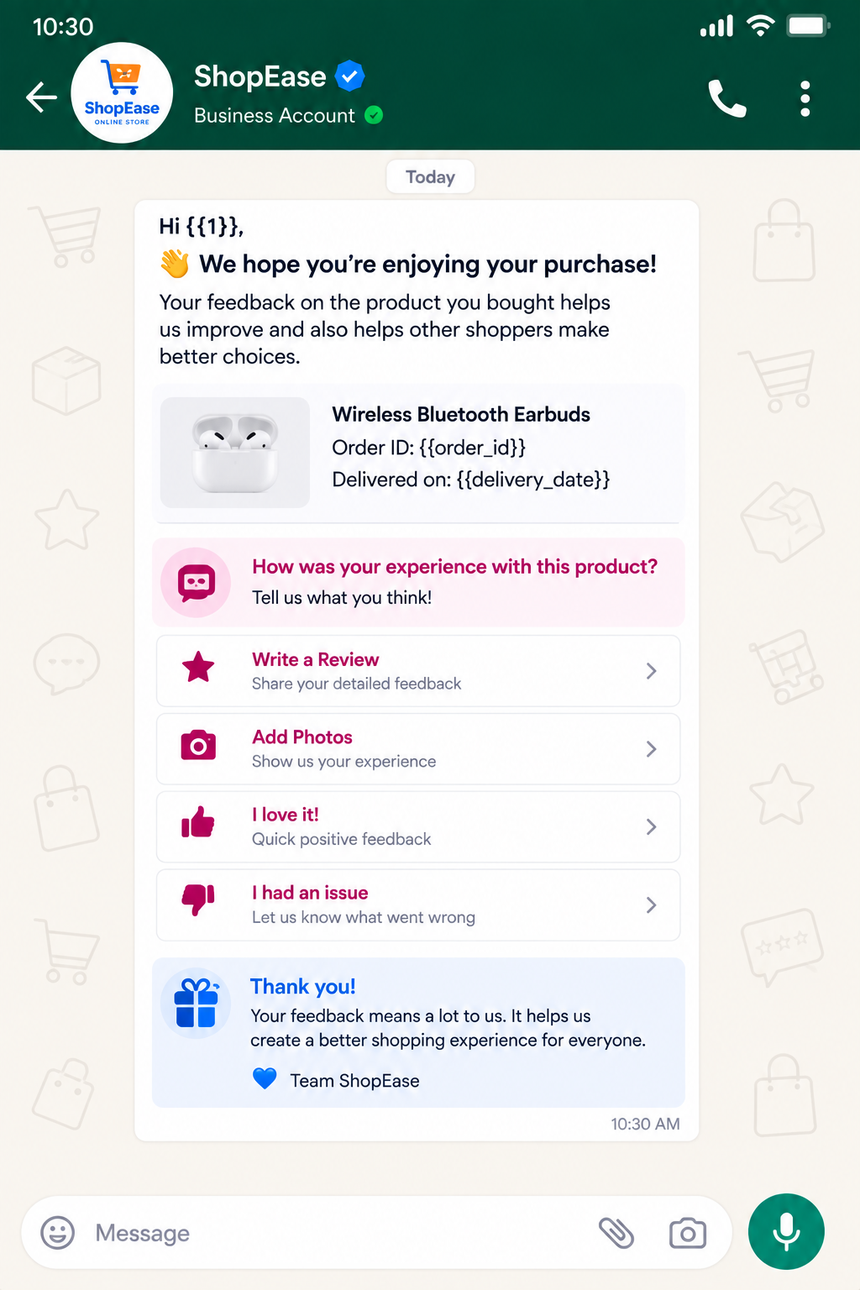
Why Feedback Request Templates for Ecommerce Matters
Well-timed feedback requests help you turn post-purchase silence into high-value insights. When customers can respond in a familiar chat window, they tend to share more and respond faster. That’s why Feedback Request Templates for Ecommerce are essential to modern customer operations.
- Capture product insights: Learn what customers liked, what missed expectations, and how to improve variants or bundles.
- Reduce returns and churn: Identify friction points early, resolve issues proactively, and retain customers who might otherwise leave.
- Increase review volume: Make it simple to submit a rating or comment, feeding your product pages with fresh, trust-building content.
- Improve support quality: Gather post-interaction feedback to coach agents and prioritize training topics.
- Close the loop fast: If a rating is low, you can instantly route the chat to support for resolution.
Consistent, automated outreach on WhatsApp transforms feedback collection from an occasional campaign into a reliable, always-on workflow that supports merchandising, CX, and marketing.
Benefits of WhatsApp Business API
Direct7 Networks connects your ecommerce stack to the WhatsApp Business API so you can orchestrate compliant, personalized feedback requests at scale.
- Template-based messaging: Use approved templates that keep outreach consistent and brand-safe.
- Automations and triggers: Send after delivery, return completion, support closure, or cart abandonment—no manual work.
- Personalization: Merge order IDs, product names, delivery dates, and first names to raise response likelihood.
- Two-way conversations: Turn low ratings into live chats and high ratings into review links with a single tap.
- Rich messaging: Share links, order summaries, and instructions to guide customers through quick actions.
- Opt-in and compliance controls: Manage consent, language, and categories to keep outreach customer-friendly and compliant.
- Analytics and routing: Monitor reply rates and route conversations to the right team for follow-up.
The result: a dependable, scalable feedback loop on a channel customers trust.
Best Practices
Maximize response rates and keep the experience effortless with these actionable tips:
- Ask at the right moment: Trigger after confirmed delivery or once a support ticket is closed.
- Keep it short: One clear question plus a link or simple numeric reply options works best.
- Set expectations: Tell customers it takes less than 30 seconds to answer.
- Offer options: Encourage replies like 1–5 or share a short comment to lower friction.
- Personalize: Include their name, product name, and order number for context and trust.
- Be transparent: If offering a perk (e.g., a discount), clarify that honest feedback—positive or negative—is welcome.
- Route negatives fast: If 1–2 is selected, follow up with a human within the same WhatsApp thread.
- Track links: Use UTM-tagged review URLs to measure source performance.
- Respect preferences: Provide an opt-out line (e.g., “Reply STOP to opt out”).
- Localize: Send templates in the customer’s preferred language where possible.
Ready-to-use WhatsApp Templates
Copy any of the Feedback Request Templates for Ecommerce below into your Direct7 Networks dashboard, adjust variables, and submit for WhatsApp template approval where required.
1) Post-Delivery Product Review
Trigger: 1–3 days after confirmed delivery.
Hi {{name}}, your order {{order_id}} with {{product_name}} was delivered on {{delivery_date}}. How was it? Reply with a number: 1=Poor 2=Fair 3=Okay 4=Good 5=Excellent Or leave a short comment. You can also post a quick review here: {{review_url}} Reply STOP to opt out.
2) Support Experience Feedback
Trigger: After a support ticket is marked solved.
Hi {{name}}, we’ve closed your support request {{ticket_id}}. How satisfied are you with the help you received? 1=Not satisfied 2=Needs work 3=Neutral 4=Happy 5=Delighted Any detail helps us improve. Thanks!
3) Purchase Experience Rating
Trigger: 24–48 hours after checkout is completed.
Thanks for shopping with {{brand_name}}, {{name}}! How likely are you to recommend us to a friend? 0–10 (0=Not at all, 10=Extremely likely) Optional: tell us what made the difference. Your input shapes our next releases.
4) Abandoned Checkout Insight
Trigger: 2–6 hours after cart abandonment (opted-in customers only).
Hi {{name}}, we noticed you left items in your cart. Was something unclear? Reply with a number: 1=Pricing 2=Shipping 3=Payment 4=Product info 5=Just browsing If you want to continue, here’s your saved cart: {{cart_link}}
5) Return/Refund Experience
Trigger: After a return is processed or refund issued.
Your return for order {{order_id}} is complete. How was the return experience? 1=Very hard 2=Hard 3=Okay 4=Easy 5=Very easy If there’s anything we can fix, reply here and we’ll help.
Tip: Configure Direct7 Networks to auto-route 1–2 ratings to your support queue and share 4–5 ratings with your review collection flow.
Why Choose Direct7 Networks
Direct7 Networks makes WhatsApp feedback programs reliable, scalable, and simple to manage for ecommerce teams.
- WhatsApp Business API expertise: Guidance on template categories, approvals, and compliance so your outreach runs smoothly.
- Event-driven automation: Trigger messages from delivery events, helpdesk status, or payment updates using webhooks and integrations.
- Unified messaging and routing: Consolidate inbound replies, tag conversations, and auto-assign to the right agent or queue.
- Personalization at scale: Merge variables from your ecommerce platform or CRM to keep every message relevant.
- Analytics you can act on: Track send, delivery, read, and reply trends to optimize wording and timing.
- Security and reliability: Enterprise-grade controls and audit trails that help protect customer data and your brand reputation.
- Onboarding support: From number registration to template setup, our team helps you ship a working feedback program fast.
The outcome is a streamlined, measurable feedback loop that supports customer support, merchandising, and growth marketing.
Conclusion
Winning brands treat feedback as a continuous conversation, not a quarterly project. With Direct7 Networks and the WhatsApp Business API, you can deploy Feedback Request Templates for Ecommerce that respect customer time, drive higher reply rates, and surface insights you can use immediately. Turn moments like delivery, support closure, and returns into opportunities to listen—and act.
Ready to build your always-on feedback engine? Launch your first WhatsApp workflows with Direct7 Networks today.
Frequently Asked Questions
Do I need customer opt-in to send WhatsApp feedback requests?
Yes. You should collect explicit consent through checkout, account creation, or a website form. Direct7 Networks can help you store and honor opt-in preferences and language choices.
When should I send a post-delivery feedback template?
Most brands see better engagement when sending 1–3 days after confirmed delivery. Add product context (name, order ID) and offer a quick 1–5 rating to reduce friction.
How do I handle low scores automatically?
Use Direct7 Networks to tag 1–2 replies and route them to a live agent within the same WhatsApp thread. Share a short apology, request details, and aim to resolve the issue in-chat.
Can I integrate WhatsApp feedback with my CRM or helpdesk?
Yes. Connect events (delivery, ticket closed) to trigger messages, and sync replies back to contact profiles. This creates a single view for support and marketing teams.
What should I include in a template for approval?
Keep it concise, include variables like {{name}} and {{order_id}} where relevant, avoid promotional claims if the category is utility or service, and provide a clear call to action.
Are incentives allowed when requesting reviews?
You can thank customers with a general perk, but be transparent and never request only positive feedback. Ensure your wording encourages honest opinions and complies with platform policies.

Ready to turn feedback into growth?
Deploy WhatsApp feedback templates, automate triggers, and route replies with Direct7 Networks. Start collecting actionable insights today.