


Issue Resolution Templates for Ecommerce That Win Back Customers
When orders go wrong, shoppers want clear, quick answers—not long email threads or hold music. Issue Resolution Templates for Ecommerce help your team respond instantly with accurate, empathetic messages that guide customers to a fix. As part of the broader Customer Support Templates for Ecommerce category, these templates focus on fast resolutions for common problems like missing packages, damaged items, refunds, returns, and account access.
Direct7 Networks helps you deliver those answers natively on WhatsApp, where customers already read, reply, and share photos. With the WhatsApp Business API, your support operations gain consistent, on-brand responses while allowing agents to personalize and escalate when needed.
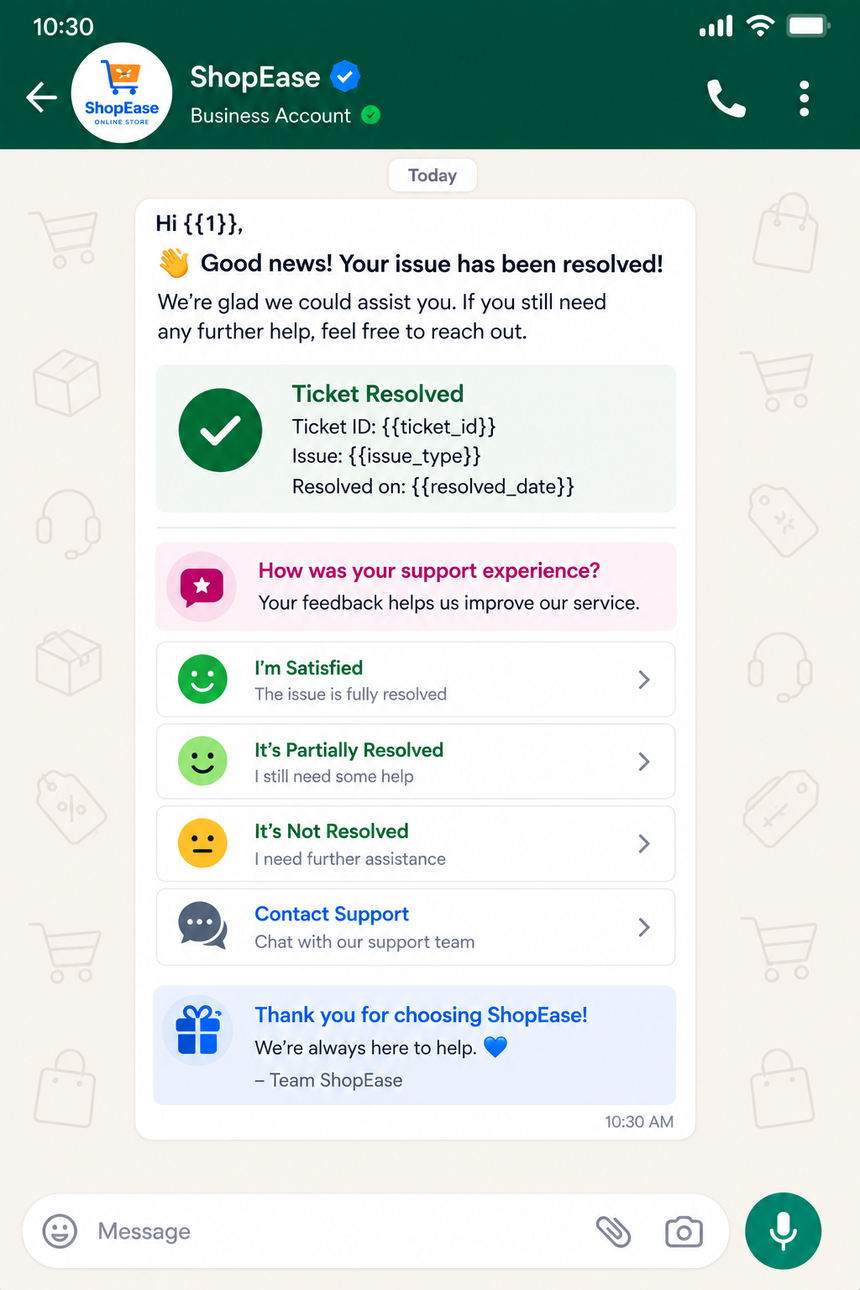
Why Issue Resolution Templates for Ecommerce Matters
Every delay in resolving a support issue impacts the bottom line—repeat purchases, reviews, and even ad efficiency. Consistent, well-structured WhatsApp messages reduce back-and-forth, clarify next steps, and make customers feel heard.
- Reduce friction: Use structured prompts and buttons to gather required details in one go.
- Build trust: Acknowledge the issue, set expectations, and update proactively.
- Scale efficiently: Standardize replies for the top 10 issues without sacrificing empathy.
- Capture proof: Request photos, receipts, and delivery notes within the chat to speed investigations.
- Drive retention: Quick resolutions turn a negative moment into a loyalty boost.
Example: A customer reports a missing package. Instead of emailing a form, send a WhatsApp template that asks for order ID, delivery address confirmation, and a photo of the door tag if available—plus two quick-reply buttons for "Resend" or "Refund." Your team gets all the context immediately, and the customer feels in control.
Benefits of WhatsApp Business API
WhatsApp is designed for speed and clarity—the perfect channel for ecommerce issue resolution. With Direct7 Networks’ WhatsApp Business API, you combine automation and human touch to resolve cases faster.
- Reliable delivery: Message receipts and high open rates keep customers informed in real time.
- Template workflows: Pre-approved message templates speed outreach and re-engagement.
- Interactive elements: Use quick-reply buttons and call-to-action links to cut steps.
- Rich media support: Collect photos or share return labels, receipts, and how-to clips right in chat.
- Agent handoff: Route complex cases from automation to live agents smoothly.
- Compliance and security: Maintain opt-in and data standards while scaling conversation volumes.
Pair these features with your ecommerce stack—order management, logistics, and helpdesk—so each template pulls the right context and updates customers automatically as statuses change.
Best Practices
Templates are powerful when they feel human and remove uncertainty. Use these actionable best practices to improve resolution speed and satisfaction.
- Lead with empathy: Start with a sincere apology and acknowledgment of the issue.
- Ask once, clearly: Request all necessary details in a single message (order ID, photos, contact, preferred outcome).
- Offer choices: Provide two to three clear options via buttons (refund, resend, store credit) to reduce decision friction.
- Set timelines: Share what happens next and when the customer can expect an update.
- Automate status updates: Trigger messages at key stages (investigation started, label issued, refund processed).
- Escalate seamlessly: Detect frustration keywords and route to a live agent promptly.
- Localize content: Translate and adapt templates by market, including currency and return policies.
- Track conversation health: Monitor first response time, resolution time, and deflection to automation to optimize templates.
Review templates regularly based on transcripts and agent feedback, then A/B test phrasing and button labels to reduce clarifying questions.
Ready-to-use WhatsApp Templates
Plug the following Issue Resolution Templates for Ecommerce into your Direct7 Networks WhatsApp Business API setup. Replace variables like {{1}} with dynamic data from your store or helpdesk.
- 1) Missing Package Acknowledgment & Next Steps
Hi {{1}}, we’re sorry your order {{2}} hasn’t arrived. To help right away, please confirm your delivery address and share any delivery notes (e.g., gate code). If you have a door tag/photo, reply here. Choose your preferred resolution below.Buttons: "Resend Item", "Refund", "Talk to Agent" - 2) Wrong/Damaged Item Resolution
Hi {{1}}, thanks for flagging the issue with order {{2}}. Please reply with a photo of the item and packaging, plus whether you prefer a replacement or refund. We’ll act as soon as we receive your reply.Buttons: "Replacement", "Refund", "Return Label" - 3) Refund Progress Update
Good news, {{1}}. Your refund for order {{2}} has been initiated to {{3}}. Depending on your bank, it may take a short time to reflect. We’ll notify you when it is completed. Need help?Buttons: "Track Refund", "Talk to Agent" - 4) Return Instructions & Label
Hi {{1}}, your return for order {{2}} is approved. Use the label here: {{3}}. Please drop the package at {{4}} within {{5}}. We’ll process your refund/replacement once it scans at the carrier.Buttons: "Find Drop-off", "Extend Window", "Agent Help" - 5) Account Access/Checkout Error Fix
Sorry about the trouble logging in, {{1}}. Here’s a secure link to reset your password: {{2}}. If you were checking out, your cart is saved here: {{3}}. Reply if the issue continues.Buttons: "Reset Now", "Need Help"
Tips for implementation:
- Submit templates for approval through the WhatsApp Business API before large-scale use.
- Map variables to your OMS/CRM fields (e.g., {{2}} = order_id, {{3}} = payment method).
- Use language codes per market and maintain localized policy copy for returns.
- Attach documents (PDF label) or short clips (how to re-pack) when helpful.
- Log every template send and outcome to refine your flows over time.
Why Choose Direct7 Networks
Direct7 Networks provides the infrastructure, tooling, and expertise to operationalize WhatsApp support at scale—without losing the human touch your brand is known for.
- Quick onboarding: Get production-ready with guided template approval and channel setup.
- Robust APIs and docs: Integrate with your ecommerce platform, OMS, WMS, and helpdesk.
- Global delivery: Reach customers reliably across markets with regional routing and compliance.
- Smart automation: Orchestrate flows for returns, refunds, and replacements with event-driven triggers.
- Unified agent experience: Blend bot-led triage with live agent chats and conversation history.
- Insightful analytics: Track response times, outcomes, and customer sentiment to optimize templates.
With Direct7 Networks, your team spends less time collecting details and more time delighting customers. The result: cleaner operations, faster resolutions, and stronger lifetime value.
Conclusion
Ecommerce support is judged in minutes, not days. By using Issue Resolution Templates for Ecommerce through Direct7 Networks’ WhatsApp Business API, you deliver clarity, speed, and empathy at scale. Standardize what can be standardized, then empower agents to personalize and escalate when needed.
Ready to resolve issues faster and keep customers coming back? Start free on Direct7 Networks or book a demo to see how templates, automation, and live support fit your stack.
Frequently Asked Questions
Do I need to get WhatsApp templates approved before using them?
Yes. Message templates used for proactive outreach or re-engagement require WhatsApp approval. Direct7 Networks guides you through naming, content formatting, and variable use to speed approval and reduce rejections.
How do I personalize Issue Resolution Templates for Ecommerce without rewriting them each time?
Use variables like {{1}} for customer name, {{2}} for order ID, and {{3}} for links or payment methods. Connect these fields to your CRM or ecommerce platform so each message is populated automatically at send time.
Can I include buttons and links in WhatsApp templates?
Yes. Templates can include quick-reply buttons or call-to-action links. For issue resolution, common buttons include Resend, Refund, Talk to Agent, and Track Refund to reduce friction and guide next steps.
What kinds of media can I send to speed up resolutions?
You can send photos, PDFs, and short clips. Many brands use photos to verify damage, PDFs for return labels, and quick how-to videos for setup or troubleshooting. Media in chat removes the need for email attachments.
How should I handle cases that automation cannot solve?
Design escalation rules that hand off complex or sensitive cases to agents. Trigger a transfer when a customer requests an agent, when certain keywords appear, or when the issue has multiple back-and-forth messages without resolution.
Is WhatsApp suitable for international support?
Yes. With Direct7 Networks, you can route messages globally, localize templates by language, and present market-specific return windows or carrier options, all while maintaining brand consistency.

Ready to resolve issues faster?
Launch WhatsApp support with Direct7 Networks and turn problems into loyalty.