


Ticket Creation Templates for Ecommerce That Convert
Ecommerce brands win or lose customers at the support desk. When issues surface, your buyers want fast, clear answers—without repeating themselves or waiting in a queue. Ticket Creation Templates for Ecommerce help you standardize and speed up the first mile of support: capturing the right details, routing to the right team, and setting clear expectations. With Direct7 Networks and the WhatsApp Business API, you can turn WhatsApp into a responsive ticketing front door that scales from a handful of daily chats to peak-season surges.
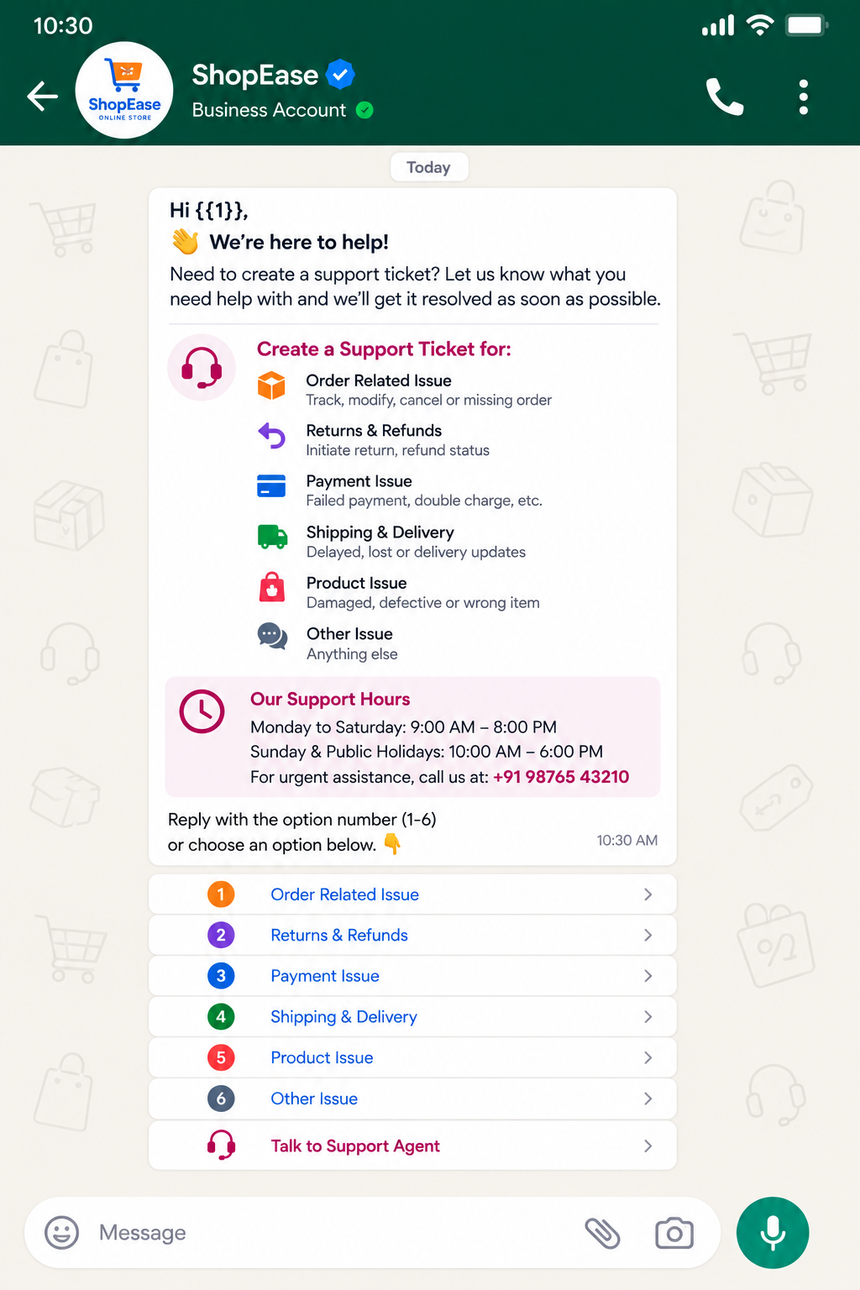
Why Ticket Creation Templates for Ecommerce Matters
Every delayed response risks a lost sale or a chargeback. Ticket Creation Templates for Ecommerce help you automate consistent intake, so you avoid back-and-forth, reduce handle time, and preserve customer trust. Standardized templates ensure you capture the essentials—order ID, item, issue type, preferred resolution—on the first message. That means faster triage, clearer SLAs, and fewer escalations.
- Reduce friction: ask for only what you need, with simple quick-reply choices.
- Route smarter: label tickets by issue type (delivery, returns, payments) the moment they are created.
- Increase transparency: confirm receipt, share reference numbers, and outline next steps in the same thread.
- Handle peaks: scale intake during sales, holidays, or launches without drowning agents.
- Keep it personal: reference the customer’s name and order for a human touch.
Common ecommerce scenarios where templates shine include:
- “My order hasn’t arrived.”
- “The item came damaged.”
- “I want to return or exchange.”
- “Payment failed but I was charged.”
- “I need to update my delivery address.”
Benefits of WhatsApp Business API for Ticket Creation
The WhatsApp Business API, delivered by Direct7 Networks, transforms WhatsApp into a robust support channel tailored for ecommerce operations. Unlike ad-hoc messaging, the API lets you automate, orchestrate, and measure the entire intake experience.
- Structured templates: pre-approved messages ensure compliance and predictable formatting.
- Interactive components: quick replies and list messages capture issue categories in one tap.
- Media support: request photos or videos of damaged items directly in the thread.
- Automated routing: apply tags and route to returns, payments, or shipping teams based on customer input.
- System integrations: send tickets to your helpdesk or order system via webhooks and APIs.
- Reliable delivery: enterprise-grade messaging and fallbacks keep conversations flowing during traffic spikes.
- Security and privacy: encryption in transit and opt-in tooling help you stay compliant.
With Direct7 Networks, you can move from scattered DMs to an accountable, scalable process that starts on WhatsApp and syncs seamlessly with your back office.
Best Practices for Ticket Creation Templates for Ecommerce
A thoughtful template is short, clear, and frictionless. Use these proven practices when you design Ticket Creation Templates for Ecommerce on WhatsApp:
- Start with identity: greet the customer by name when available and reference the store name to build trust.
- Request essentials first: order ID, issue type, and preferred resolution. Ask for proof (photo) only when necessary.
- Offer tap-to-respond: present issue types as quick replies to reduce typing and errors.
- Confirm and educate: provide a ticket number and outline the next step or ETA right away.
- Keep it short: use one call to action per message and avoid long paragraphs.
- Localize: match the customer’s language and time zone when possible.
- Respect consent: ensure opt-in before sending proactive notifications or updates.
- Enable handover: let customers escalate to a human agent with one tap.
- Close the loop: after resolution, invite quick CSAT feedback to improve processes.
- Test and iterate: A/B test phrasing and button labels to improve completion rates.
Ready-to-use WhatsApp Templates
Copy, paste, and adapt these five Ticket Creation Templates for Ecommerce for your WhatsApp Business API setup with Direct7 Networks. Replace placeholders like {{1}} with dynamic variables from your CRM or store.
1) New Support Ticket Intake
Hi {{1}}, thanks for contacting {{2}}. Let’s get this resolved fast. Please choose your issue: - Delivery delay - Damaged/defective item - Return or exchange - Payment or refund - Account or other Reply with your choice or tap a button. Then share your Order ID (e.g., #12345).
Tip: Implement quick replies for the five issue types to minimize typing.
2) Order Not Received
Thanks, {{1}}. We’re opening a ticket for a delivery issue. Please confirm: - Order ID: {{2}} - Expected delivery date (if known): {{3}} Optional: Send a message like “TRACKING” and we’ll fetch the latest tracking update.
Automation: Map “TRACKING” to a webhook that pulls the carrier status and adds it to the ticket.
3) Return or Exchange Request
We can help with your return/exchange. Please select one: - Start a return - Request an exchange Required details: - Order ID: {{1}} - Item/variant: {{2}} - Reason (e.g., size, color, defect): {{3}} We’ll create ticket {{4}} and send the next steps.
Note: If photo proof is needed, follow up with a separate message asking for 1–2 clear images.
4) Payment or Refund Issue
Let’s sort out your payment concern. Pick one: - Payment failed - Charged but no order - Refund status Please share: - Order/transaction ID: {{1}} - Payment method (card/UPI/wallet): {{2}} We’ll log ticket {{3}} and update you shortly.
Routing: Auto-tag as PAYMENT and route to the billing queue in your helpdesk.
5) Damaged or Defective Item
Sorry to hear that, {{1}}. We’ll make this right. Please provide: - Order ID: {{2}} - Item name/variant: {{3}} - Brief description of damage: {{4}} Kindly attach 1–2 photos so we can speed up the resolution. Ticket ref: {{5}}.
Best practice: Set media size limits and confirm receipt of each attachment automatically.
Why Choose Direct7 Networks for WhatsApp Ticketing
Direct7 Networks helps ecommerce teams launch, scale, and optimize Ticket Creation Templates for Ecommerce with the WhatsApp Business API—without heavy lifting.
- Fast template approval: get compliant message templates live quickly.
- Plug-and-play integrations: connect WhatsApp to popular helpdesks and ecommerce platforms via APIs and webhooks.
- Advanced automation: auto-tagging, routing rules, and event triggers for order, shipment, and refund updates.
- Operational reliability: resilient messaging pipelines for sale events and seasonal peaks.
- Expert guidance: solution architects who understand ecommerce workflows from checkout to returns.
Whether you’re a boutique DTC brand or a multi-store marketplace, Direct7 Networks provides the platform and expertise to turn WhatsApp into your most efficient support intake channel.
Conclusion
Customers expect instant, convenient support. With Ticket Creation Templates for Ecommerce powered by Direct7 Networks’ WhatsApp Business API, you’ll capture the right details, route issues automatically, and resolve faster—without losing the personal touch. Start building templates that reduce handling time and boost satisfaction today.
Start free or book a demo to see how quickly you can launch.
Frequently Asked Questions
What are Ticket Creation Templates for Ecommerce?
They are pre-approved WhatsApp messages that standardize support intake. Templates ask the right questions (order ID, issue type, preferred outcome) so your system can instantly create and route a support ticket.
How does the WhatsApp Business API differ from using WhatsApp on a phone?
The API enables automation, integrations, and multi-agent workflows. It’s built for scale, compliance, and reliability—so your team can manage thousands of conversations with consistent experiences and measurable outcomes.
Can Direct7 Networks connect WhatsApp to my helpdesk?
Yes. Using APIs and webhooks, Direct7 Networks can push intake data into popular helpdesks and ecommerce systems. You can tag, categorize, and assign tickets to the right queue automatically.
Do I need template approval before sending messages?
For outbound or re-engagement messages, yes—templates must be approved. Direct7 Networks helps you draft and submit templates so they meet WhatsApp’s policies and get live quickly.
How should I measure success?
Track first-response time, ticket creation completion rate, time to resolution, and CSAT. You can also monitor drop-offs within templates and optimize wording, button labels, or data requests.

Ready to streamline support on WhatsApp?
Launch ticket creation templates that reduce handling time and improve CSAT with Direct7 Networks’ WhatsApp Business API.