


Ticket Update Templates for Ecommerce
Customer care is won or lost in the moments after a shopper asks for help. Ticket Update Templates for Ecommerce make those moments predictable, timely, and reassuring. When a customer opens a support ticket about a missing parcel, a sizing exchange, or a payment error, they expect clear, consistent updates until resolution. That is where Direct7 Networks and the WhatsApp Business API shine—turning updates into a proactive experience your customers will appreciate and remember.
As part of the broader category of customer support templates for ecommerce, WhatsApp ticket messages help you standardize responses, reduce manual typing, and keep your brand voice uniform. They also speed up agent workflows and minimize back-and-forth, so you can solve more cases without compromising quality. Whether you run a DTC storefront, a marketplace shop, or a subscription brand, well-structured templates help you send the right message at the right time, all while staying compliant with WhatsApp policies.
Why Ticket Update Templates for Ecommerce Matters
Shoppers want transparency. When an issue arises, silence or vague replies increase anxiety and refunds. Ticket Update Templates for Ecommerce provide a repeatable way to confirm receipt, share progress, request details, and close the loop—all on a channel customers actively use. Templates remove inconsistency and typing errors, accelerate agent response, and ensure legal and brand guidelines are always followed.
- Set expectations early with instant acknowledgements and ticket IDs.
- Lower inbound volume by pushing self-serve links, FAQs, and tracking pages.
- Shorten resolution time with clear requests for missing information.
- Build trust with timestamped milestones and accurate status labels.
- Collect feedback at closure to improve processes and agent coaching.
Practical examples include: confirming a return authorization within seconds, sending a courier delay update as soon as it is detected, or escalating a payment discrepancy with a precise list of documents needed. Every message is clear, auditable, and consistent across teams and time zones.
Benefits of WhatsApp Business API
The WhatsApp Business API, delivered by Direct7 Networks, brings scale and structure to your support messaging. Unlike ad hoc texting, the API is designed for reliability, automation, and compliance. You can send approved ticket templates instantly, personalize them with order data, and trigger them from your helpdesk or ecommerce platform as events occur.
- Automation: Trigger updates on status changes—opened, in progress, awaiting info, resolved—without manual agent work.
- Personalization: Merge customer names, ticket IDs, and order details into every template safely and consistently.
- Interactive features: Use quick replies and links to drive next steps, such as uploading photos or confirming an address.
- Consistency: Centralize message templates so every agent sends compliant, on-brand updates every time.
- Security: Verified business profiles and server-to-server authentication support enterprise-level operations.
- Integrations: Connect your CRM, order management, and helpdesk to keep data flowing and context intact.
With Direct7 Networks, you gain robust delivery infrastructure and pragmatic developer tooling so your team can launch faster and run ticket updates at scale, globally.
Best Practices
Use these practices to get the most from Ticket Update Templates for Ecommerce on WhatsApp:
- Be specific: Include the ticket ID, affected order, and clear next steps in every update.
- Set timing rules: Send the acknowledgement right away, status milestones as they happen, and a closure message once resolved.
- Keep it short: Use concise sentences and scannable structure so customers grasp updates at a glance.
- Personalize safely: Merge only necessary data; avoid exposing sensitive information in chat.
- Offer self-service: Link to tracking pages, return portals, and FAQs when appropriate.
- Ask for what you need: When requesting documents or photos, list exactly what to provide and acceptable formats.
- Respect preferences: Obtain consent where required and make opting out simple and clear.
- Use a helpful tone: Be empathetic, avoid jargon, and confirm ownership of the issue.
- Escalate gracefully: If delays occur, acknowledge them, provide reasons when known, and give a revised timeline.
- Measure and iterate: Track response times, resolution rates, and CSAT to refine templates regularly.
Ready-to-use WhatsApp Templates
Copy, adjust placeholders, and submit for WhatsApp template approval via Direct7 Networks.
1) Ticket Acknowledgement
Hi {{customer_name}}, we’ve created support ticket #{{ticket_id}} for {{issue_summary}}. Our team is reviewing and will update you here. View/Reply: {{ticket_link}}
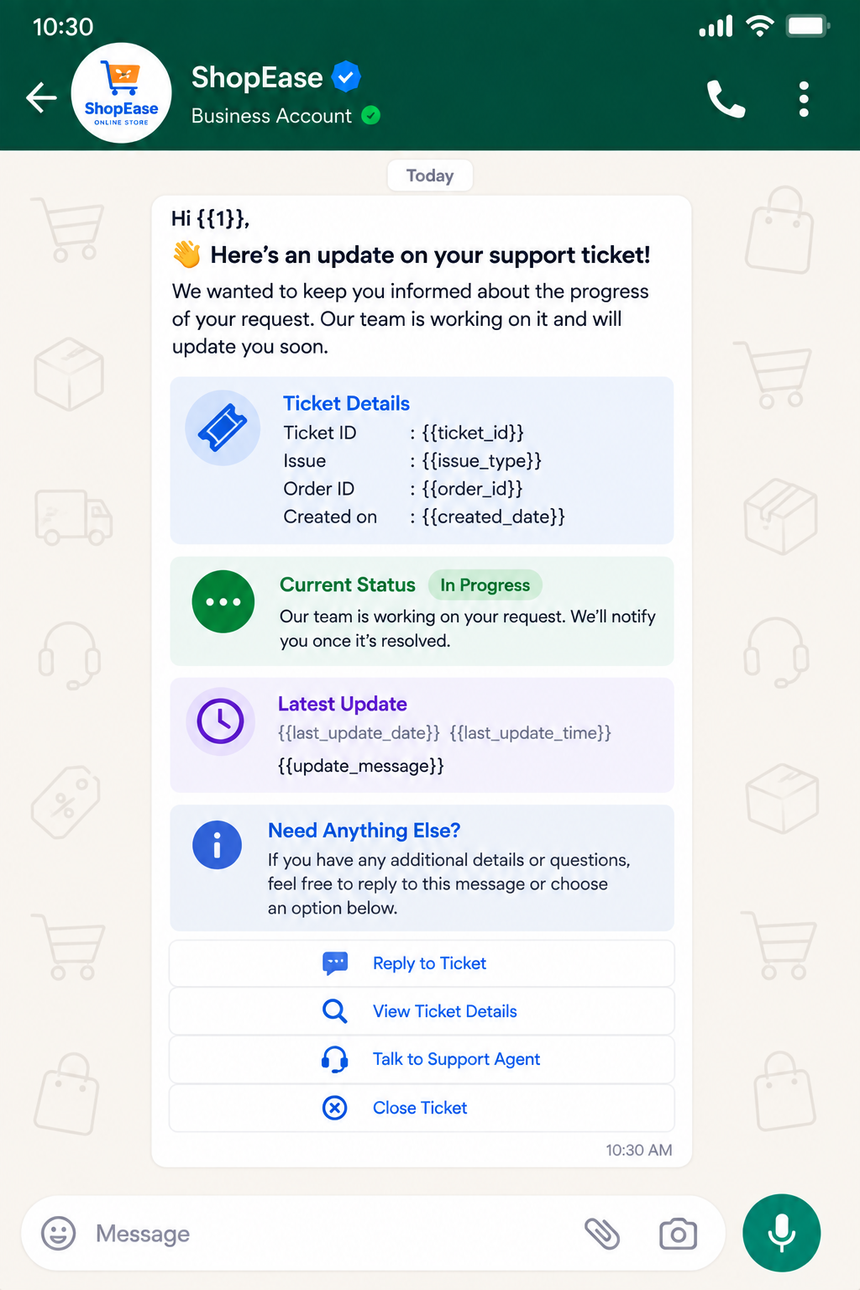
2) Status Update: In Progress
Update on ticket #{{ticket_id}}: we’re investigating your {{issue_type}} with {{carrier_or_team}}. Next update by {{next_update_time}}. You can add notes anytime: {{ticket_link}}
3) Need More Information
We’re close to resolving ticket #{{ticket_id}}, but we need a bit more info. Please send: {{required_items}}. Reply with files or use this link: {{upload_link}}. Thank you!
4) Delay or Escalation Notice
Heads up on ticket #{{ticket_id}}: there’s a delay due to {{reason}}. We’ve escalated to {{escalation_team}}. New ETA: {{revised_eta}}. Thanks for your patience—updates will follow here.
5) Resolution & Feedback
Good news! Ticket #{{ticket_id}} is resolved: {{resolution_summary}}. If anything feels off, reply to reopen within {{reopen_window}}. Mind rating your experience? {{feedback_link}}
Tip: Add localized versions for key markets, and map each template to specific triggers in your helpdesk or order system for zero-manual routing.
Why Choose Direct7 Networks
Direct7 Networks provides a dependable, developer-friendly WhatsApp Business API built for ecommerce support teams. From template management to delivery insights, Direct7 helps you launch fast and stay efficient as volume grows.
- Fast go-live: Clear documentation, SDKs, and a straightforward onboarding process.
- Scalable infrastructure: Handle spikes such as seasonal sales or launch days with confidence.
- Template governance: Centralized approvals and version control keep messages compliant and on-brand.
- Workflow-ready: Webhooks and APIs to sync tickets, statuses, and notes across your tech stack.
- Global reach: Deliver updates reliably to customers worldwide with a verified business identity.
- Real support: Solution engineers who understand ecommerce use cases and can guide best practices.
Pair your helpdesk and order data with Direct7 Networks’ WhatsApp Business API to build a reliable ticket update engine that delights customers and reduces agent strain.
Conclusion
Ticket Update Templates for Ecommerce turn reactive service into proactive communication. With Direct7 Networks and the WhatsApp Business API, you can acknowledge issues instantly, keep shoppers informed, and close tickets with confidence—all while lowering inbound workload. Standardize your messaging, personalize at scale, and measure outcomes that truly matter to your business and your customers.
Ready to deliver faster, clearer support updates on WhatsApp? Start with Direct7 Networks today.
Frequently Asked Questions
What are Ticket Update Templates for Ecommerce?
They are pre-approved WhatsApp message formats used to acknowledge tickets, share status changes, request missing information, and confirm resolution. Templates keep messages consistent, compliant, and easy to automate across support workflows.
How do templates integrate with my helpdesk or ecommerce platform?
Using Direct7 Networks’ WhatsApp Business API, you can trigger templates based on system events (e.g., ticket created, agent note added, shipment scanned). Webhooks and APIs let you push ticket IDs, order details, and links directly into each outgoing message.
Do I need approval for WhatsApp templates?
Yes. WhatsApp reviews templates to ensure they meet policy and formatting guidelines. Direct7 Networks helps you submit, track, and manage approvals, and advises on wording to improve approval likelihood.
Can I include order or tracking links in ticket updates?
Absolutely. You can safely include links to tracking pages, return portals, or your help center. Keep URLs clear, and provide a short description of what customers can expect after tapping the link.
How do I handle customer consent and opt-outs?
Follow WhatsApp’s consent policies and your local regulations. Obtain opt-in through your site, checkout, or account settings, and allow customers to opt out at any time. Direct7 Networks can help you set up routing that respects preferences automatically.
What metrics should I track for ticket messages?
Monitor response times, resolution rates, follow-up volume, link clicks, and customer satisfaction after closure. Use these insights to refine templates and automate more steps without losing the human touch.

Deliver clearer ticket updates on WhatsApp
Launch with Direct7 Networks’ WhatsApp Business API to automate, personalize, and resolve ecommerce tickets faster.