


Loyalty Program Templates for Ecommerce
Loyalty programs are a proven way for ecommerce brands to drive repeat purchases, strengthen customer relationships, and increase lifetime value. WhatsApp, with its high open and response rates, is the perfect channel to deliver timely, personalized loyalty updates that customers appreciate and act on. This page explains how to use Loyalty Program Templates for Ecommerce to automate critical touchpoints, boost engagement, and scale your rewards strategy with D7 WhatsApp API.
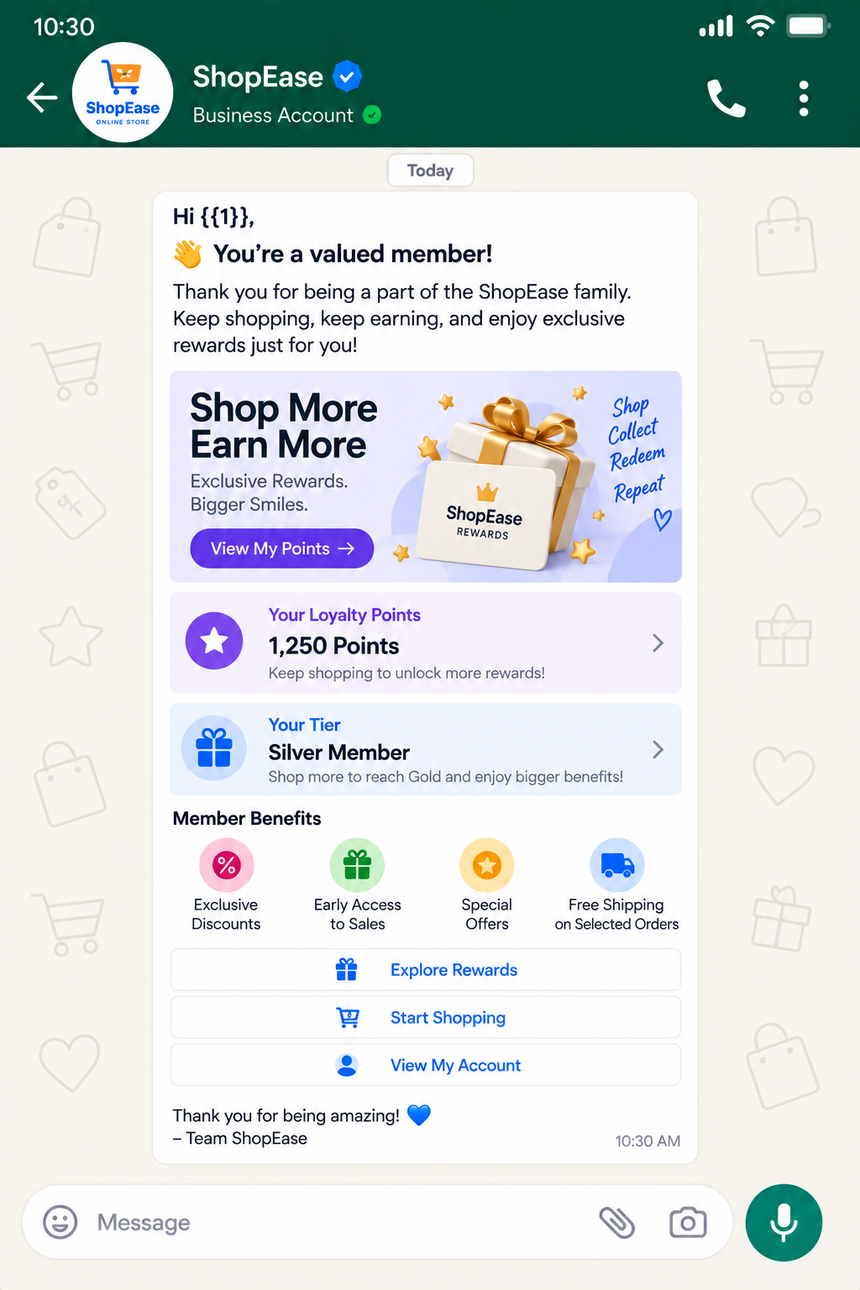
What Are Loyalty Program Templates for Ecommerce?
Loyalty Program Templates for Ecommerce are pre-approved WhatsApp message formats designed for recurring, high-value communications such as points balances, tier changes, rewards issuance, and expiry reminders. Templates include variables (for names, amounts, links), can support media and interactive buttons, and are optimized for compliance with WhatsApp Business Messaging policies. Using templates accelerates approvals, ensures consistency, and enables automated, event-driven messaging at scale.
Why Businesses Use Loyalty Program Templates for Ecommerce
- Increase retention and repeat purchases with timely nudges tied to rewards.
- Deliver clear, personalized value updates that customers want to receive.
- Automate lifecycle messaging (enrollment, accrual, redemption, expiry) to reduce manual effort.
- Maintain brand consistency and policy compliance with pre-approved content.
- Accelerate campaign launches and testing with reusable, modular templates.
- Improve analytics and A/B testing through standardized message structures.
Common Messaging Scenarios
- Enrollment welcome: Confirm signup and explain how to earn and redeem.
- Points accrual confirmation: Notify customers after a purchase or action.
- Balance and milestone alerts: Share current points and progress to next reward.
- Tier upgrade/downgrade: Celebrate achievements or clarify changes and benefits.
- Voucher or reward issuance: Send codes, links, and redemption instructions.
- Points expiry reminders: Prevent loss with timely, multi-touch nudges.
- Win-back campaigns: Re-engage inactive members with tailored incentives.
- Referral updates: Track referral status, bonus points, and rewards earned.
- Post-redemption follow-up: Request feedback and suggest next actions.
- Policy or benefit updates: Communicate changes to terms and perks.
WhatsApp Template Examples
1) Points Balance Update Purpose: Utility — keep members informed and motivated.
Body: Hi {{1}}, you currently have {{2}} points in {{3}}. Earn just {{4}} more points to unlock your next reward. Redeem or shop here: {{5}} Buttons: View Rewards | Shop Now
2) Tier Upgrade Congratulations Purpose: Marketing — celebrate milestones and highlight perks.
Body: Great news, {{1}}! You’ve been upgraded to {{2}} tier. Enjoy {{3}}% extra points and perks like {{4}}. Explore your new benefits: {{5}} Buttons: See Benefits | Start Shopping
3) Points Expiry Reminder Purpose: Utility — prevent point loss and prompt redemption.
Body: Hi {{1}}, {{2}} of your points will expire on {{3}}. Redeem them before they’re gone. Choose a reward or apply at checkout: {{4}} Buttons: Redeem Now | Browse Rewards
4) Birthday Reward Voucher Purpose: Marketing — deliver personalized, time-bound offers.
Body: Happy Birthday, {{1}}! Celebrate with a {{2}} off voucher: {{3}}. Valid until {{4}}. Apply at checkout or tap below to use now. Buttons: Use Voucher | Shop New Arrivals
5) Inactive Member Win‑Back Purpose: Marketing — re-engage dormant members with clear value.
Body: We miss you, {{1}}. You still have {{2}} points waiting. Enjoy an extra {{3}}% bonus on your next order before {{4}}. Discover picks you’ll love: {{5}} Buttons: Claim Bonus | Explore Picks
Best Practices
- Obtain explicit WhatsApp opt-in and honor user preferences.
- Lead with value: balance, reward, deadline, or benefit within the first line.
- Personalize with variables (name, points, tier) and relevant product links.
- Use buttons and deep links to streamline redemption and shopping flows.
- Time messages to behavior and timezone; avoid excessive frequency.
- A/B test copy, call-to-action, and send windows to optimize conversion.
- Localize content (language, currency, date format) to improve clarity.
- Keep templates concise and compliant; avoid spammy phrasing or ALL CAPS.
- Chain utility and promotional value (e.g., balance + curated picks) responsibly.
- Track outcomes (opens, clicks, redemptions, repeat purchases) and iterate.
Why Choose D7 WhatsApp API
- Fast onboarding and guided template approvals to go live quickly.
- Simple REST API and SDKs with support for variables, media, and interactive buttons.
- Event-driven automation with webhooks for enrollments, purchases, and redemptions.
- Reliable delivery with scalable infrastructure and smart retries.
- Real-time analytics and dashboards to track engagement and conversions.
- Role-based access and audit logs for governance and compliance.
- Enterprise-grade security, data privacy controls, and regional hosting options.
- 24/7 technical support and solution architects to optimize performance.
Frequently Asked Questions
Do I need WhatsApp Business API access to send loyalty templates?
Yes. Templates are approved and sent via the WhatsApp Business API. D7 streamlines registration, template submission, and go-live.
How do I personalize messages for each member?
Use template variables (e.g., {{1}} for name, {{2}} for points). D7’s API lets you inject values per recipient and manage localization.
Can I include media or buttons in loyalty templates?
Yes. Templates can include media (images, documents) and interactive buttons (URL or call-to-action) subject to WhatsApp policies.
How long does template approval take?
Most templates are reviewed within minutes to a few hours. D7 provides best-practice guidance to reduce rejections and speed approvals.
What KPIs should I track for loyalty messaging?
Monitor delivery, read rates, clicks, redemptions, repeat purchase rate, and revenue per message. Use A/B tests to improve continuously.

Start Sending WhatsApp Templates with D7
Create, manage, and automate WhatsApp templates using D7 WhatsApp API.