
Integrating WhatsApp with CRM and ERP Systems
How APIs connect WhatsApp to customer data and business workflows — explained simply, with practical steps you can use tomorrow.
People live inside messaging apps. For millions of customers, WhatsApp is the easiest and most trusted way to talk to a brand. This makes WhatsApp far more than a marketing channel — it’s quickly becoming the primary interface for support, sales, and transactional interactions.
But a message on its own is just a chat.The real business value emerges when WhatsApp conversations are connected to your operational systems, such as:
- CRM (Customer Relationship Management): stores customer history and preferences.
- ERP (Enterprise Resource Planning): manages orders, inventory, and billing.
- Ticketing or Helpdesk systems: handle service requests and escalation.
When WhatsApp is linked to these systems:
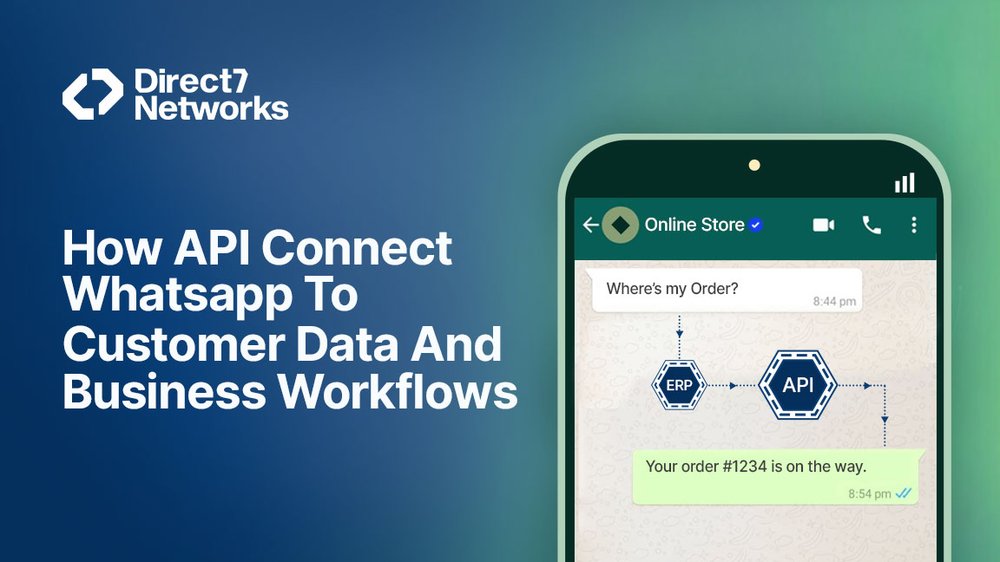
A simple customer message — “Where’s my order?” — can trigger a real-time lookup in the ERP, create a support ticket in the CRM, and route the task automatically to the right team.
That’s the essence of WhatsApp integration — it turns chat into action.
How the Pieces Fit Together (The Practical Stack)
1. WhatsApp Channel Layer
- This is your WhatsApp Business Account — either Cloud API (managed by Meta) or on-premise API.
- It handles:
- Sending and receiving messages.
- Managing templates, media, and interactive elements (buttons, lists, carousels).
- Pushing inbound message events (like user replies) to your server or middleware.
Explore more about WhatsApp API here
2. Integration Layer (Middleware / API Orchestration)
- This is the “brain” between WhatsApp and your internal systems.
- It typically includes:
- Webhooks to receive WhatsApp events in real time.
- Middleware services or iPaaS platforms (like Zapier, Make, or custom Node.js/Python services).
- Business logic to interpret messages, enrich data, and route actions.
Key functions:
- Parse message intent (e.g., “Track order 1234”).
- Query CRM or ERP for relevant data.
- Apply workflow rules (refunds, order updates, reminders).
- Send structured replies or trigger next actions.
Try WhatsApp API Integration at https://d7networks.com/integrations/
3. Core Systems (CRM / ERP / Backends)
- These are your systems of record, where verified data lives:
- Customer profiles, purchase history → in CRM.
- Orders, inventory, invoices → in ERP.
- Policies, FAQs → in Knowledge Bases.
- The integration layer reads and writes to these systems through secure APIs, ensuring real-time synchronization.
Example: Typical End-to-End Flow
| Step | Process | System Involved |
|---|---|---|
| 1. | Customer sends “Track order 1234” via WhatsApp. | |
| 2. | Message is received by your webhook endpoint. | Channel Layer |
| 3. | Middleware detects “Track order” intent and queries ERP. | Integration Layer + ERP |
| 4. | ERP returns live order status. | ERP |
| 5. | Middleware formats a friendly WhatsApp reply (e.g., “Your order will arrive today by 4 PM”). | Integration Layer |
| 6. | Bot sends messages back via WhatsApp API. | Channel Layer |
| 7. | Middleware logs the conversation in CRM and creates follow-up if needed. | CRM |
Common Integration Approaches and When to Use Each
There’s no one-size-fits-all way to connect WhatsApp with CRM and ERP systems.
Your ideal approach depends on your business complexity, technical maturity, and how much control you need over customization.
Below are the four main integration models — and when each makes the most sense.
Native CRM / ERP Connectors
What It Is:
Many enterprise platforms now include built-in WhatsApp modules (e.g., Salesforce Digital Engagement, HubSpot Conversations, Zoho, SAP C4C).
Why It Works:
- Fastest to deploy — minimal coding required.
- Provides agent-friendly interfaces and pre-configured workflows.
- Handles message templates, routing, and opt-out management out of the box.
When to Use:
Choose this if your CRM/ERP already supports WhatsApp and your business processes fit within its native configuration. Avoid it if you need deep customization or external system orchestration.
2. Middleware / Integration Platforms (iPaaS)
What It Is:
Platforms like Make, Zapier, and ActiveCampaign act as a bridge between WhatsApp and your backends.
They provide drag-and-drop automation and pre-built connectors for popular systems (Salesforce, HubSpot, Shopify, NetSuite, etc.).
Why It Works:
- Accelerates integration without heavy engineering.
- Ideal for non-developers or operations teams.
- Supports visual flow orchestration and quick iteration.
When to Use:
Use when you want speed, flexibility, and low engineering overhead.
Perfect for small to mid-sized teams that prioritize time-to-market over full control.

3. Custom API Integration
What It Is:
A fully custom build using webhooks, REST APIs, and backend logic to connect WhatsApp with CRM, ERP, or billing systems.
Why It Works:
- Provides total control over architecture, performance, and security.
- Supports complex workflows (multi-step approvals, data enrichment, audit trails).
- Integrates seamlessly with proprietary or legacy systems.
When to Use:
Ideal for enterprises or regulated sectors needing:
- Advanced performance tuning.
- Sensitive data handling (finance, healthcare).
- Complex two-way transactions (e.g., refunds, order changes).
Expect higher engineering effort but maximum flexibility and compliance control.
4. Hybrid Approach
What It Is:
Combines middleware for messaging orchestration with custom microservices for deeper CRM/ERP writes or validations.
Why It Works:
- Best of both worlds: fast flow design + custom logic where needed.
- Easier to maintain than full-code builds while retaining flexibility.
When to Use:
Perfect for growing organizations scaling from basic automation to enterprise-grade workflows.
What Integrations Actually Automate (Real Use Cases)
Once your WhatsApp layer connects to business systems, automation can cover the entire customer lifecycle — from lead to billing.
1. Lead Capture → CRM
- How it works: Customer chats generate lead records in CRM with name, tags, and conversation source.
- Value: Sales teams get instant visibility and assigned tasks — no manual entry.
2. Order Confirmation & Tracking → ERP
- How it works: WhatsApp bots automatically confirm purchases, update shipping status, and provide live tracking using ERP data.
- Value: Reduces customer “Where’s my order?” queries and improves transparency.
3. Support Ticket Creation & Context → CRM
- How it works: When a bot can’t resolve an issue, it creates a CRM ticket with the full chat transcript and user profile.
- Value: Agents start with context, avoiding repetitive questioning.
4. Inventory Checks & Reservations → ERP
- How it works: Customers can check stock in real time; the ERP temporarily reserves inventory while they complete checkout.
- Value: Fewer lost sales from stockouts or delays.
5. Billing and Receipts → Finance Systems
- How it works: Chat-triggered invoicing, payment links, and confirmation updates sync directly with accounting or billing modules.
- Value: Automates the post-sale process and improves accuracy.
6. Field Operations & Workflows
- How it works: Dispatch or maintenance teams receive WhatsApp alerts tied to ERP work orders (e.g., job assignments, status updates).
- Value: Improves field coordination, SLA compliance, and visibility.
Summary:
Every integration should aim to remove manual steps between WhatsApp and core systems. When designed well, it doesn’t just answer questions — it drives the workflow.
Design and Data Considerations You Must Plan For
A strong WhatsApp–CRM/ERP integration is not just about connecting APIs. It’s about data discipline, reliability, and trust. Poor data mapping or missed security controls can break workflows — or worse, expose sensitive information.
Below are the seven key design and data pillars you must plan for before going live.
1. Data Mapping
What It Is:
Mapping defines how customer and transaction data moves between systems — from WhatsApp messages to CRM/ERP records.
Best Practices:
- Decide which fields flow in and out of chat (e.g., customer name, order ID, order status, SLA).
- Keep mappings consistent and versioned so updates don’t break alignment.
- Validate data types and null-handling before writing to systems of record.
Goal: ensure messages, records, and business dashboards always reflect the same data source of truth.
2. Message Templates and Localization
What It Is:
WhatsApp proactive messages (e.g., confirmations, reminders, re-engagements) must use pre-approved templates per Meta’s policy.
Best Practices:
- Design templates for clarity — one purpose per message.
- Localize content for each region and language.
- Maintain a template library with version control and expiry tracking.
- Include compliance fields (opt-out note, sender info).
Goal: compliant, customer-friendly messaging across every market.
3. Consent and Opt-In Tracking
What It Is:
Consent management ensures you message only users who have explicitly opted in.
This is mandatory under WhatsApp Business rules and most data protection laws.
Best Practices:
- Record who, where, and when each user opted in.
- Store consent flags in your CRM contact record.
- Sync opt-outs instantly across all tools — WhatsApp, CRM, marketing platforms.
- Keep timestamps and sources for audit readiness.
Goal: a single, authoritative source of truth for consent status.
4. Security and Privacy
What It Is:
WhatsApp chats may carry sensitive information — personal details, order IDs, billing references — so security must be built in from day one.
Best Practices:
- Never expose confidential data in plain messages.
- Use short-lived secure links or require authentication for access to private content (e.g., payment pages, health data).
- Encrypt data both in transit (TLS) and at rest in your database.
- Apply least-privilege access controls for your integration accounts.
Goal: protect customer trust and comply with privacy regulations.
5. Failure Handling and Idempotency
What It Is:
In real-world networks, retries happen. WhatsApp webhooks can trigger multiple times, and backend APIs can occasionally timeout.
Best Practices:
- Build idempotent webhook handlers so repeated messages don’t create duplicate tickets or orders.
- Assign unique request IDs to each transaction.
- Log every request and response pair for traceability.
Goal: reliability — every message should be processed once and only once.
6. Rate Limits and Batching
What It Is:
Both WhatsApp APIs and your CRM/ERP backends have rate limits to prevent overload.
Best Practices:
- Respect platform API rate limits.
- Use asynchronous queues for non-urgent operations.
- Batch or schedule heavy updates (e.g., nightly syncs).
- Apply retry backoffs with exponential delays for error handling.
Goal: maintain stability and scalability as volume grows.
7. Audit Trails
What It Is:
Complete, timestamped logs for every key event — essential for compliance, debugging, and analytics.
Best Practices:
- Log message content (anonymized where necessary), API calls, and consent changes.
- Store logs securely with retention policies (e.g., 90–180 days).
- Tag logs by user ID, order ID, and session for traceability.
Goal: make every conversation and API action auditable end-to-end.
Summary:
Designing for success means planning for consistency, security, and resilience.When your data mappings, consent controls, and logging are airtight, your WhatsApp integration will scale confidently — no surprises, no downtime.
Agent Experience and Handoff
Integrations should make agents faster, not busier. A well-designed WhatsApp–CRM/ERP integration enhances productivity by giving agents full context, actionable tools, and effortless escalation options, all within one interface.
Best Practices for an Optimized Agent Experience
1. Surface Full Context
- Show complete ticket history, recent orders, and CRM notes directly in the agent workspace.
- Include metadata like customer lifetime value, order IDs, and previous resolutions.
Benefit: Agents resolve queries faster and avoid asking repetitive questions.
2. Suggested Replies and Quick Actions
- Offer predefined responses or clickable actions (e.g., issue refund, reassign order, trigger return).
- Let agents execute common workflows without leaving the chat interface.
Benefit: Reduces clicks and average handling time (AHT).
3. One-Click Handoff
- Enable seamless escalation from bot to human, transferring all conversation history, user data, and intent metadata.
Benefit: Customers never need to “start over.” Agents pick up mid-conversation with full context.
4. Queue and SLA Rules
- Route messages intelligently based on language, product line, customer tier, or risk level.
- Apply SLA timers to track escalation response times.
Benefit: Balanced workloads, improved SLA adherence, and faster resolutions.
💡 Insight: Even a small boost in agent context can reduce handling time by 20–30%. Integrations should empower agents, not just automate responses.
Implementation Roadmap (Practical Steps)
Follow this phased approach to move from concept to production safely and effectively:
| Step | Action | Key Output |
|---|---|---|
| 1. Start with a business case | Pick one measurable use case (e.g., order tracking, appointment booking, or lead capture). | Clear goal and KPIs |
| 2. Model data flows | Define which CRM/ERP fields are read or written and design API calls. | Data mapping diagram |
| 3. Pick integration approach | Choose between native connector, middleware, custom API, or hybrid model. | Technical architecture |
| 4. Build templates and consent flows | Create pre-approved WhatsApp templates and simple opt-in UX. | Approved messaging setup |
| 5. Develop and test | Implement webhooks, validate idempotency, simulate retries and failures. | Tested backend integration |
| 6. Pilot with a small audience | Run with 500–2,000 users. Track performance, agent feedback, and business metrics. | Pilot results and feedback loop |
| 7. Iterate and expand | Gradually add new flows (e.g., returns, billing queries) and automate repetitive tasks. | Scaled automation |
| 8. Monitor and govern | Build dashboards for delivery rates, API errors, escalations, and CSAT. | Continuous improvement system |
Tip: Integrate early with analytics dashboards (e.g., Power BI, Looker, or Grafana) for real-time visibility.
Common Pitfalls and How to Avoid Them
| Problem | Why It’s a Problem | How to Avoid It |
|---|---|---|
| Automating everything too soon | Over-automation leads to broken flows and poor UX. | Start small; validate one use case first. |
| Ignoring consent and templates | Violations trigger message blocking or regulatory issues. | Follow WhatsApp Business and regional compliance from day one. |
| Poor data hygiene | Dirty CRM/ERP data multiplies agent workload. | Clean and validate records before syncing. |
| No fallback strategy | Bots can fail; customers need human help. | Always include human handoff and escalation paths. |
| Not planning for scale | Volume spikes break APIs and queues. | Design for rate limits, queuing, and retries. |
Final Thought
When WhatsApp connects seamlessly to CRM and ERP, the conversation becomes transactional, not just informational.
- Customers get instant, accurate responses and real actions like refunds, tracking, or rescheduling — right inside chat.
- Agents gain context and control, resolving issues faster.
- Operations run smoother, as every interaction ties directly to orders, inventory, and billing systems.
Done right, WhatsApp isn’t just a messaging channel — it becomes a core business system that unites automation, data, and human service.