
Send OTP Using SMS API in Node.js: A Complete Developer Guide
Learn how to send OTP using the D7 Networks SMS API in Node.js. Explore implementation steps, security best practices, troubleshooting, and real-world use cases.
One-Time Passwords (OTPs) have become the standard for verifying users during account registration, login, password recovery, and transaction approvals. For Node.js developers, implementing SMS-based OTP authentication is straightforward when you use a reliable SMS API. However, building a production-ready OTP system involves more than sending a six-digit code, it requires secure OTP generation, expiration handling, rate limiting, verification workflows, and robust error management.
This guide walks you through implementing OTP verification in Node.js using the D7 Networks SMS API. You'll learn how to configure your environment, send OTPs, verify user input, secure your authentication flow, and scale the solution for real-world applications. Whether you're building a SaaS platform, banking application, eCommerce store, healthcare portal, or logistics platform, this guide provides practical implementation advice, code examples, and best practices that go beyond basic API documentation.
Why SMS OTP Authentication Still Matters
Quick Answer: SMS OTP remains one of the most widely adopted methods for user verification because it balances security, ease of use, and universal accessibility.
Every day, millions of businesses send verification codes to authenticate users before allowing access to sensitive services. Unlike email verification, SMS messages are delivered directly to a user's mobile device, making them ideal for time-sensitive authentication.
Common scenarios include:
- User registration
- Password reset
- Two-factor authentication (2FA)
- Transaction confirmation
- Device verification
- Phone number validation
Even with newer authentication technologies, SMS OTP continues to be a trusted choice because almost every mobile user can receive text messages without installing additional apps.
Why Use Node.js for OTP Authentication?
Node.js is one of the most popular runtime environments for building APIs and authentication services because it is fast, lightweight, and designed to handle large numbers of concurrent requests.
Some key advantages include:
- High performance with asynchronous processing
- Easy integration with REST APIs
- Excellent support for Express.js and other frameworks
- Scalable architecture for growing applications
- Large ecosystem of authentication libraries
These features make Node.js an ideal choice for applications that process thousands of authentication requests every day.
How SMS OTP Verification Works
Before diving into the code, it's helpful to understand the complete verification flow.
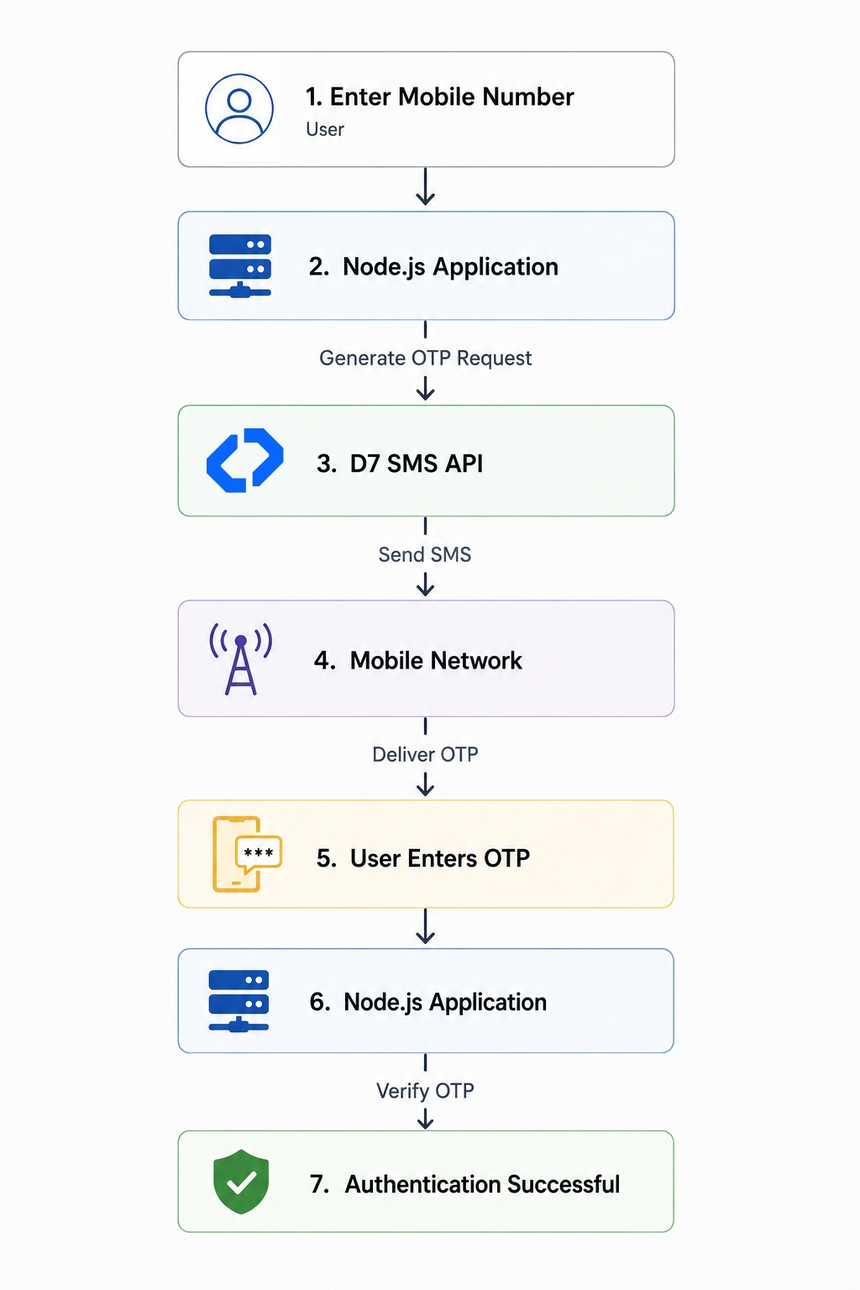
This workflow minimizes friction while maintaining a secure verification process.
Prerequisites
Before implementing OTP verification, ensure you have: Node.js 18.x or later, npm or Yarn, A D7 Networks account API Token, Basic knowledge of JavaScript, Express.js (recommended for web applications), A database such as MongoDB, PostgreSQL, or MySQL (for user management)
Why Choose D7 Networks SMS API?
Choosing a reliable SMS provider is just as important as writing secure authentication code. Delayed or failed OTP messages can lead to poor user experiences and increased support requests.
The D7 Networks SMS API offers features that simplify OTP implementation, including:
- Global SMS delivery
- High delivery rates
- REST API integration
- Developer-friendly documentation
- Secure API authentication
- Delivery reports
- Scalable messaging infrastructure
For businesses that need a complete verification workflow, D7 also provides a dedicated Verify API that manages OTP generation and validation, reducing the amount of custom code developers need to maintain.
Getting Started
Step 1: Create a D7 Networks Account
To get started:
- Sign up for a D7 Networks account.
- Complete account verification if required.
- Create an API token from the dashboard.
- Store the token securely.
- Never hardcode API credentials in your application.
A common approach is to use environment variables.
Create a .env file:
D7_API_TOKEN=your_api_token_here
Then load it in your application:
require("dotenv").config();
Step 2: Install the Required Packages
Install the necessary dependencies: npm install dotenv express
If you're using the official D7 SDK (where applicable), install it according to the latest D7 developer documentation.
Your project structure might look like:
project/
│
├── server.js
├── routes/
├── controllers/
├── services/
├── middleware/
├── config/
├── utils/
├── package.json
└── .env
Organizing your code this way makes it easier to maintain and scale as your application grows.
Step 3: Configure Environment Variables
A clean configuration file helps keep sensitive information out of your source code.
Example .env:
PORT=3000
D7_API_TOKEN=xxxxxxxxxxxxxxxx
OTP_EXPIRY=300
Load these values at application startup:
require("dotenv").config();
const config = {
port: process.env.PORT,
apiToken: process.env.D7_API_TOKEN,
otpExpiry: process.env.OTP_EXPIRY,
};
Using environment variables also simplifies deployment across development, staging, and production environments.
Step 4: Send Your First OTP Using the D7 SMS API
Once your environment is configured, you can send an OTP request through the D7 API.
A typical request includes:
- Recipient phone number (in international format)
- OTP template or message content
- Expiration time (if using a Verify API)
- Sender configuration (where applicable)
The D7 Verify API is designed to generate and deliver OTPs while allowing you to configure parameters such as code length, expiry, and message templates. This approach reduces the need to build OTP generation and storage logic yourself, helping you implement a secure verification flow more quickly.
Best Practices for SMS OTP Authentication
A secure OTP implementation requires more than simply sending a verification code.
Use Short Expiration Times
Most applications use OTP expiration periods between 3 and 5 minutes. Short validity periods reduce the risk of unauthorized access.
Limit Verification Attempts
Allow only three to five verification attempts before requiring a new OTP. This helps prevent brute-force attacks.
Prevent Unlimited Resend Requests
Adding a 30–60 second cooldown before allowing another OTP request prevents abuse and reduces messaging costs.
Validate Phone Numbers
Always validate phone numbers using the international E.164 format before sending SMS messages.
Use HTTPS
Ensure all communication between your application and the SMS API takes place over HTTPS to protect sensitive information.
Recommended OTP Configuration
| Setting | Recommendation |
|---|---|
| OTP Length | 6 digits |
| Expiration Time | 3–5 minutes |
| Verification Attempts | 3–5 |
| Resend Delay | 30–60 seconds |
| Phone Number Format | E.164 |
These settings provide a good balance between security and user experience for most applications.
Security Considerations
Authentication systems are common targets for attackers. Implementing the following security measures can significantly improve your application's resilience.
- Store API credentials securely.
- Hash OTPs if you generate them yourself.
- Invalidate OTPs after successful verification.
- Log failed authentication attempts.
- Monitor unusual request activity.
- Apply rate limiting to both OTP requests and verification attempts.
If you're using a managed Verify API, many of these responsibilities are simplified because the verification process is handled by the service.
Common Use Cases
SMS OTP authentication is used across many industries.
SaaS Platforms
- New user registration
- Passwordless login
- Team account verification
Banking
- Transaction approval
- Login verification
- Two-factor authentication
eCommerce
- Customer registration
- Checkout verification
- Account recovery
Healthcare
- Patient portal login
- Appointment confirmation
- Secure access to medical records
Logistics
- Driver verification
- Delivery confirmation
- Customer pickup validation
Common Challenges and Troubleshooting
Even well-designed OTP systems occasionally encounter delivery issues.
| Issue | Possible Solution |
|---|---|
| SMS not received | Verify phone number format |
| Invalid OTP | Check user input and retry limits |
| OTP expired | Generate a new verification code |
| Too many requests | Apply rate limiting and cooldown periods |
| Delivery delays | Review SMS delivery reports and carrier status |
Monitoring delivery reports can help identify recurring issues and improve overall message delivery performance.
Tips for Production Deployments
As your application grows, your authentication service should scale with it.
Consider these recommendations:
- Separate authentication logic from business logic.
- Use caching for temporary OTP data.
- Monitor API performance and delivery metrics.
- Log authentication events for auditing.
- Regularly rotate API credentials.
- Test your implementation under high traffic conditions before deploying to production.
Planning for scalability early helps avoid costly redesigns later.