


Connect Bitrix24 to D7 SMS with Make to automate customer alerts and team updates
Turn every Bitrix24 event into a reliable, trackable SMS workflow. With D7 SMS inside Make, you can trigger personalized messages at scale, centralize delivery reporting, and keep teams aligned all without manual follow-up. Build once, run continuously, and iterate with data.
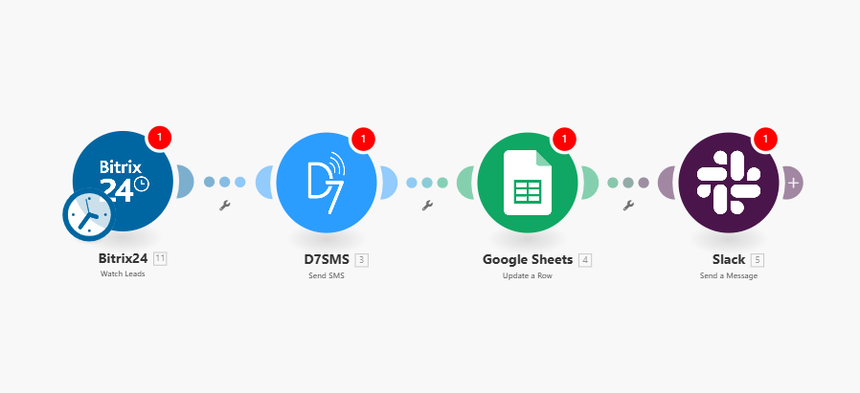
Core Features:
- Delivery reports you can trust: Get real-time status (queued, sent, delivered, failed) via callbacks and map them to fields for analytics or alerts.
- Personalization at scale: Use Bitrix24 fields (name, deal amount, dates) to dynamically populate message templates and localize content.
- API flexibility for any use case: REST-based integration, Unicode and long message support, sender ID options where available, retry logic, and regional compliance controls.
Automation Flow:
1) Trigger: Bitrix24 – New Event Triggered
- Watch for a new lead, deal stage change, task creation, or custom webhook event.
2) Action: D7 SMS – Send automated SMS message
- Map recipient numbers from Bitrix24 records, insert dynamic variables, choose sender ID, and set delivery callback URL if needed.
3) Action: Slack – Notify team
- Post a message to a channel or user with event context and SMS status.
4) Action: Google Sheets – Log entry
- Append timestamp, recipient, message ID, delivery state, and Bitrix24 reference for audit and reporting.
Who It’s For:
- Developers: Clean REST integration, structured payloads, and callback handling for delivery receipts.
- Marketers: Rapid setup of personalized campaigns driven by CRM events without engineering cycles.
- Operations teams: Reliable notifications, centralized logs, and visibility into delivery and response metrics.
