


Automate Instagram New Followers with D7 SMS & Make.com
Building consistent, timely engagement with new Instagram followers is easier when it’s automated. Using Make.com and D7 SMS integration, you can build a reliable workflow that sends an SMS welcome message to new followers, logs their details in Google Sheets, and notifies your marketing team in Slack without manual effort.
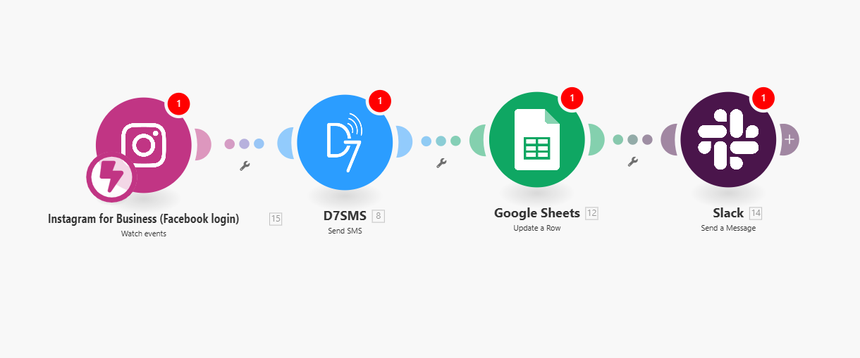
This landing page walks through the full Make.com workflow using Instagram for Business as the trigger, and D7 SMS, Google Sheets, and Slack as the action apps.
How It Works
This Make.com workflow centers on a single event: a new follower on your Instagram Business account . From there, it chains together three automated actions designed for developers and growth teams who want traceability and low operational overhead.
1. Trigger: Instagram for Business – New Follower Added
- Trigger app : Instagram for Business
- Event : New Follower Added
When a user follows your Instagram Business account, Make.com polls or receives the event from the Instagram for Business API. The scenario captures key follower data such as:
- Username / handle
- User ID
- Follower timestamp
This data becomes available as variables throughout the Make.com workflow for downstream actions.
2. Action: D7 SMS – Send Welcome Message
- Action app : D7 SMS
- Event : Send SMS
Using the D7 SMS integration in Make.com, the second step sends a personalized welcome SMS to the new follower. You can map the follower’s phone number (if collected via lead forms, CRM, or other data sources connected in Make) along with dynamic fields from the trigger.
Example configuration:
- To : `{{phone_number}}` (from your data source or mapped lookup)
- Message :
“Hi {{username}}, thanks for following our Instagram! Reply YES to get exclusive product updates and offers via SMS.”
You can add conditional logic in Make.com to handle:
- Fallback messages if phone number is missing
- Country-specific messaging or compliance text
- Rate limiting or throttling via routers and filters
3. Action: Google Sheets – Log Follower Data
- Action app : Google Sheets
- Event : Add a Row (or Update a Row)
To keep an auditable record of every new follower and the associated automation, the next module writes a new row to a Google Sheets spreadsheet.
Typical columns:
- Instagram username
- Instagram user ID
- Follow date/time (ISO 8601)
- SMS sent status (success/failure)
- SMS message ID (from D7 SMS)
- Source workflow ID or scenario name
This logging layer helps with analytics, funnel tracking, and debugging your Make.com workflow when something goes wrong.
4. Action: Slack – Notify Marketing Team
- Action app : Slack
- Event : Send Channel Message or Send Direct Message
Finally, the workflow posts a structured message to Slack so your marketing or growth team can track real-time follower acquisition and engagement.
Example Slack payload:
> New Instagram follower: *@{{username}}*
> Followed at: {{follow_timestamp}}
> SMS status: {{sms_status}}
> Sheet row: {{google_sheets_row_link}}
You can enrich this with:
- Links to the follower’s Instagram profile
- UTM or campaign parameters if sourced from ads
- Emojis or formatting for easy scanning (if your team prefers it)
Key Benefits
This automation scenario combines Instagram for Business, D7 SMS, Google Sheets, and Slack into a single Make.com workflow that is efficient, observable, and easy to maintain.
1. Immediate, Consistent Engagement
- Send instant SMS welcome messages via D7 SMS every time a new follower joins.
- Ensure consistent tone and content without relying on manual outreach.
- Reduce response times and increase the likelihood of early engagement.
2. Centralized Data Logging
- Log every follower and SMS event into Google Sheets for reporting and tracking.
- Use the logged data for cohort analysis, campaign attribution, and follow-up workflows.
- Export or connect this sheet to BI tools or a data warehouse for deeper analytics.
3. Real-Time Team Visibility
- Keep your marketing and growth teams updated via Slack notifications.
- Highlight high-value or campaign-specific followers (e.g., those tagged or filtered in the scenario).
- Enable rapid manual follow-up when needed (e.g., for influencers or partners).
4. Developer-Friendly Automation
- Use Make.com’s visual builder for complex routing, filtering, and error handling.
- Add conditional branches , retries, and webhooks to harden the scenario.
- Maintain all integrations Instagram for Business, D7 SMS, Google Sheets, Slack via one unified automation layer.
5. Scalable, Low-Maintenance Workflow
- Once deployed, the scenario runs on autopilot with minimal manual intervention.
- Adjust message templates, Slack channels, and logging structure without code changes.
- Scale to thousands of followers with robust D7 SMS integration and Make.com’s orchestration.
Practical Use Cases
This Instagram–D7 SMS–Google Sheets–Slack scenario can be adapted to multiple real-world workflows, especially for teams already investing in automation.
1. Lead Nurturing from Instagram Followers
- Automatically send introductory SMS messages that contain links to lead magnets, landing pages, or product tours.
- Track click-through and conversion in Google Sheets by adding additional automation steps.
- Use Slack alerts to notify sales or SDR teams when high-intent followers arrive (e.g., based on profile tags or DM keywords).
2. Campaign-Specific Follower Tracking
- Run Instagram campaigns (e.g., giveaways, product launches) and tag or filter followers based on campaign criteria.
- Trigger different D7 SMS message templates per campaign segment.
- Log campaign IDs and tags in Google Sheets to evaluate performance by acquisition source.
- Notify specific Slack channels (e.g., `#campaign-launch`, `#growth`) based on the campaign variable in the workflow.
3. VIP and Influencer Onboarding
- Add rules to detect influencer or VIP profiles (by follower count, verified status, or manual tag).
- Trigger a more personalized D7 SMS message or a direct Slack alert to your partnerships team.
- Add extra metadata to Google Sheets so you can build a separate VIP outreach pipeline.
4. Compliance and Consent Workflows
- Integrate this Make.com workflow with your consent management logic.
- Send D7 SMS messages only to followers who have provided explicit consent via forms or prior interactions.
- Store consent timestamps and consent sources in Google Sheets for auditability.
- Use Slack to alert your team when consent is missing so they can handle the case manually.
5. Multi-Channel Engagement Sequences
- Use this scenario as step one in a broader Make.com workflow that includes email, CRM updates, or push notifications.
- After the first SMS welcome, add delays and conditional steps that send follow-up messages or assign tasks to account managers.
- Keep all events logged centrally in Google Sheets while feeding key milestones to Slack for monitoring.
Get Started with This Make.com Workflow
To implement this Instagram follower automation with D7 SMS integration, follow these high-level steps:
1. Prepare your accounts
- Instagram Business account connected to Facebook/Meta.
- D7 SMS account with API credentials and a verified sender ID (where required).
- Google account with a target Sheet created and permissioned.
- Slack workspace with an app or webhook configured for channel messaging.
2. Build the scenario in Make.com
- Add Instagram for Business as the trigger: “New Follower Added.”
- Add the D7 SMS module to send an SMS using mapped fields from the trigger or your CRM.
- Add Google Sheets to insert a row with follower and SMS data.
- Add Slack to post a formatted message to your chosen channel.
3. Configure routing, filters, and error handling
- Add filters for consent, geography, or campaign tags.
- Implement retries or error notifications if D7 SMS or Slack calls fail.
- Optionally add a separate error logging sheet in Google Sheets.
4. Test and deploy
- Use test followers or sandbox data where possible.
- Validate that SMS messages send correctly, logs populate in Sheets, and Slack posts appear in real time.
- Once verified, enable the scenario in Make.com and monitor the first few days of activity.
By combining Instagram for Business, D7 SMS, Google Sheets, and Slack in a single Make.com workflow, you get a robust, developer-friendly automation pipeline that handles new followers from first contact through tracking and team visibility automatically.
