


Unify Microsoft Teams, SMS, Slack, and Google Sheets with Make real-time alerts, traceability, and scale
Turn Microsoft Teams events into instant, personalized SMS notifications with D7 SMS no manual steps required. This Make automation pushes mission‑critical updates to customers or stakeholders, alerts your team in Slack, and logs every detail in Google Sheets for full auditability.
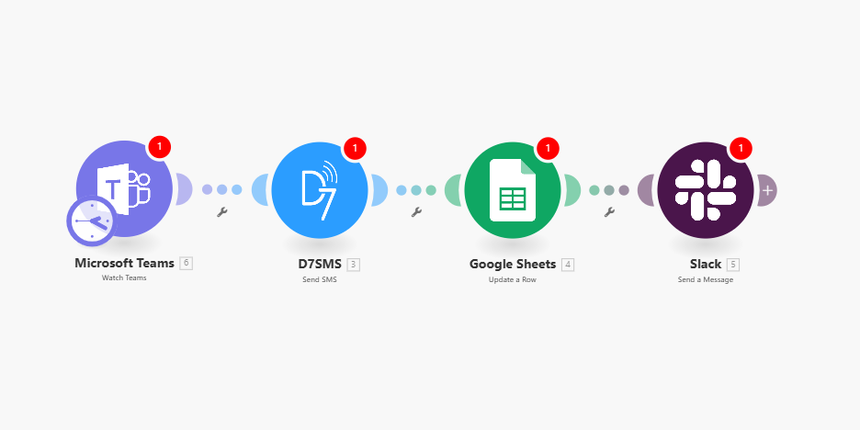
Core Features
- Delivery reports you can act on: Leverage D7 SMS delivery receipts via webhook to capture message IDs, status, and timestamps. Map statuses in Make and auto-update your Google Sheet or trigger retries/workflows when a message is delayed or failed.
- Personalization at scale: Use Teams fields (name, topic, channel, custom attributes) to dynamically compose messages, set sender IDs, and handle Unicode. Send the right message to the right contact with variable mapping and conditional routing.
- API flexibility developers love: RESTful JSON endpoints, secure API key auth, configurable callback URLs, batching controls, and rate limiting. Map custom headers and parameters in Make to match your routing, compliance, or template needs.
Automation Flow
1) Trigger: Microsoft Teams – New Event Triggered
- The scenario watches for a new event (e.g., channel message, meeting event, or tagged post). The payload includes author, subject, body, and any relevant metadata.
2) Action: D7 SMS – Send automated SMS message
- Map recipient number(s), message body, and optional sender ID from the Teams payload.
- Set the D7 delivery report callback URL to Make for real-time status updates.
- Capture the D7 message ID to correlate delivery results and logs.
3) Action: Slack – Notify team
- Post a structured summary (event type, recipient, SMS preview, message ID, and link to the log row) to a designated channel so your team stays in the loop.
4) Action: Google Sheets – Log entry
- Append a new row with timestamp, event details, recipient, SMS content, D7 message ID, and an initial status of “Queued.”
- On D7 delivery callback, update the row to Delivered/Failed with the final status code and time.
5) Reliability and controls
- Use Make’s error handlers and routers for retries, fallbacks, or escalation (e.g., notify ops in Slack if sending fails).
- Batch or throttle SMS sends to meet traffic and compliance requirements.
Who It’s For
- Developers: Build reliable, observable messaging flows with webhooks, IDs, and precise error handling.
- Marketers: Trigger personalized, timely SMS from live engagement in Teams no coding required.
- Operations teams: Standardize alerts, maintain complete logs, and keep stakeholders informed instantly.
