


Pinterest 1K Impressions Automation with D7 SMS & Make.com
When a Pinterest pin hits 1,000 impressions, you don’t want to discover it days later in a manual report. With a simple Make.com workflow using D7 SMS integration, you can instantly alert your team, update your analytics dashboards, and keep key stakeholders informed in real time.
This automated scenario connects Pinterest, D7 SMS, Google Data Studio, and Slack to give you a fully synchronized, event‑driven analytics pipeline optimized for teams that care about timely performance insights.
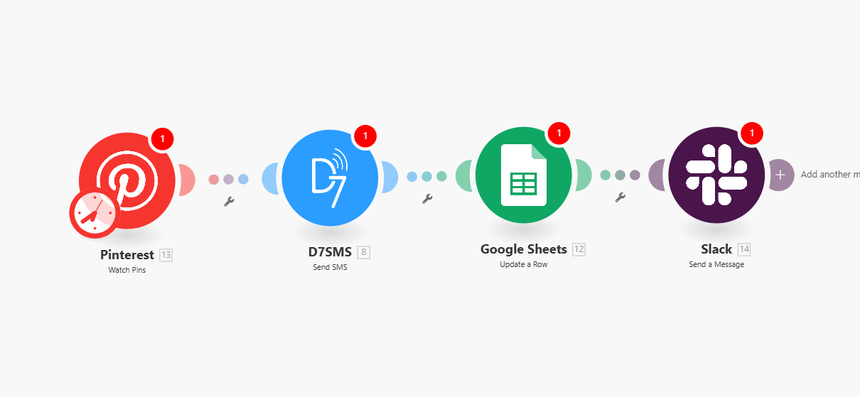
How It Works
This Make.com automation scenario is designed for developers and technical marketers who want precise, event‑based triggers and reliable cross‑tool synchronization. Below is the logical flow of the Make.com workflow:
1. Trigger: Pinterest – Pin Reaches 1K Impressions
- The scenario starts with a Pinterest module configured to monitor pin performance.
- When a specific pin (or any pin in a defined board or account) reaches 1,000 impressions , the trigger fires.
- Relevant data captured can include:
- Pin ID and URL
- Title and description
- Current impressions, saves, and clicks
- Board information and timestamps
2. Action: D7 SMS – Send Performance Alert
- Using the D7 SMS integration in Make.com, the scenario sends an SMS alert to one or more recipients.
- The message can be dynamically constructed using Pinterest data, for example:
> “Pinterest Alert: Pin ‘{{pin_title}}’ just reached {{impressions}} impressions. Check performance details in the dashboard: {{dashboard_link}}”
- Configure routing by:
- Team member phone numbers
- Geographic routing (e.g., separate numbers for EMEA/US teams)
- Time‑based rules if you add routing logic modules in Make
3. Action: Google Data Studio – Update Dashboard Source
Google Data Studio connects to data sources like Google Sheets, BigQuery, or external databases. This scenario typically updates the underlying data source rather than Data Studio directly.
Common approach:
- Update a Google Sheet or database used as the Data Studio data source:
- Append a new row with pin ID, timestamp, impressions, and campaign metadata.
- Or update an existing row keyed by pin ID or campaign ID.
- Once the source is updated, your Google Data Studio dashboard will automatically refresh based on its data refresh settings, reflecting the latest milestone event (1K impressions).
4. Action: Slack – Notify Analytics Team
- A Slack module in Make.com posts a structured message to a designated channel, such as `#analytics`, `#social-performance`, or a channel per brand/campaign.
- Typical payload:
- Pin title, link, and image preview
- Current impressions count and growth vs. previous period
- Link to the Data Studio dashboard and campaign documentation
- You can use blocks and formatting in Slack for better readability and quick triage.
5. Optional Logic & Enhancements (within Make.com)
For more advanced Make.com workflows, you can insert:
- Filter modules to only alert on:
- Certain boards or campaigns
- Pins tagged with specific UTM parameters
- Routers to branch flows:
- High‑priority campaigns trigger SMS + Slack + email
- Lower‑priority campaigns only update the dashboard
- Iterators and aggregators to process multiple pins in batches and minimize noise.
The end result is a fully automated pipeline: Pinterest event → D7 SMS → Data source for Google Data Studio → Slack notifications, all orchestrated within a single Make.com scenario.
Key Benefits
This automation scenario provides tangible advantages for data‑driven teams and developers managing marketing stacks.
1. Real‑Time Performance Visibility
- As soon as a pin reaches 1K impressions, an SMS and Slack notification are triggered.
- No more waiting for daily or weekly reports to see which content is gaining traction.
2. Reliable, Event‑Driven Reporting
- The Data Studio dashboard is kept up to date by automated writes to its underlying data source.
- This removes manual CSV exports and error‑prone copy‑paste operations.
3. Reduced Operational Overhead
- Once configured, the Make.com workflow runs continuously with minimal maintenance.
- Developers can centralize logic (filters, thresholds, and routing) in one reusable scenario instead of coding multiple custom integrations.
4. Configurable Thresholds and Rules
- Start at 1K impressions, then easily clone and modify the scenario for 5K, 10K, or click‑through milestones.
- Use Make.com filters and variables to dynamically change SMS copy, recipients, or Slack channels based on campaign priority or region.
5. Scalable Notification Strategy
- Combine D7 SMS integration and Slack notifications for layered incident and performance alerts:
- SMS for urgent, high‑impact milestones
- Slack for detailed analysis and collaboration
- Prevent alert fatigue by fine‑tuning frequency and conditions directly within the Make interface.
6. Developer‑Friendly Automation
- Use Make.com’s visual scenario builder to manage complex flows without heavy custom code.
- When needed, integrate with webhooks or custom modules to extend logic and connect additional systems.
Practical Use Cases
This Make.com automation scenario is flexible enough to support multiple real‑world workflows across marketing, analytics, and product teams.
1. Campaign Milestone Alerts for Social Teams
- Alert social media managers when promotional pins cross the 1K impressions mark within a certain launch window.
- D7 SMS ensures stakeholders are notified even when they are away from their desks, while Slack keeps the broader analytics team updated.
2. A/B Testing and Creative Optimization
- Track multiple pins that test different creatives, messaging, or CTAs.
- When a variant hits 1K impressions, the automation:
- Logs event data to your Data Studio source
- Posts performance metrics to Slack
- This provides fast feedback loops for deciding which creative to scale.
3. Performance SLAs for Clients or Brand Partners
- Agencies can use the workflow to confirm when pins for a client campaign hit contracted impression thresholds.
- The D7 SMS integration can send direct alerts to account managers, who can then share performance updates or screenshots from the Data Studio dashboard.
4. Early‑Warning Signals for Under‑Performing Content
- Clone the main scenario and invert logic: trigger an alert if a pin fails to reach 1K impressions within a specific timeframe.
- Automatically update a “watchlist” tab in the Data Studio source, and notify the team via Slack to reconsider targeting or creative.
5. Cross‑Channel Reporting Hub
- Extend the same Make.com workflow by adding more modules:
- Push Pinterest milestone data into a central sheet or database already used by Google Data Studio for other channels.
- This builds a unified performance view across Pinterest, Meta, TikTok, and more, all driven by similar automated triggers.
Get Started
Implementing this Make.com workflow is straightforward for any developer or technical marketer familiar with APIs and automation tools.
1. Connect Your Accounts
- In Make, add and authorize:
- Pinterest account
- D7 SMS integration (API credentials)
- Data source for Google Data Studio (e.g., Google Sheets or database)
- Slack workspace and channel access
2. Configure the Trigger
- Set up the Pinterest module to monitor your target pins or boards.
- Define the condition that the pin’s impressions must reach or exceed 1,000.
3. Build the Action Chain
- Add a D7 SMS module with dynamic content from the Pinterest trigger.
- Add modules to update the data source that powers your Google Data Studio dashboard.
- Attach a Slack module to send structured, context‑rich notifications to the analytics team.
4. Test and Iterate
- Run test events with sample pins to validate data mappings, message content, and dashboard updates.
- Adjust filters, thresholds, and routing rules to align with your alerting strategy.
5. Deploy and Scale
- Enable the Make.com scenario in production.
- Clone and adapt the workflow for other thresholds, campaigns, or channels as your automation strategy evolves.
Automate your Pinterest performance tracking today with a robust Make.com workflow, D7 SMS integration for real‑time alerts, and synchronized analytics in Google Data Studio and Slack.
